After a reservation is created, you can make various changes to its status and details. Changes to a reservation must be made either in Guesty or in the booking channel.
General limitations
- The listing must be active to update a reservation.
- Calendar-based tasks are set to a specific timeframe and a particular listing or reservation. When a task applies to a reservation, changes to the reservation dates or assigned listing don't update the task. Edit the task to resolve this.
- Reservations with a length of stay of more than 730 days can't be changed.
- Guesty doesn't support changing the guest in a reservation. Instead, cancel the reservation and recreate it manually.
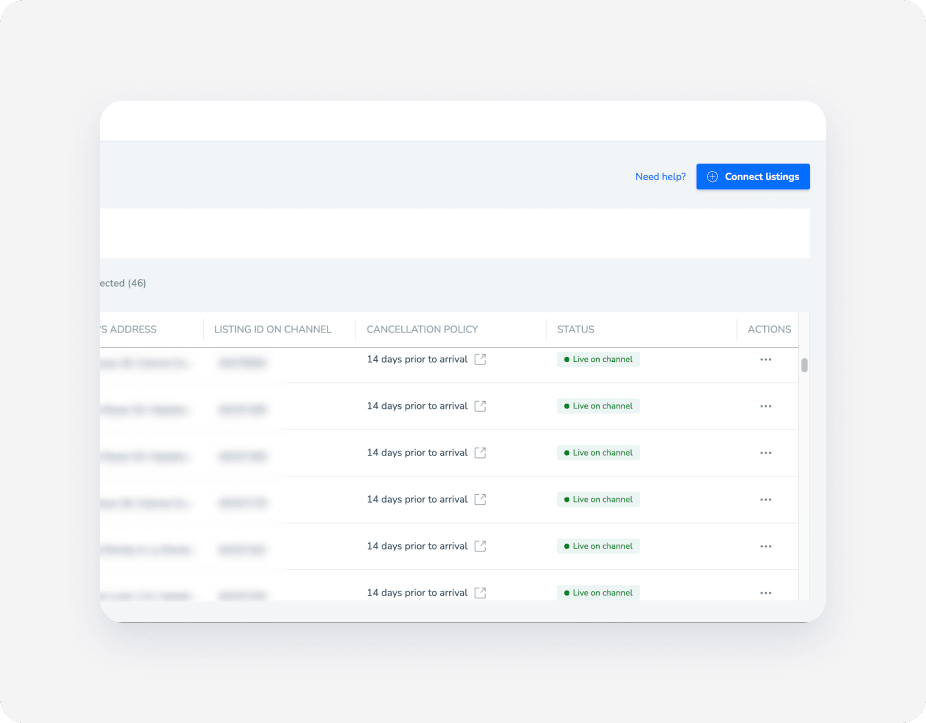
- Changes only sync between Guesty and the channel if the listing's connection status with the channel is “Connected” or “Live on channel”. You can check the connection status of the listing on the relevant channel's distribution page, under the “Status” column.
Note:
Before moving a reservation to another listing, review the limitations on which listings can be selected.
Changes or updates you can make to a reservation
Review the types of changes and updates available for reservations.
- Update the reservation status (for example, from "Reserved"/"Inquiry" to "Confirmed").
- Update the stay status (for example, “Checked-in” or “Checked-out”).
- Report a guest as a no-show to Booking.com.
- Change the dates of a reservation (modify the check-in date or check-out dates).
- Cancel a reservation.
- Update the estimated time of arrival (ETA) and estimated time of departure (ETD).
- Manually add blocks before or after a reservation with early check-in or late check-out.
- Update guests’ personal information (for example, contact details and basic info).
- Change the number of guests in the reservation (also, make an age breakdown in manual reservations and direct bookings).
- Change the number of pets in a reservation (manual and Vrbo reservations only).
- Add or change the payment method of the reservation.
- Add line items/ adjust existing line items to the guest folio, including:
Where to make changes or updates
Check below whether to change a reservation in Guesty or the reservation’s channel of origin, depending on the channel.
Change in the channel.
Approve or decline an alteration request from the guest in Guesty. Make changes to an Airbnb reservation in Guesty and choose whether to send an alteration request to the guest and Airbnb for approval, or to make the change internally in Guesty.
Internal changes don't sync with Airbnb and may be overridden by future alterations made in Airbnb. Avoid changing the reservation’s assigned listing in Guesty, because it disables the reservation’s messaging and payment setup.
Important:
An Airbnb reservation has a limit of three alterations per day.
- Vrbo via Rentals United: Change in Guesty.
- All other channel integrations via Rentals United: Change in Rentals United or the original channel.
Change in the original channel.
When to change in Guesty
- Reservations after check-in for the following cases:
- Change the reservation dates (extending or shortening the stay).
- Change the accommodation fare.
- Report a guest as a no-show to Booking.com.
- Move a reservation from one sub-unit to another under the same multi-unit (same room ID).
- Report a guest's credit card as invalid to Booking.com. If the guest hasn’t updated their credit card within the provided timeframe, cancel the reservation in Guesty.
When to change in Booking.com
- Reservations before check-in.
- Reservations after check-in, for cases other than the ones listed above.
Only the guest can change the room in their reservation to another room in the same listing (a different Room ID under the same Hotel ID). The change automatically syncs to Guesty.
Learn more about Booking.com's reservation alteration best practices.
Payments by Booking.com
If you use Payments by Booking.com, handle alteration requests for date changes or price updates directly in the Booking.com Extranet, where financial processing for these listings is managed.
If a pop-up appears while trying to modify a reservation in Guesty, it confirms that the change must be processed directly on Booking.com.
Change in the channel.
Change in Guesty, as reservations are received via the Guesty Booking Engine.
Change in Guesty for the following sources:
- Manual reservations
- Guesty Booking Engine
- Guesty Websites
- Guesty Booking Engine API
Change in the channel.
Change in the channel.
Changes to reservation dates or the status of a reservation, must be made in Guesty.
Changes update in Vrbo within 24 hours. Learn more about what data is synced between Vrbo and Guesty and where to manage it.
Tip:
Create an automated message for Vrbo reservations that sends a confirmation to the guest immediately after an alteration is made.
Change in the channel.
Change a reservation via the reservation page
Follow the steps below to change a reservation in Guesty.
Learn more about managing changes to an Airbnb reservation.
Step by step:
- Sign in to your Guesty account.
- In the side navigation menu, click
 Reservations.
 - Click the relevant reservation.
- Select the relevant tab on the reservation sub-menu.
- In the Overview tab, click
 and select the relevant action. You can also click one of the quick actions in the top-right corner of the reservation page. These change according to the reservation status.
 - For other sections, review what information shows in each specific tab and how to edit it.
- In the Overview tab, click
Tip:
You can also change a reservation via the Inbox or Multi-Calendar. Locate the relevant reservation and click  in the right-side panel.
