Personalize your communication with guests, owners, and team members using variables. Variables act as placeholders that automatically fill in specific details—like a guest's name, key code, or check-in time—when a message is sent. This enables you to provide accurate, relevant information without manually editing every message.
You can add variables to the following communication methods:
Note:
You can also use variables in the Guest App check-in forms. Learn which variables are supported.
Guesty automatically replaces each variable with the relevant information when the message triggers. See the example below.
Automated message template |
How the message is sent |
|---|---|
|
Hi {{guest}}, {{listing_checkin_instructions_notes}} Let us know if you have any questions. |
Hi Jill Ross, Check-in is at 3pm. There is free street parking available. When you arrive, enter the above key code then the check button. To lock the door press the X button. Let us know if you have any questions. |
Below is a list of available variables and their values. You can use the default variables listed below, or create custom variables by adding a new custom field, which automatically generates a custom variable.
Important:
- If you add a variable incorrectly, the message will fail. Ensure variables are spelled correctly and don't contain additional characters or spaces.
- If you see unexpected values when using variables, check your settings first. For example, verify your financial or availability settings, or check if a team member has recently made changes.
Custom variables
Use custom variables to send specific information not covered by default variables. When you create a custom field, Guesty automatically generates a custom variable. You can find these in the "Variable" column of the custom fields page.
For example, if you create a custom field like "Building Name", a variable like {{buildingname}} is generated.
When you add a custom variable to a message, the relevant custom field value updates automatically when sent.
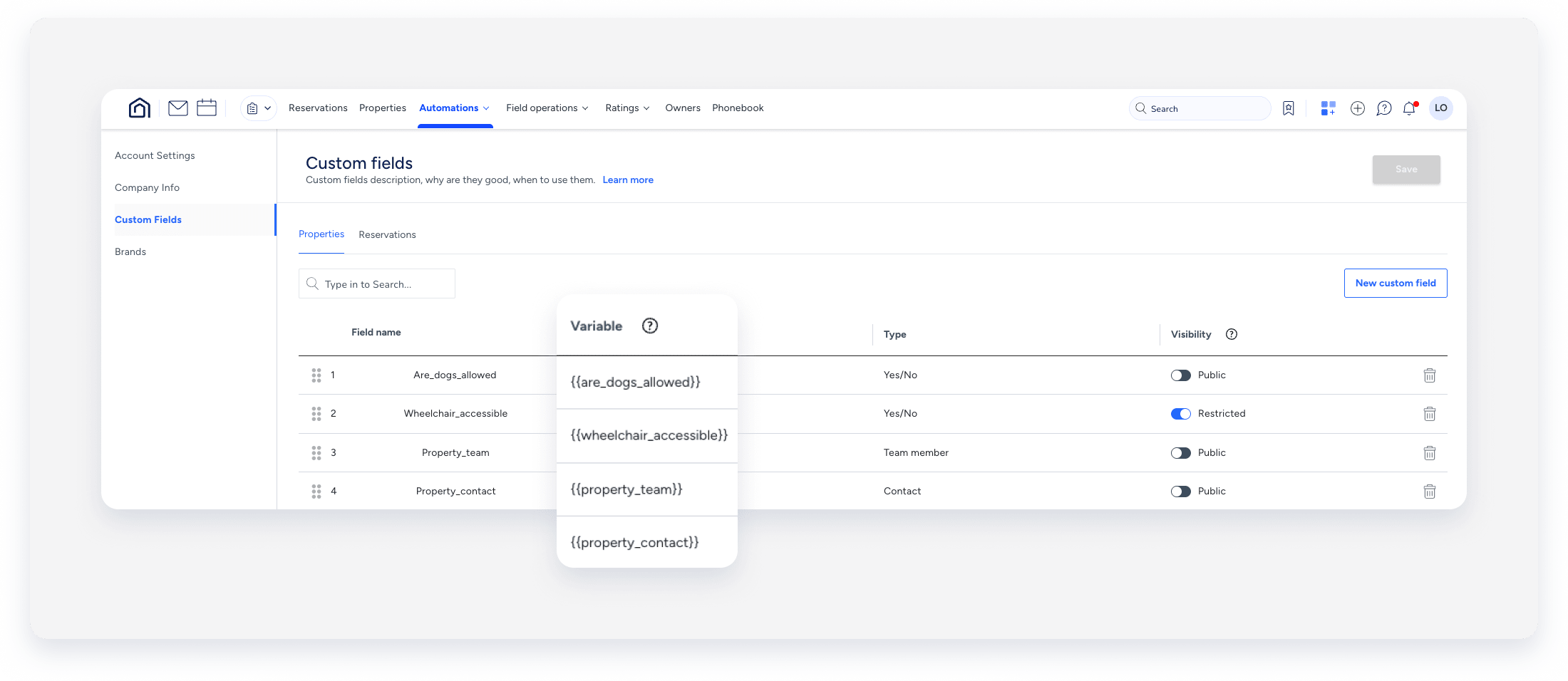
You must set up the custom fields via the "Properties" page or the "Reservations" page before using the variable in a message. If a custom field isn't working, check the following:
- The custom field wasn't set up for the listing or reservation.
- You set up the custom field after sending the message.
- The custom field contains a default variable or another custom field.
- The custom variable contains a dash, which is not supported.
Tip:
You can add custom fields with a "Yes/No" field type as a sending condition. Select them from the dropdown under Add condition.
Default variables
These variables are created by Guesty based on the needs and demands of the industry.
Variable |
Placeholder to insert into message |
Additional details |
|---|---|---|
| Check-in date | {{checkin}} |
Displays the date based on the listing's time zone. Learn how to change the dates of the reservation. |
| Check-out date | {{checkout}} |
Displays the date based on the listing's time zone. Learn how to change the dates of the reservation. |
| Guest first name | {{guest_first}} |
Learn how to update the guest details. Updating a guest’s details will change their details in all the reservations that they're assigned to, as well as on their contact page. |
| Guest flight number | {{flight_number}} |
Learn how to update the guest details. Updating a guest’s details will change their details in all the reservations that they're assigned to. |
| Guest full name | {{guest}} |
Learn how to update the guest details. Updating a guest’s details will change their details in all the reservations that they're assigned to, as well as on their contact page. |
| Guest planned arrival time | {{planned_arrival_time}} | The planned arrival time is the guest's estimated arrival time (if it was set) or the listing's default check-in time. |
| Guest planned departure time | {{planned_departure_time}} | The planned departure is the guest's estimated departure time (if it was set) or the listing's default check-out time. |
| Guest transportation method | {{transportation}} |
Learn how to update the guest details. Updating a guest’s details will change their details in all the reservations that they're assigned to. |
| Guest's email address | {{guest_email}} |
Learn how to update the guest details. Updating a guest’s details will change their details in all the reservations that they're assigned to, as well as on their contact page. |
| Guest's hometown | {{guest_hometown}} |
Learn how to update the guest details. Updating a guest’s details will change their details in all the reservations that they're assigned to, as well as on their contact page. |
| Guest's phone number | {{guest_phone}} |
Learn how to update the guest details. Updating a guest’s details will change their details in all the reservations that they're assigned to, as well as on their contact page. |
| Guest’s preferred language | {{guest_preferred_language}} |
Learn how to update the guest details. Updating a guest’s details will change their details in all the reservations that they're assigned to, as well as on their contact page. |
| Guest’s identity number | {{guest_identity_number}} | Learn how to update the guest details. |
| Number of adult guests | {{adults_count}} | Learn how to update the age breakdown for manual and direct reservations. |
| Number of children guests | {{children_count}} | Learn how to update the age breakdown for manual and direct reservations. |
| Number of guests | {{guests_count}} |
The number of guests in the reservation includes both adults and children. Manual reservations: Includes adults only—children aren't counted in. Learn how to update the number of guests in the reservation. |
| Number of infant guests | {{infants_count}} | Learn how to update the age breakdown for manual and direct reservations. |
| Number of nights | {{nights_count}} | Learn how to change the dates of the reservation. |
| Reservation confirmation code | {{confirmation_code}} | The reservation's confirmation code, as displayed at the top left of the reservation page. |
| Signed PDF Agreement | {{guest_app::[app_name]::pdf}} | Copy of signed PDF agreement to guest. |
Variable |
Placeholder to insert into message |
Additional notes |
|---|---|---|
| Currency | {{currency}} |
The currency that the reservation should be paid in. The currency will be based on the listing's set currency. |
| Guest invoice | {{guest_invoice}} |
Send the guest invoice as an attachment. Note:This variable is not supported for saved replies. |
| Reservation accommodation fare | {{fare_accommodation}} | The net accommodation fare, excluding fees or taxes. |
| Reservation accommodation fare - adjusted | {{accommodation_fare_adjusted}} |
The net accommodation fare that has been adjusted, excluding fees or taxes. Note:This variable is not supported for saved replies. |
| Reservation balance due | {{balance_due}} | The balance of the reservation if it is still due to be paid. |
| Reservation cleaning fee | {{fare_cleaning}} | The reservation's cleaning fee. |
| Reservation payments | {{payments}} | The total amount paid by the guest and when they paid it. |
| Reservation taxes | {{reservation_taxes}} | The reservation's tax amount. |
| Reservation total paid | {{total_paid}} | The reservation's total amount paid. |
Variable |
Placeholder to insert into message |
Additional notes |
|---|---|---|
| Listing’s door code | {{listing_door_code}} | Learn how to set the listing's check-in/check-out instructions. |
| Listing’s lock code | {{listing_lock_code}} | Learn how to set the listing's check-in/check-out instructions. |
| Cancellation policy | {{direct_cancellation_policy_name}} | Learn how to change a listing's cancellation policy. |
| Cancellation fee | {{direct_cancellation_fee}} | Learn how to change a listing's cancellation policy. |
| Check-in form link | {{checkin_form}} | Learn more about check-in forms. |
| Guest access code | {{guest_access_code}} | The guest access code is generated per reservation by Guesty Locks Manager. |
| Host first name | {{host_first}} |
Airbnb: Rentals United: If a message is being sent to a guest for the first time, the placeholder's value will be the first user in your Guesty account's user list. The list is sorted alphabetically. Note:Changing an owner's name doesn't update the name displayed in automated messages using this variable. Use {{listing_host_name}} instead to display the updated owner's name. |
| Host full name | {{host}} |
Rentals United: The full name of the last user who responded to the guest via the Inbox. If a message is being sent to a guest for the first time, the placeholder's value will be the first user in your Guesty account's user list. The list is sorted alphabetically. |
| Key code | {{key_code}} | The guest key code is generated by a third-party Marketplace partner. |
| Listing check-in time | {{checkin_time}} |
Learn how to change a listing's check-in time. Check-in time is displayed in the listing's time zone. |
| Listing check-out time | {{checkout_time}} |
Learn how to change a listing's check-out time. Check-out time is displayed in the listing's time zone. |
| Listing nickname | {{listing_nickname}} | Learn how to change a listing nickname. |
| Listing title | {{listing}} | Learn how to change a listing's title (as published in your connected booking channels). |
| Listing's check-in notes | {{listing_checkin_instructions_notes}} |
Learn how to set the listing's check-in/check-out instructions. The variable will be populated with info from the "Additional entry instructions" field in the reservation policies. |
| Listing's check-out instructions | {{listing_checkout_instructions}} | Learn how to set the listing's check-in/check-out instructions. |
| Listing's city | {{listing_address_city}} |
The city where the listing is located. Learn how to update a listing address. |
| Listing's cleaning instructions | {{listing_cleaning_instructions}} | The variable will be populated with information from the "Location and details" section. |
| Listing's full address | {{listing_address}} |
The complete address of your listing. This includes the following optional fields:
Learn how to update a listing address. |
| Listing's luggage storage | {{listing_luggage_storage}} | Learn how to set the listing's check-in/check-out instructions. |
| Listing's host name | {{listing_host_name}} | The variable will be populated from the "Guest should know" section, appearing in Details & layout >Location & details. |
| Listing's wifi name | {{listing_wifi_name}} | The variable will be populated from the "Guest should know" section, appearing in Details & layout >Location & details. |
| Listing's wifi password | {{listing_wifi_password}} | The variable will be populated from the "Guest should know" section, appearing in Details & layout >Location & details. |
| Listing's house manual | {{listing_house_manual}} | The variable will be populated with information from the "Guest should know" section, appearing in Details & layout >Location & details. |
| Listing's trash pick up instructions | {{listing_trash_collected_on}} | The variable will be populated with information from the "Guest should know" section, appearing in Details & layout >Location & details. |
| Listing's parking instructions | {{listing_parking_instructions}} | The variable will be populated with information from the "Guest should know" section, appearing in Details & layout >Location & details. |
| Listing’s building name | {{listing_address_building_name}} |
The variable will be populated with information from the "Full address" section >"Additional address details". Learn how to update a listing address. |
| Property size in square feet | {{property_size_square_feet}} | The variable will be populated with information from Details & layout > Location & details > Property details. |
Variable |
Placeholder to insert into message |
Additional notes |
|---|---|---|
| Guesty fee | {{our_fee}} | Guesty's fee for the reservation (in USD). |
| Guesty commission | {{our_commission}} | Guesty's commission for the reservation if the user’s billing plan is a revenue-based percentage. |
| Host channel fee | {{host_service_fee}} | The channel fees (only for the listing). |
| Host taxes | {{host_taxes}} |
The sum of the taxes + pre-deducted channel commission. Only applicable for "airbnb", "airbnb2", and "tripAdvisor". |
| Net rental income | {{net_rental_income}} | All fees and charges that were set in the business model as “net rental income” (commission calculation). |
| Rate plan description | {{direct_rate_plan_description}} |
The description of the rate plan. Learn about managing rate plans. |
| Reservation host payout | {{host_payout}} | The host's final earnings from the reservation. |
| Reservation owner's revenue | {{owners_revenue}} |
The owner's revenue from the reservation. The owner's revenue data will be available 1 hour after confirmation. |
| Reservation’s property manager commission | {{commission}} |
The "your commission" figure from the reservation. Reservation's property manager commission data will be available 15 minutes after the reservation is created. |
Variable |
Placeholder to insert into message |
Additional notes |
|---|---|---|
| Integration nickname | {{integration_nickname}} | The unique name for each of the user's connections (as it appears in Guesty). |
| Reservation channel | {{channel}} |
The source of a reservation. This could be the booking channel or the source that is entered when creating a manual reservation in Guesty. |
| Reservation cleaning notes | {{notes_cleaning}} | The text in the reservation's "cleaning notes" field. |
| Reservation general notes | {{notes_other}} | The text in the reservation's "general notes" field. |
| Team member first name | {{user_first}} |
The user's first name (as it appears in Guesty). Note:Use this variable for manual messages only. It will remain blank if used in an automated message. |
| Team member full name | {{user}} |
The user's full name (as it appears in Guesty). Note:Use this variable for manual messages only. It will remain blank if used in an automated message. |
Next reservation variables
Use these variables to share information with your staff about the next reservation on the calendar (the reservation immediately following the current one).
|
For example: To inform your cleaner when the next check-in is planned for, create this automated message: Hi {{user}}, |
Below are the next reservation variables you can use in Guesty.
Variable |
Placeholder to insert into message |
Additional notes |
|---|---|---|
| Check-in date | {{next::checkin}} | The check-in date for the next reservation based on the listing's time zone. |
| Check out date | {{next::checkout}} | The check-out date for the next reservation based on the listing's time zone. |
| Guest first name | {{next::guest_first}} | The first name of the next guest. |
| Guest full name | {{next::guest}} | The full name of the next guest. |
| Guest planned arrival time | {{next::planned_arrival_time}} |
If the guest's estimated arrival time was added to the reservation, that will be used. Otherwise, the listing's default check-in time will be used. |
| Guest planned departure time | {{next::planned_departure_time}} | If the guest's estimated departure time was added to the reservation, that will be used. Otherwise, the listing's default check-out time will be used. |
| Guest's email address | {{next::guest_email}} | The email address of the next guest. |
| Guest's phone number | {{next::guest_phone}} | The phone number of the next guest. |
| Guesty fee | {{next::our_fee}} | Guesty's fee for the next reservation displayed as a percentage (%). |
| Host channel fee | {{next::host_service_fee}} | The channel fees of the next reservation, specific to the listing only. |
| Listing check in time | {{next::checkin_time}} | The next reservation's check-in time based on the listing's time zone. |
| Listing check out time | {{next::checkout_time}} | The next reservation's check-out time based on the listing's time zone. |
| Number of guests | {{next::guests_count}} | The number of guests in the next reservation. |
| Number of nights | {next::nights_count}} | The number of nights booked for the next reservation. |
| Reservation accommodation fare | {{next::fare_accommodation}} | The payout for the next reservation, excluding fees or taxes. |
| Reservation cleaning fee | {{next::fare_cleaning}} | The next reservation's cleaning fee. |
| Reservation cleaning notes | {{next::notes_cleaning}} | The text in the next reservation's "cleaning notes" field. |
| Reservation confirmation code | {{next::confirmation_code}} | The next reservation's confirmation code. |
| Reservation guest notes | {{next::notes_guest}} |
The text in the next reservation's "guest notes" field.
|
| Reservation host payout | {{next::host_payout}} | The host's final earnings for the next reservation. |
| Reservation general notes | {{next::notes_other}} | The text in the next reservation's "general notes" field. |
