Guesty’s pricing tools help you maximize income and make your listing stand out in booking channels. This article explains how these tools, including third-party tools, work together to optimize your rates.
These tools can also be utilized to control when a listing can be booked.
How pricing works in Guesty
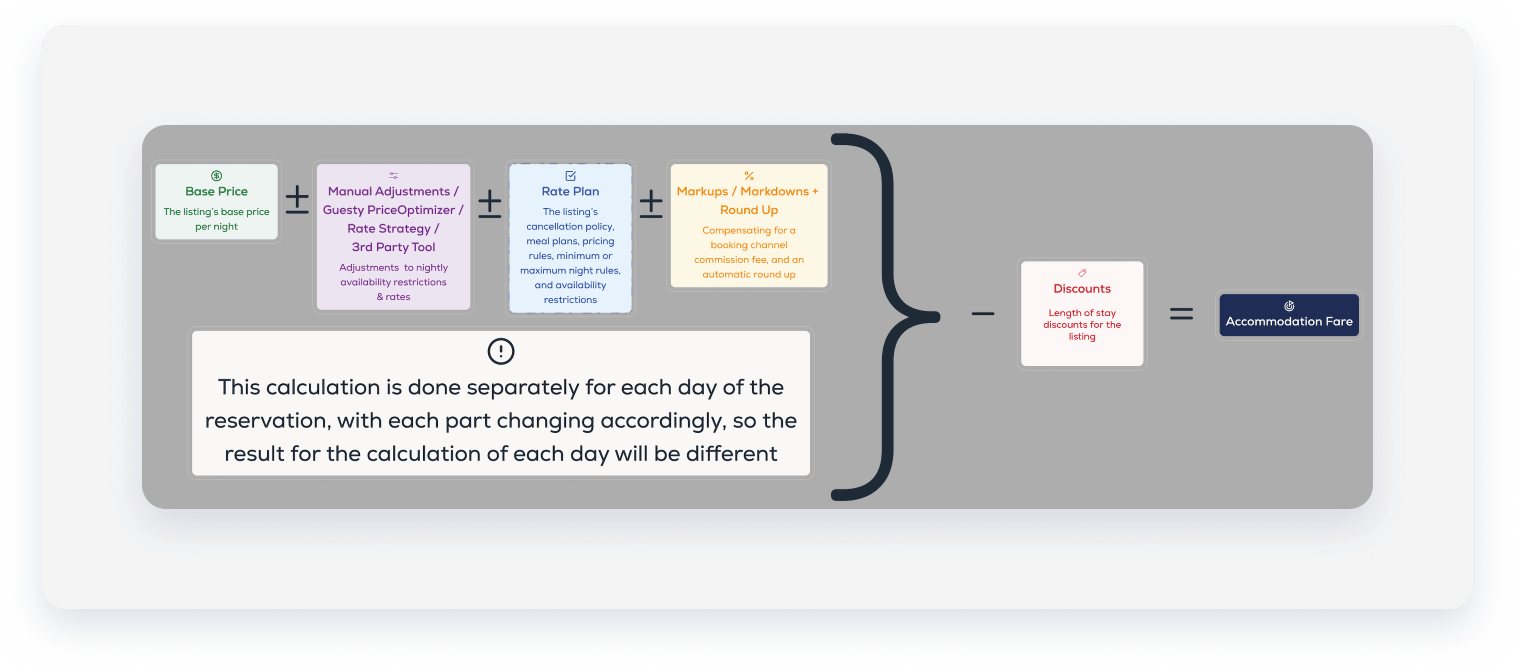
Accommodation fare is the foundation of a reservation's total price. By default, Guesty calculates this by multiplying the listing's base price by the number of reserved dates. When you adjust this price using a pricing tool, it becomes the "nightly rate" (or "price per night").
Each night can have a different price due to adjustments, except for weekly or monthly discounts, which apply to the overall price.
Important:
Adjustments can't reduce the price per night below $10 (or the equivalent in other currencies). Adjustments resulting in a lower amount will fail.
Layering adjustment tools
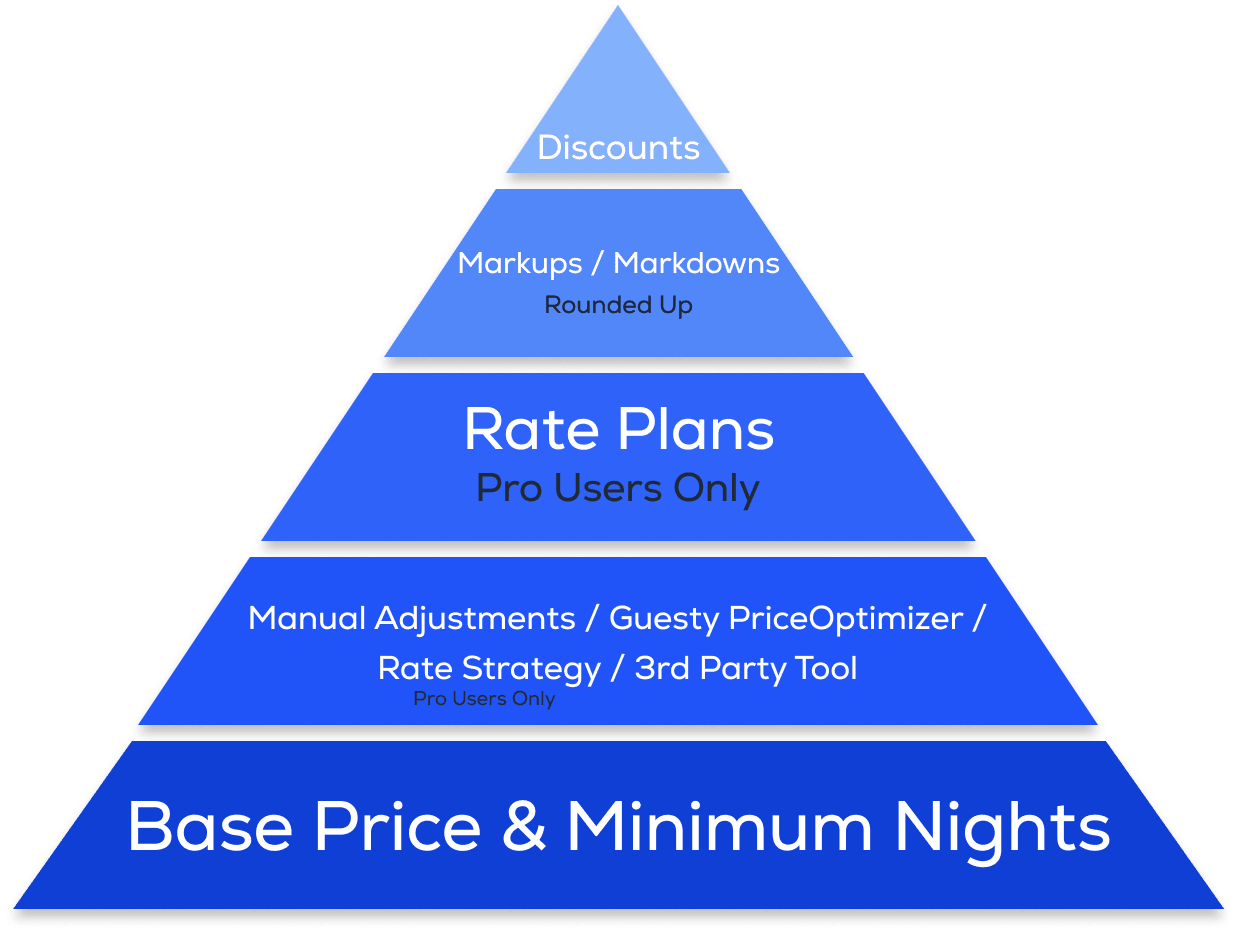
Tools interact based on their layer in the pricing hierarchy:
- Same level: Tools at the same level generally override each other.
- Different levels: Higher-level tools apply on top of adjustments made by lower-level tools.
The guest folio displays the updated accommodation fare after all adjustments. Non-accommodation fare components (like cleaning fees) appear as separate line items, with some exceptions.
Additional costs
Guesty calculates other costs based on the accommodation fare:
- Basic fees
- Additional fees
- Taxes
- Price reductions, such as coupons and promotions
You can include an additional fee in the accommodation fare.
Note:
Channel commission can be added to the reservation total payout or just to the accommodation fare, fees, and taxes.
Pricing layers overview
The following table illustrates the calculation order for the accommodation fare.
| First layer | |
| Second layer |
|
| Third layer | |
| Fourth layer | |
| Fifth layer | |
| "On top" of the accommodation fare |
Layer 1: Base price
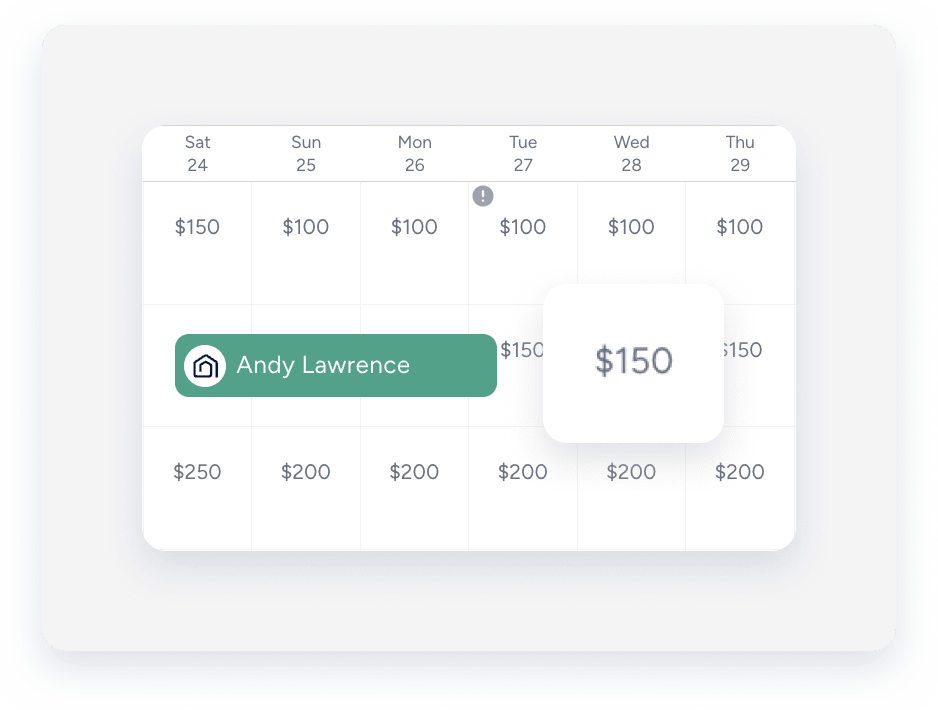
The listing's base price is the price per night if you don't use other tools. You can view the base price in the Multi-Calendar. When you import a listing from Airbnb, the base price syncs to Guesty.
Layer 2: Calendar rates
These tools adjust the price per night and minimum nights visible in the Multi-Calendar.
Important:
Since same-layer tools override each other, use only one pricing tool per listing at a time.
Manual adjustments via the calendar
You can manually adjust the price per night for specific dates without changing the base price. These changes reflect immediately.
Guesty treats imported pricing rules from Airbnb as manual adjustments.
When you adjust the nightly rate on the Multi-Calendar, you will be notified if the price is controlled by a rate strategy.
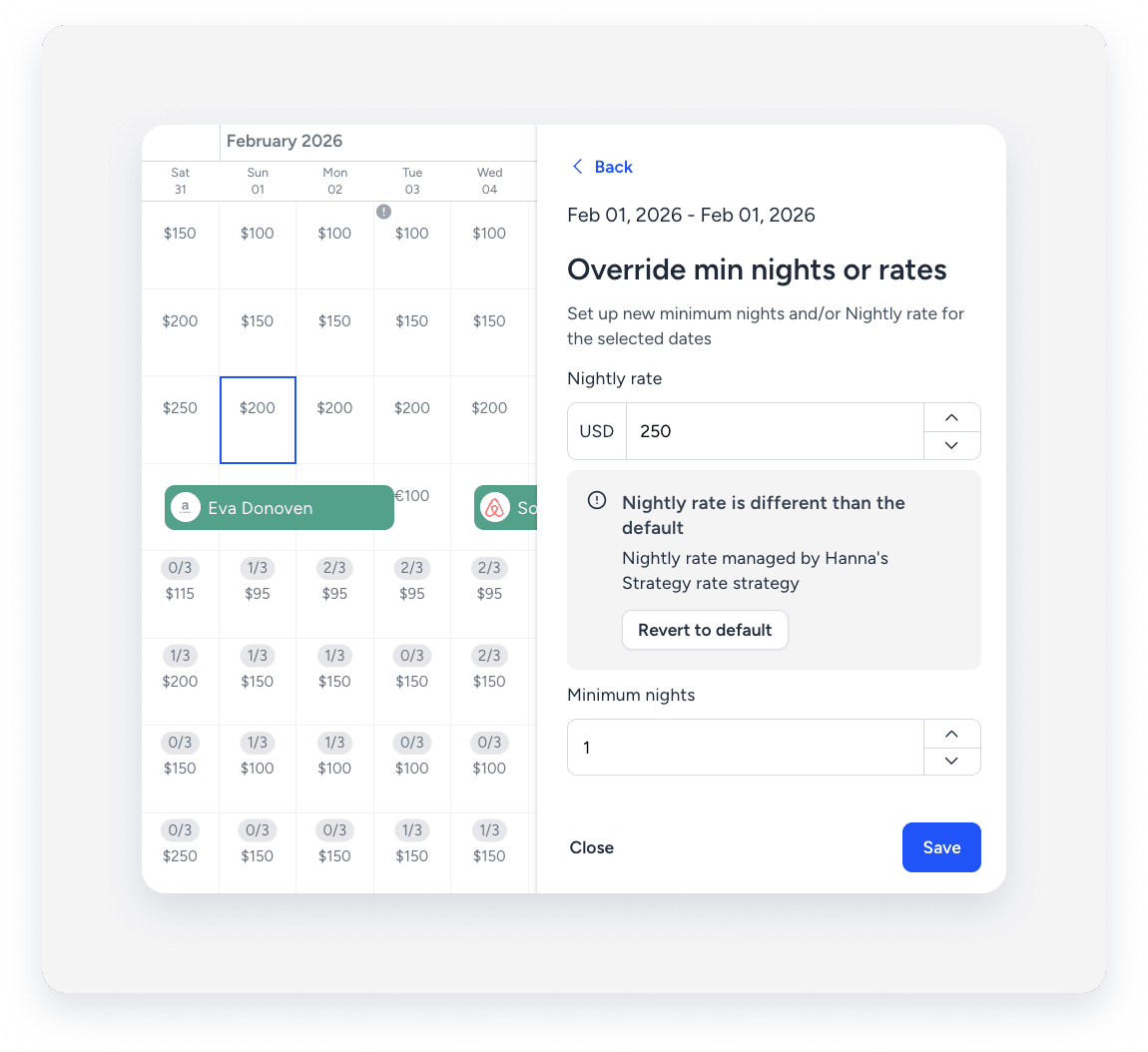
When you assign listings to a rate strategy, select Override rate strategy to override manual adjustments already made with a rate strategy.
Guesty PriceOptimizer
GUesty PriceOptimizer uses machine learning to recommend rates. Adjust the price per night directly via the PriceOptimizer settings. Deactivating it reverts rates to the Base price.
Rate strategy
A rate strategy adjusts pricing and availability based on rules (such as seasons or holidays). Set a minimum and maximum limit to prevent the rate strategy from altering the price per night outside your specified range.
After you activate a rule, the Multi-Calendar reflects the adjusted base price. Access the "Pricing" tab on the relevant property page to check the assigned rate strategy.
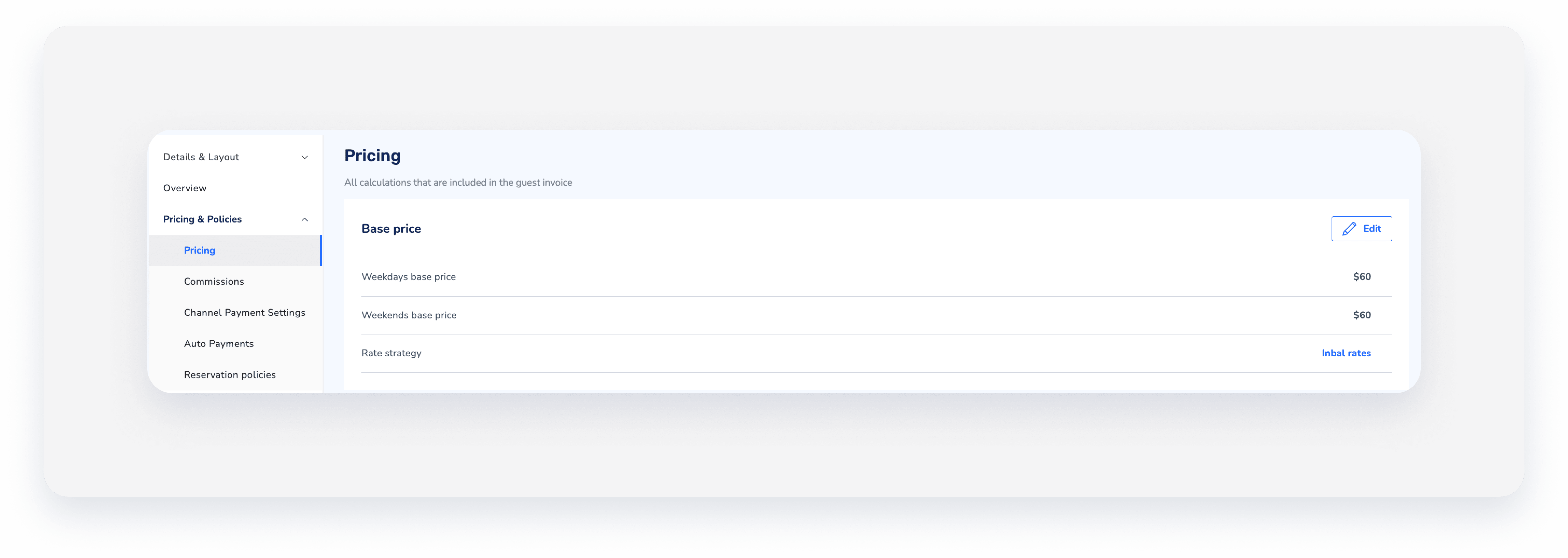
If you unassign a listing from a rate strategy, the listing's price per night reverts to the base price.
Multiple rules: Pricing rules within a strategy can overlap. Learn how they work together.
Strategies skip dates with existing manual adjustments or third-party tool adjustments, unless you perform a one-time override.
Tip:
To master increasing revenue and managing occupancy with rate strategies, visit Guesty Academy for interactive courses and step-by-step video tutorials.
Third-party pricing tools
Changes from third-party tools appear in the calendar. If you disconnect a tool, prices remain as set (they don't revert to base price).
When you assign listings to a rate strategy, select Override rate strategy to override third-party tool adjustments already made with a rate strategy.
Layer 3: Rate plans
A rate plan combines cancellation policies with other optional components, including meal plans, availability restrictions, minimum or maximum night rules, and pricing rules.
Cancellation policies
Cancellation policies can be part of a rate plan or standalone. Standalone policies can't have availability restrictions. If a rate plan has availability restrictions, the reservation must meet those terms to be booked.
Rate plans apply specifically to a reservation. They don't change the listing's overall settings or the price displayed in the Multi-Calendar.
- Calendar and listing settings: Availability rules in the rate plan (such as minimum nights and advance notice) take precedence over the calendar and listing settings. To ensure calendar rules apply, leave the rate plan's availability rules undefined.
- Higher-level and lower-level tools: Rate plans can be used with any higher or lower-layer tools.
- First and Second-layer tools: Rate plan pricing adjustments apply "on top" of the price calculated by Layer 2 tools (Base price, Manual adjustments, Guesty PriceOptimizer, or Rate strategy).
Learn more about the differences between a rate plan and a cancellation policy and how rate plans interact with promotions for Booking.com reservations.
Tip:
To master configuring pricing and booking conditions with a rate plan, visit Guesty Academy for interactive courses and step-by-step video tutorials.
Layer 4: Markups and markdowns
Markups and markdowns adjust prices to compensate for a booking channel commission fee. Guesty automatically rounds up the price following any markup or markdown adjustment.
Layer 5: Weekly and monthly discounts
Weekly and monthly discounts sync with Airbnb, Vrbo, and direct integrations and manual reservations.
Discounts are embedded in the accommodation fare and calculated based on the rounded price.
These discounts are the final adjustment layer applied to the accommodation fare, meaning the accommodation fare won't be rounded after a discount is applied.
"On top": Promotions and coupons
Promotions and coupons are applied on top of the accommodation fare, and when creating a manual reservation, you can decide not to apply them.
In most cases, an applied promotion or coupon is displayed on a separate line item in the guest folio (invoice).
Tip:
To master attracting potential guests by offering promotions and coupons, visit Guesty Academy for interactive courses and step-by-step video tutorials.
How to calculate multi-layer pricing adjustments
Use the following examples to understand the hierarchy between different pricing tools when they are used together.
A listing’s base price is $60.
- You manually change it to $63 in May 2024.
- You then assign the listing to a rate strategy with a rule: "Between May 21, 2024, and May 25, 2024, increase the base price by 10%."
Result:
- If you override previous manual adjustments, the nightly rate for May 21–25 changes to $66 ($60 + 10%).
- If you don't override, the nightly rate remains $63 (the manual adjustment).
The base price is $60.
- Later, you manually adjust the price for May 23 to $68.
- A rate plan adjustment of +5% applies to this date.
Result: The rate plan applies to the manually adjusted price. $68 + 5% = $71.40.
You create two rate plans for your Booking.com listings:
- Plan A: No restrictions.
- Plan B: A 5% price increase per night, with no date range.
Result:
- If a guest selects Plan A, the price per night and minimum nights follow the calendar rates.
- If a guest selects Plan B, Guesty multiplies the calendar rate by 1.05 for that reservation.
- The calendar rates and minimum nights remain unchanged, so different reservations can use different rate plans.
A listing’s base price is $60.
- A rate strategy rule increases the price per night by 10% for certain dates.
- A rate plan adds a $20 increase with no date range limitation.
Result: The rate strategy adjusts the price first ($60 + 10% = $66). Then, the rate plan applies ($66 + $20). Final price per night: $86.
The calendar indicates a minimum night requirement of 2 nights. The rate plan specifies a minimum of 3 nights.
Result: The date will be available for a 3-night stay. The rate plan takes precedence. (To use the calendar rules, leave the rate plan availability rules undefined).
You apply a markup to a reservation. The calculated accommodation fare becomes $79.20.
Result: Guesty rounds the price up to $80.
A listing’s base price is $100.
The following adjustments apply:
- A rate strategy decreases the base price by $5 for the following dates: 26-31 May 2024.
- A rate plan is set to decrease the nightly rate by $17 with no date limit.
- A markup of 5% is set.
- A weekly discount is applied, giving a 9% discount per stay.
Screnario 1: 01/06 - 08/06
|
Screnario 2: 27/05 - 01/06
|
Screnario 3: 26/05 - 02/06
For the first 6 nights from 26/05 to 01/06:
For 02/06:
Combined total:
|
Screnario 4: 04/06 - 08/06
|
Screnario 5: 27/05 - 29/05
|
Tip:
To master maximizing revenue effectively, visit Guesty Academy for interactive courses and step-by-step video tutorials.
