Tip:
If you have Admin permissions, use Guesty Copilot in place of static reports to ask questions in plain English and get instant insights, downloadable reports, and interactive visualizations.
Enhance your reservations report by including financial details, such as each reservation's payment status and a breakdown of applied fees and taxes. Refer to the table below for explanations of the terms that can be added as columns or filters.
If a column has a tooltip in the column name, hover over it to view the column total. The tooltip information is not visible on shared reports.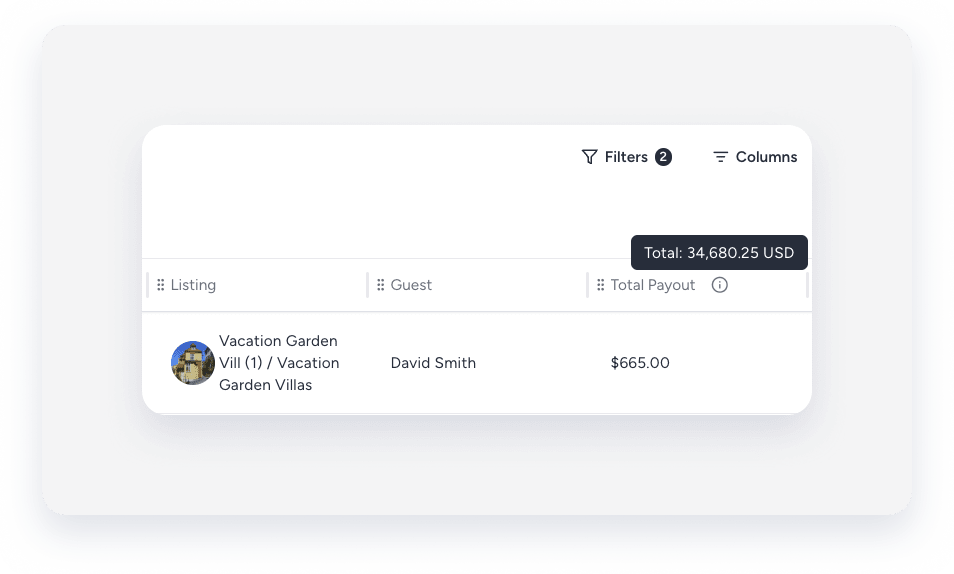
Base pricing and adjustments
-
Accommodation fare: Displays the sum of the price per night for the reservation dates, including markup, EPF (Extra Person Fees), and discounts (excluding adjustments). This matches the total price per your base pricing or any nightly rate adjustments set by pricing tools.
Note:
You can't use this column to display the fare without markup, EPF, or discounts at this time.
- Markup and EPF refer to extra pricing components applied to the base rate.
- Discounts reduce the overall accommodation price shown in this column.
- Net accommodation fare: Shows the final accommodation fare after all adjustments, including monthly or weekly discounts, any fee deductions, and manual modifications.
| Accommodation fare | The sum of the price per night for the reservation dates — includes markup, EPF, and discounts. Doesn't show the base fare before these items are applied. Adjustments are excluded. This column helps you see what the guest pays for accommodation before adjustments. |
| Accommodation fare adjustment | The adjustment value made to the accommodation fare after the initial calculation. |
| Net accommodation fare | The accommodation fare after adjustments such as monthly or weekly discounts, fee deductions, or manual modifications. |
| Airbnb Resolution Center | The Airbnb Resolution Center value, as displayed in the guest folio. |
| Balance due | The reservation amount remains to be paid. |
| Meal plan |
The meal plan of the applied rate plan. The value will be null if a rate plan isn't applied. |
| Rate plan name | The applied rate plan's name. |
| Subtotal price | The reservation total price before applying taxes. |
| Total payout |
The reservation's total amount = [e.g. accommodation fare+ additional fees+ taxes - channel commission]. Learn more about how a reservation's total payout amount is calculated. For Airbnb: The total amount will reflect price updates by the Airbnb Resolution Center. |
| Total guest payout (Vrbo) |
The total amount the guest pays on the channel. The calculation is Total payout (see definition above) + Total guest fee (received from channel) Supported for VRBO only. Does not work with Airbnb's fixed fee service model. Note:This field is only populated for reservations created or updated after Feb 1, 2026. |
Cancellations
| Canceled accommodation fare | The accommodation fare of the canceled reservation. |
| Canceled total payout | The total price of the canceled reservation (calculated based on the cancellation fee). |
| Cancellation fee | The cancellation fee that is applied to the reservation, as defined in the listing's cancellation policy or applied rate plan. |
| Cancellation policy | The cancellation policy applied to the reservation. |
Commission - channel
| Channel commission | The commission value that is charged by the booking channel for the reservation. |
| Channel commission inc tax | The commission that is charged by the booking channel for the reservation including tax. |
| Channel commission tax | The tax value that is applied to the channel commission. |
| Host channel fee | The channel commission value. |
Commission - PMC
| Commission | Your PMC commission of the reservation, calculated based on the commission formula |
| Commission formula | The formula used to calculate your PMC commission from the net income value. For example: Net income*0.25/Net income*1, etc. |
| Commission incl tax | Your PMC commission of the reservation, including tax. |
| Commission tax | The value of the PMC commission tax. |
| Commission tax percentage | The tax percentage that is applied to your PMC commission. This is a fixed percentage amount, not based on the commission calculation formula. |
| Net income | The value of the "Net income formula" for the reservation. |
| Net income formula |
The revenue basis for calculating your PMC commission. The formula is calculated based on your revenue share formula settings. For example, the net income formula can be equal to the reservation total payout/ the accommodation fare, including cleaning fee, etc. |
| Owner net revenue (accounting) |
The output of the owner's revenue formula, as defined in a Business model. The Owner net revenue value syncs with the commission banner on the reservation summary page. |
| Owner revenue |
The output of the owner's revenue formula, as defined in the commission calculation. The owner revenue value syncs with the "commission" banner on the reservation summary page. |
Discounts and coupons
| Coupon applied | Is a coupon applied? (Yes/No value) |
| Coupon code |
The coupon's code (will appear in uppercase) The value will be null if a coupon isn't applied. |
| Coupon discount |
The coupon's discount amount. The value will be null if a coupon isn't applied. |
| Coupon internal name |
The applied coupon's internal name (as it appears in the coupon settings) The value will be null if a coupon isn't applied. |
| Coupon percentage |
The coupon's percentage amount applied to the reservation. The value will be null if a coupon isn't applied. |
| Generic channel discount | An unspecified discount applied to the reservation by the booking channel. |
| Length of stay discount |
The weekly or monthly discount amount applied to the reservation. The value will be null if a discount isn't applied. |
| Promotion name |
The applied promotion's name. The value will be null if a promotion isn't applied. |
Fees and taxes
| [Additional fee name] |
For example: Management fee, Damage waiver, Guest service fee, etc. The additional fee amount applied to the reservation. If this fee is not applied, its value will be null. If the fee originated in a booking channel and is not yet mapped to a fee type supported in Guesty, it will appear as "Other”. |
| Cleaning fee |
The reservation's cleaning fee. When adding columns to the reservations report, there are two related options:
For standard cleaning charge reporting, we recommend using the "Cleaning Fare" column in your reservation reports. |
| Expedia AFE | Expedia's cleaning fee and additional fees. |
| Payment processing fee | Booking.com payment processing fee. |
| [Tax name] |
For example: City tax, State tax, VAT, Goods and Services tax, etc. The tax amount applied to the reservation. If this tax is not applied, its value will be null. If the tax originated in a booking channel and doesn't exist in Guesty, it will appear as "Other". |
| Total fees |
The sum of basic fees only - cleaning fee and pet fee. Doesn't include additional fees. See details further below specifically about cleaning fee data. |
| Total payout based fee |
The specific fee type calculated based on total payout. In addition to identifying reservations with the fee, options include total payout based fee "purchased", "purchased at", and "updated at". See when the fee was purchased at confirmation vs added manually, and when the price was created or last updated. |
| Total taxes | The sum of all applied taxes. |
Tip:
To master setting up customized reservation reports, visit Guesty Academy for interactive courses and step-by-step video tutorials.
