Protect your revenue and manage booking risks by defining clear cancellation fees and policies. In Guesty, you can control two key parameters:
- How far in advance guests can cancel before check-in
- The fee charged for cancellations or no-shows
These fees and policies apply to reservations made manually or through direct booking integrations, such as Guesty Websites and the Booking Engine.
Important:
Vrbo: If a reservation is canceled in Guesty, accounting users must add a line item in the guest folio to collect cancellation policy fees manually.
The guest receives a refund based on the cancellation fee setup for all policy types.
Policy |
Cancellation deadline |
|---|---|
| Free | 2:00 PM on arrival day |
| Flexible | 1 day before arrival |
| Semi-flexible | 2 days before arrival |
| Semi-moderate | 5 days before arrival |
| Moderate | 7 days before arrival |
| Firm | 14 days before arrival |
| Semi-strict | 30 days before arrival |
| Strict | 60 days before arrival |
| Super-strict | 90 days before arrival |
| Non-refundable | No refund |
In addition to selecting a policy, specify the cancellation fee applied when a guest cancels after the permitted deadline.
Cancellation fee |
Fee amount |
|---|---|
| Total Price | The entire booking amount |
| 50% of the total price | Half of the booking amount |
| The first night | The cost of the first night only |
Choosing between rate plans and standalone policies
Listings must have a cancellation policy or a rate plan to be bookable on a channel. You can configure a standalone policy for each property or include the policy as part of a rate plan. You aren't required to configure a cancellation policy when creating a new property in Guesty.
You can configure distinct rate plans and policies for each channel. Consider the following when choosing between a rate plan and a standalone policy:
- Flexibility: You can assign multiple rate plans to a single property, whereas each property supports only one standalone cancellation policy.
- Efficiency: You can update rate plans in bulk to save time, while standalone policies require individual updates for each listing.
Channel-specific information
Some channels, such as Airbnb and Vrbo, use their own policy types. Review the details below to determine how to set your policies.
Set the cancellation policy in Agoda. Policies set in Guesty don't sync to this channel.
Airbnb periodically updates its cancellation policies to streamline options for hosts and guests. Learn more below about the most recent policy updates, including retired choices and the timeline for upcoming policy deprecations, helping to keep listings optimized.
Airbnb supports standalone cancellation policies only.
Publish: Set the cancellation policy when you publish a listing to Airbnb.
Import: Policies created in Airbnb sync to Guesty automatically during the import process.
Link: When you link an existing listing between platforms, Guesty syncs the policy set in Airbnb.
Limitations
- Date-specific cancellation policies: Configure date-specific (dynamic) cancellation policies directly in Airbnb. If you connect a listing to Guesty with dynamic cancellation policy settings, Guesty respects these configurations and won't override them.
- Long-term cancellation policies: Long-term cancellation policies aren't supported in Guesty. If you configure a long-term cancellation policy in Airbnb, it will be overridden by your settings in Guesty.
- Rate plans: Rate plans aren't supported in Airbnb.
Past policy changes
Airbnb implemented global updates to cancellation policies on October 1, 2025. Reservations booked before this date remain unchanged.
Key changes include:
- Airbnb retired the Strict policy and replaced it with Firm for existing listings, unless hosts opted out
- The new Limited policy provides a full refund when a guest cancels at least 14 days before check-in
- An updated 24-hour grace period applies to trips shorter than 28 days booked more than seven days in advance
- Hosts in Italy offer discounted base prices when selecting a non-refundable policy
Super Strict policy deprecation
Airbnb is deprecating the Super Strict 30 and Super Strict 60 cancellation policies.
The deprecation follows this schedule:
- June 15, 2026: Airbnb removes the ability to select Super Strict 30 and Super Strict 60 for newly created listings.
- June 15, 2026 – September 15, 2026: Airbnb notifies affected hosts and provides a 90-day window to choose a different supported cancellation policy.
- September 15, 2026: Airbnb ends support for Super Strict 30 and Super Strict 60 on most existing listings.
Existing reservations:
Existing reservations remain unaffected by the migration, as changes to the cancellation policy apply only to future bookings. Reservations confirmed under Super Strict policies keep their original cancellation terms.
Existing listings:
Existing listings using Super Strict 30 or Super Strict 60 continue to function normally until September 15, 2026. During the 90-day transition period, switch to any supported Airbnb cancellation policy. Guesty users don't have to use Airbnb's default migration option.
If you take no action before September 15, 2026, Airbnb will automatically migrate eligible non-Luxe listings to the Firm cancellation policy (better_strict_with_grace_period). After this migration, listings can't use the Super Strict 30 or Super Strict 60 policies.
Guesty impact:
All Guesty listings currently using Super Strict 30 or Super Strict 60 policies face impact from this Airbnb deprecation. Guesty syncs cancellation policies directly from Airbnb. Update the cancellation policy directly in Airbnb or through Guesty where cancellation policy settings are available.
Cancellation policy comparison
All standard cancellation policies for stays of 27 or fewer consecutive nights include a 24-hour grace period. This allows guests to cancel for a full refund, including taxes, for up to 24 hours after reservation confirmation, as long as the booking occurs at least seven days before check-in.
The table below describes how standard cancellation policies apply to shorter stays.
| Cancellation policy | Description |
|---|---|
| Flexible |
Guests receive a full refund, including taxes, when canceling up to 24 hours before check-in. Hosts receive payment for each night of the stay plus one additional night when a guest cancels after that period. |
| Moderate |
Guests receive a full refund, including taxes, when canceling up to five days before check-in. Hosts receive payment for each night of the stay, one additional night, plus 50% for all unspent nights when a guest cancels after that period. |
| Limited |
Guests receive a full refund, including taxes, when canceling at least 14 days before check-in. Guests receive a 50% refund, and hosts receive 50% for all nights, when a guest cancels between seven and 14 days before check-in, outside the 24-hour cancellation period. Hosts receive 100% for all nights when a guest cancels less than seven days before check-in. |
| Firm |
Guests receive a full refund, including taxes, when canceling up to 30 days before check-in. Guests receive a 50% refund, and hosts receive 50% for all nights, when a guest cancels between seven and 30 days before check-in, outside the 24-hour cancellation period. Hosts receive 100% for all nights when a guest cancels less than seven days before check-in. |
|
Strict
Important:Deprecated as of October 1, 2025. Only applicable to listings that opted-out before October 1, 2025. |
If a guest cancels seven or more days before check-in, but after the 24-hour cancellation period, they receive a 50% refund, and you receive 50% for all nights. If a guest cancels less than seven days before check-in, you receive 100% for all nights. |
|
Super strict 30 Important:Airbnb is deprecating this policy. It is no longer available for newly created listings. Existing listings using this policy will automatically migrate to the Firm cancellation policy on September 15, 2026, if no action is taken. |
Guests receive a full refund, including taxes, when canceling at least 30 days before check-in, but after the 24-hour cancellation period, they receive a 50% refund, and hosts receive 50% for all nights. If a guest cancels less than 30 days before check-in, but after the 24-hour cancellation period, they receive a refund of pro-rated taxes, and hosts receive 100% for all nights. Italy
Available by invitation only to certain hosts. Guests can cancel at least 30 days before check-in for a full refund. If cancelled within 30 days before check-in and by 12 PM local time, the host receives 100% of the accommodation cost, excluding fees. |
|
Super strict 60 Important:Airbnb is deprecating this policy. It is no longer available for newly created listings. Existing listings using this policy will automatically migrate to the Firm cancellation policy on September 15, 2026, if no action is taken. |
Guests receive a full refund, including taxes, when canceling at least 60 days before check-in, but after the 24-hour cancellation period, they receive a 50% refund, and hosts receive 50% for all nights. If a guest cancels less than 60 days before check-in, but after the 24-hour cancellation period, they receive a refund of pro-rated taxes, and hosts receive 100% for all nights. Italy
Available by invitation only to certain hosts. Guests can cancel at least 60 days before check-in for a full refund. If cancelled within 60 days before check-in and by 12 PM local time, the host receives 100% of the accommodation cost, excluding fees. |
| Non-refundable |
Reservations are completely non-refundable if canceled outside the standard 24-hour grace period.
|
Non-refundable discount
You can offer a non-refundable discount for stays of fewer than 28 nights in addition to your standard cancellation policy. This allows guests to book at a discounted rate that is not subject to your standard cancellation policy. If they cancel, they will not receive a refund.
The non-refundable option is still subject to the 24-hour cancellation period that applies to all bookings for shorter stays, with the exception of certain non-refundable hotel listings.
Eligibility and rules
- You can't add a non-refundable discount if you use a Super strict 30, Super strict 60, or Luxe policy.
- The discount applies to reservations made no more than 60 days before the check-in date, and up until the cancellation policy comes into effect. For example, 14 days or less before check-in for a Strict policy.
- Non-refundable discounts apply on top of any additional price reductions set for the listing.
Pairing with other cancellation policies
Guests can book your non-refundable rate until your listing’s standard cancellation policy kicks in:
| Cancellation Policy | Non-Refundable Booking Window |
|---|---|
| Flexible | Up to 1 day before the desired check-in date |
| Moderate | Up to 5 days before the desired check-in date |
| Limited | Up to 14 days before the desired check-in date |
| Firm | Up to 14 days before the desired check-in date |
To publish a property or link a listing, you must set a cancellation policy or rate plan. Guesty settings override any existing plans on Booking.com during the linking process.
This includes the Guesty Booking Engine, Guesty websites, Google Vacation Rentals, and the Guesty Booking Engine API.
Set a rate plan or cancellation policy per property for these direct integrations. This must be done in addition to configuring the integration itself. Every listing must have a policy to be sellable and bookable on the channels.
Default policy
If you don’t set a policy or a rate plan, Guesty automatically applies a fully refundable policy to all direct booking reservations. This includes no cancellation fee or a minimum notice period before check-in. To use a different policy, inform your guests of the terms and manually add any cancellation fees to the guest folio (invoice).
Date-based policy display
You can set multiple rate plans with different cancellation policies for each listing. Terms shown to guests change based on their selected dates.
|
Example: With a "Firm" cancellation policy that charges 100% for cancellations within 14 days of check-in:
|
Configure a cancellation policy or a rate plan when linking Expedia listings to Guesty.
Set your listing's cancellation policy via Glamping Hub.
Select a cancellation policy when connecting your HVMB account and listings to Guesty. The cancellation policy you set in Guesty will override the one configured in HVMB.
Set a cancellation policy when connecting a Misterb&b account to Guesty.
Set a cancellation policy via Rentals United.
To link your property between Guesty and any of these channels, you must set up a rate plan in both platforms. Once linked, you'll manage your listing directly through the channel's extranet. Rate plans can be configured during the linking process (the process applies to all channels listed above).
During the publishing process, you have two options when setting your cancellation policy:
-
Use the default policy
Ideal for standardizing policies across multiple listings, this automatically applies the default cancellation policy in your account to the listing.
-
Apply a custom policy
Ideal for special circumstances, seasonal rules, or premium listings.
Select Custom cancellation policy when publishing to allocate a unique policy. Define up to three refund tiers using the following parameters:
- Days before check-in: Set the timeframe for each tier.
-
Refund amount (%): Specify the percentage refunded if the guest cancels within that timeframe.
Example policy:
Days before check-in
Refund amount
14+ 94% 2+ 46% 0+ 0%
The guest receives no refund upon cancellation
Guesty automatically syncs a custom cancellation policy with Vrbo once saved; however, it displays as “Not Selected” on the reservation page in Guesty.

Set a cancellation policy when connecting your channel’s account to Guesty. The cancellation policy you configured in Guesty overrides the one in the channel.
Set a cancellation policy in Guesty
Set a cancellation policy in Guesty for manual reservations and direct integrations ("Online booking solutions"). For all channel integrations, you configure a policy when you connect to the channel. The channel is added to the cancellation policy section in Guesty following the initial connection.
Follow the instructions below to create or change a cancellation policy.
Alternatively, learn how to create or change a cancellation policy as part of a rate plan.
Step by step:
- Sign in to your Guesty account.
- In the side navigation menu, click
 Properties.
 -
Click the relevant property.
In the case of a multi-unit, set the cancellation policy in the main unit and each sub-unit.
- In the left-side menu, click Pricing & policies.
- Select Reservation policies from the dropdown menu.
- In the "Cancellation policy" section to the right, click Edit.
-
Select the desired cancellation policy for the relevant source and the cancellation fee.
Cancellation policy options-
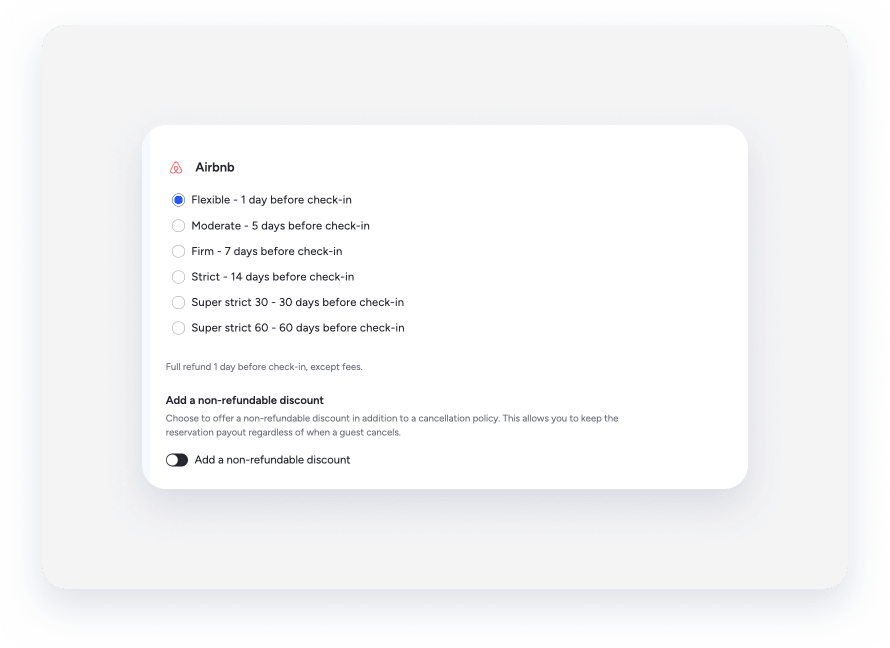
Airbnb: Choose whether to apply a non-refundable discount to the cancellation policy. Non-refundable discounts can't be added to Super strict policies.
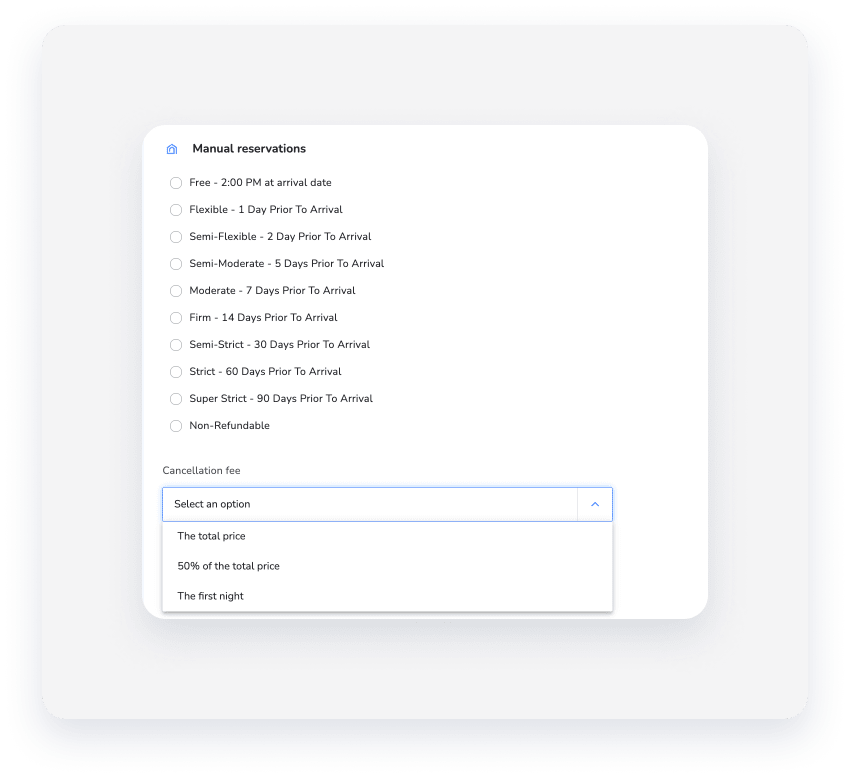
- Manual reservations
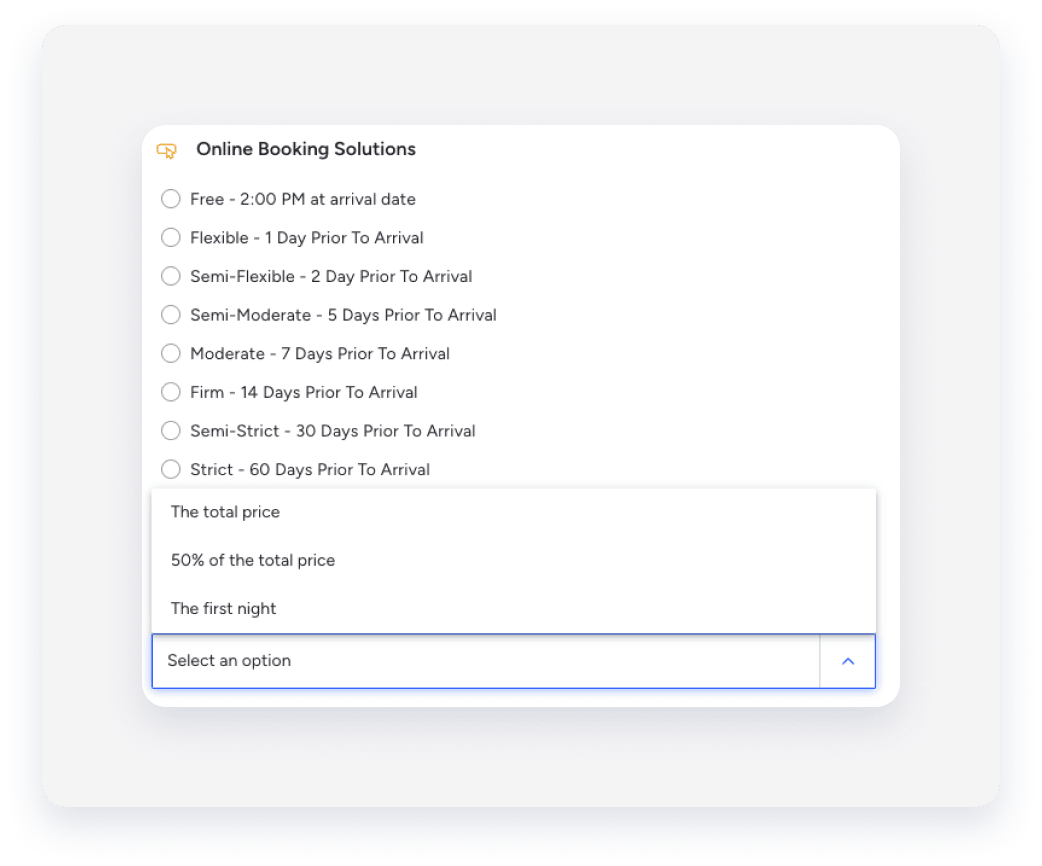
- Online booking solutions: Includes the Booking Engine, Booking Engine API, and Guesty Websites.
- Vrbo: To create a custom cancellation policy, select Custom from the list, and create up to 3 combinations of [days before check-in] and [refund amount]. Guests qualify for a refund if they cancel their reservation on or before the specified number of days before check-in.

-
- Click Save.
Edit a cancellation policy
You can change a cancellation policy after it's created via Guesty. The change syncs to the connected booking channel, except for the following booking channels, in which you must make any cancellation policy adjustments directly in the channel:
- Agoda
- Glamping Hub
- Rentals United
- Vrbo: You can only update policies after you set up the account. For accounts with multiple listings, edit each individually in Guesty or request to edit in bulk.
Changes to your cancellation policy only apply to new bookings. Reservations made before your changes are subject to your previous cancellation policy.
Follow the instructions below based on how your cancellation policy was originally set up:
- Policy included in a rate plan: If the policy was created as part of a rate plan, change it in the rate plan’s settings.
- Standalone policy: If the policy was created as a standalone, change it via the Property page. Repeat the steps above to change the cancellation policy selection for the relevant source.
- Multi-units: Update the cancellation policy in the main unit and each sub-unit.
Request bulk edit
You can manage your cancellation policies efficiently by adding or editing them across multiple properties at the same time.
To request a bulk change, first prepare your data and then send the data to guesty.
Follow the steps below to prepare your CSV file.
Step by step:
- Download the cancellation policy template.
- Enter the Guesty property ID in the "_id" column.
- Select the appropriate value in the "cancellationPolicy" column.
- Select the penalty in the "cancellationPenalty" column. Leave this column blank if the policy is "Free" or "Non-refundable".
- Enter the penalty amount in the "customPenalty" column if the policy is "Custom".
- Save the completed data file as a CSV file.
Follow the steps below to submit your data file to our support team.
Step by step:
- Create a support ticket for Guesty.
- Select Guesty Feature as the "Ticket Topic".
- Select Property settings & reports as the "Guesty Feature".
- Enter the subject line:
API Bulk Request: Update Cancellation policy. -
Copy the template below and paste it into the body of your ticket.
Hi Guesty CX,
Please update the cancellation policy for the listings provided in the attached file.
Account Name/ID: [Insert Account Name or ID]
Apply to: [Indicate ALL listings OR Active listings only]
Apply to which channel: [Indicate ALL channels OR specific channel only]
Special instructions or previous ticket with the same request:Thank you!
- Fill in the bracketed information.
- Attach your prepared CSV file.
- Click Submit.
Refer to the table below to see which bulk edits are supported by each channel.
Channel |
Cancellation policy |
Non-refundable discounts |
|---|---|---|
| Airbnb | Edit cancellation policies in bulk. | Edit non-refundable discounts bulk. |
|
Booking.com Expedia Direct booking |
Cancellation policies can be set up in bulk using rate plans. | Non-refundable discounts can be set up in bulk using rate plans. |
| Vrbo |
Cancellation policies are set up per listing under the property settings. To set up cancellation policies in bulk, contact us. |
Non-refundable discounts aren't supported. |
|
Build to Guesty channels (Hopper, Whimstay, etc.) |
One-time bulk setup of cancellation policies during integration or when connecting additional listings. Can be later edited under the property settings. To edit cancellation policies in bulk, contact us. |
Non-refundable discounts aren't supported. |
Seasonal cancellation policy
You can set seasonal policies in the cancellation policy hub for Airbnb and Vrbo. Seasonal cancellation policy overwrites the default channel policy on selected dates to help protect revenue during peak periods or boost bookings off-season without altering your default settings.
Switch between a cancellation policy and a rate plan
Review the following guidelines when switching between a cancellation policy and a rate plan.
Rate plan to cancellation policy
Don't attempt to switch from a rate plan to a cancellation policy in the Guesty dashboard. Stopping the sale of a rate plan makes the listing unsellable under the rate plan's settings, and adding a cancellation policy won't make the listing sellable again.
Cancellation policy to rate plan
You can switch from a cancellation policy to a rate plan.
Edit the rate plan and assign the properties to it. Once the property is assigned, the rate plan automatically replaces the cancellation policy.
