Tip:
Learn more about getting started with owner statements.
We offer two versions of the owner statement template:
- Original template: Provides general, listing, and owner transaction summaries on separate pages
- Updated template: Provides line item details organized per reservation in a continuous flow, plus additional customization options
The updated version continues to be enhanced with additional customization options. Switch to it at any time, following the steps below.
Important:
The template you choose will be used for your entire account. You can't select one template for some listings and the other template for the rest of your listings.
Original version
See below to understand how information is provided in the original version.
Under "General settings" you have the option to toggle on Ability to generate zero income statements:
- Create statements for owners even when no income has been generated.
- Display every transaction on the owner statement to match data in the owner activity report.
- A listing must be connected to a business model to generate an owner statement.
The rest of the owner statement is comprised of three separate pages/summaries.
General summary
Each general summary presents the initial balance and ending balance:
- Initial balance: The balance that was in the owner's account at the beginning of the month in question.
- Ending balance: What is left in the owner account after adding and subtracting the different transactions that took place during the month in question, such as those listed below.
All other items that may appear in the general summary depend on the transactions that took place during the month in question:
- Rental income: The total rental income transactions for that month.
- Supplies and purchases: Expenses to be paid by the owner during that month.
- Management fee: The PMC commission for that month.
- Minimum account balance: A reserve of money left in the account, as defined between the owner and the PMC in their contract agreement. Known as the "working capital" in the Owner's Portal.
- Payment to owner: Payments you posted to the owner.
- Payment due to the owner: The amount owed to the owner, calculated as the ending balance minus working capital. The ending balance is determined by adding earnings to the initial balance and subtracting charges. Note that this amount reflects what is owed, not the owner's monthly revenue, which is shown separately in the Owner Portal.
Important:
The initial balance of an owner statement represents the ending balance of the previous month's owner statement. If an owner was not paid the previous month, there will be an initial balance for the next month. We are able to zero out this initial balance, but it is your responsibility to account for this action as it can create a discrepancy in the owner statement if the owner is not paid.
Listing summary
At the top is a summary of the income due to the owner for a specific property. Below this is a breakdown of transactions for that listing that occurred during the month in question. The summary includes:
- Transaction date
- Transaction category
- Description of the transaction
- Amount of the transaction
- Management Fee
- VAT
- Net amount of Transaction
Owner transactions summary
The Owner Transactions Summary displays transactions that are not connected to specific listings, but rather transactions between the owner and the PMC. Transactions shown in this section include manual transactions created by the PMC via adding a transaction. The summary includes:
- Transaction date
- Transaction category
- Description of the transaction
- Amount of the transaction
- Management Fee
- VAT
- Net amount of transaction
Updated template
The updated version of the owner statement template provides line item details organized per reservation in a continuous flow, with additional customization options that can be previewed live as you edit your template.

The statement total is calculated as follows, displaying the balance of transactions for the current month, excluding the beginning balance:
| Rental income + Property income - Payment To owner |
To use and customize the updated owner statement template, follow the steps below.
Using and customizing the updated version
Step by step:
- Sign in to your Guesty account.
- In the side navigation menu, click
 Accounting to open the dropdown menu.
 - Under Owner accounting, select Owner statements.
- At the top right, click Customize statements.
General settings
- Toggle on Updated template (breakdown by reservation) to use the new template.
- (Optional) Toggle on Ability to generate zero income statements:
- Create statements for owners even when no income has been generated.
- Display every transaction on the owner statement to match data in the owner activity report.
- A listing must be connected to a business model to generate an owner statement.
- (Optional) Toggle on Separate pages per listing to separate your transactions by listing for the owner.
-
Check the boxes to include or exclude specific information in your template. See customization option details below.
Tip:
As you hover over or click on each option, view the Live preview in the right side panel to see where and how the information is displayed.
- At the top right, click Save.
- In the pop-up, review your selection then click Apply changes.
Customization options
See linked help center articles for more details on how data for the specific fields are populated.
- Statement generation date
- PMC address and phone number (From your company information)
-
Company VAT number
- From your company information
- Displayed on statement for tax purposes in regions where VAT applies
- Owner address and phone number (From "business information" in the owner profile)
-
Owner VAT number
- From "business information" in the owner profile
- Displayed on statement for tax reporting in countries where owners much charge VAT on rental income or services.
- Display summary by categories (From accounting categories to classify transactions.)
- Display year-to-date column (Display year-to-date amounts in the summary by categories section.)
- Display overall performance banner (Change the order of the metrics by reordering them in the live preview.)
- Display property quick view banner (Available when the general setting "Separate pages per listing" is activated.)
- Display taxes remitted by PMC (Available when the reservations setting "Taxes remitted by PMC" is activated.
- Working capital in summary (Money currently held for this owner to cover property expenses)
- Working capital separate summary (The reserve amount required by the contract to keep for future expenses.)
- Attach receipts to any transaction (Include files attached the journal entries, such as receipts)
- Initial and ending balance in the body of the statement
- Statement balance
- Show pending transactions (Available when "Create pending expenses" is activated in your Accounting setup.)
- Reservation confirmation code (A reservation beginning with “HM” is a reservation from Airbnb. One beginning with “HA” is from VRBO.)
- Check-in/out dates
- Number of nights
- Guest name on reservation (Select how name is displayed, e.g. full name or last name only.)
- Transactions with zero amount for the owner
- Owner reservations
-
Owner-guest reservations
Note:
An owner or owner-guest reservation may be split between different owner statements. For example, a reservation Jan 28-Feb 2 shows on the January owner statement as Jan 28-Jan 31 and on the February statement as Feb 1-Feb 2. The value for owner reservations is always 0 so this does not affect the statement balances.
- Canceled reservations (Display "canceled" on the statement for reservations that are canceled but have revenue.)
Choose the type of view:
-
Detailed reservation view
- Include taxes remitted by PMC (Taxes remitted by on owner's behalf for each guest reservation.)
- Display GST on accommodation fare only
- Include taxes remitted by PMC (Taxes remitted by on owner's behalf for each guest reservation.)
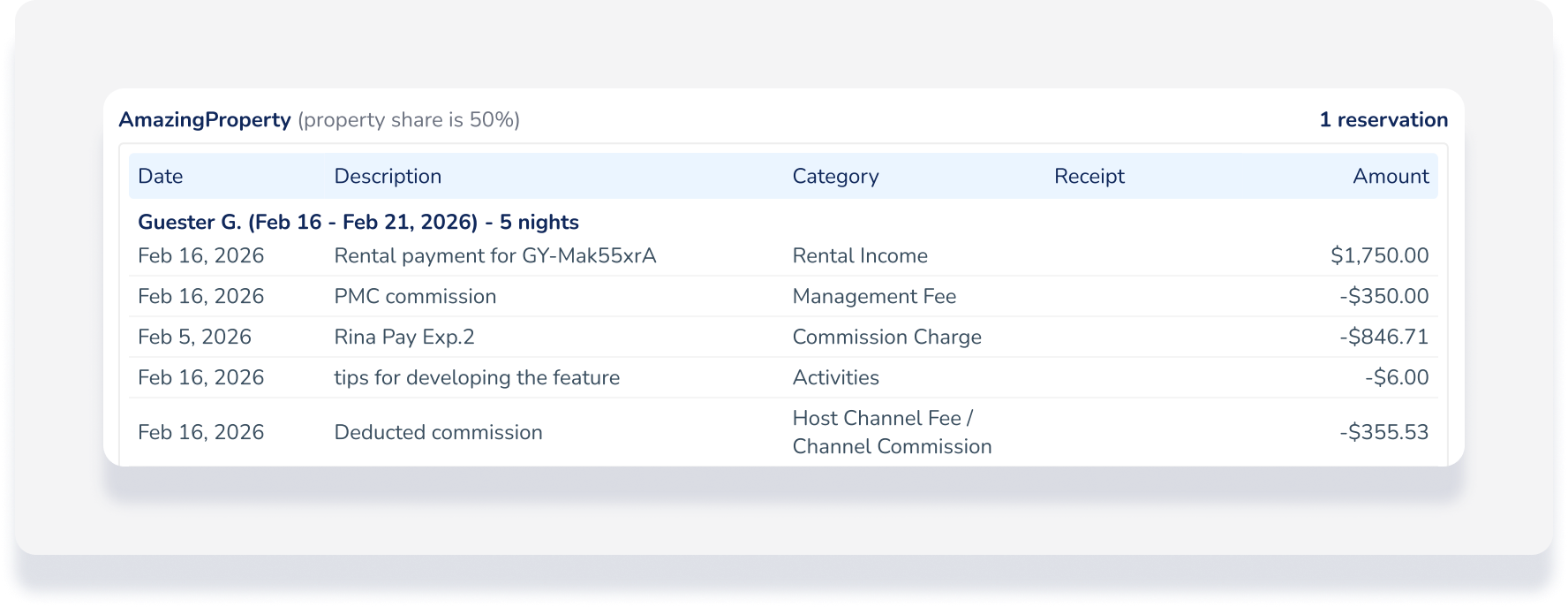
- Condensed reservation view
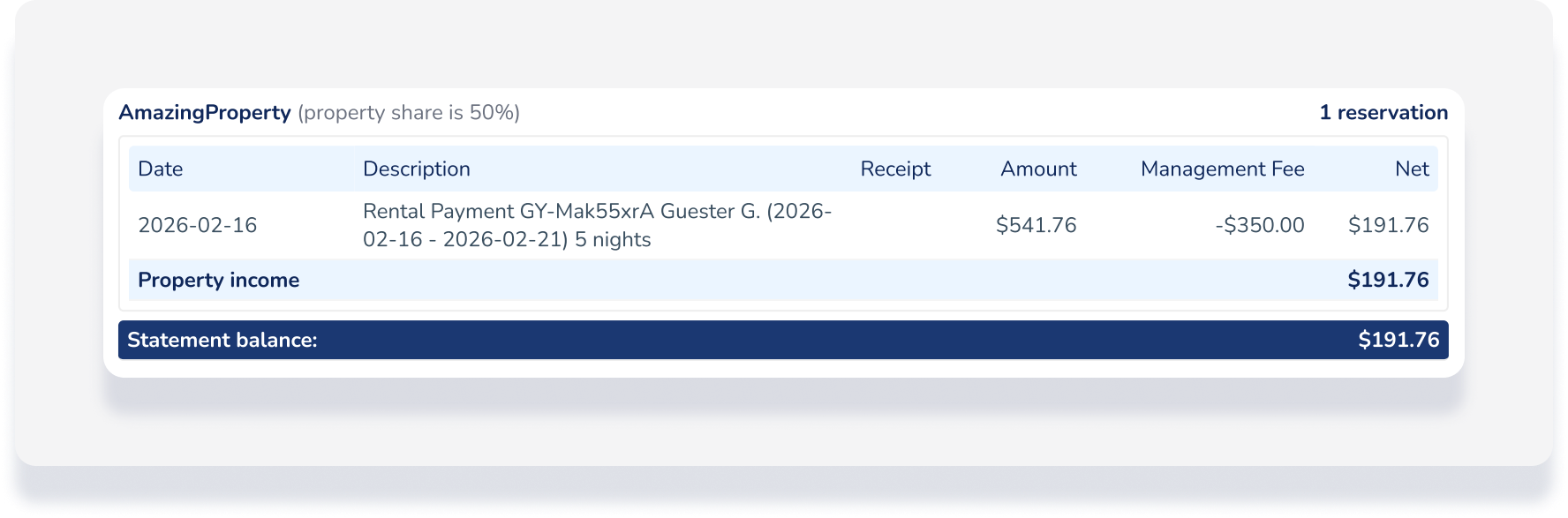
Show the task ID for an expense added to a task
