When creating a promotion in Guesty, select whether to set it for a specific period ("time-limited") or without a time limit (“whole calendar”). If multiple promotions overlap, a reservation may be eligible for more than one. However, only one promotion is applied to a reservation, based on the booking channel's logic.
To see which promotion was applied to a reservation, create a reservations report and add the “Promotion name” column. The report only shows promotions that are managed in Guesty.
Each booking channel handles promotions differently. Review the sections below to understand how promotions sync and apply for each channel.
Airbnb
Airbnb refers to price reduction tools as "discounts" and "promotions". Promotions configured in Guesty are synced to Airbnb as "discounts". Airbnb "promotions" (such as custom promotions, Airbnb.org or Low Demand promotions) don't sync to Guesty and must be managed directly in Airbnb.
Learn in which cases custom promotions don't apply.
When a promotion is applied in Airbnb, the reservation's accommodation fare is adjusted accordingly. However, the promotion isn't synced to Guesty and doesn't appear in the guest folio (invoice).
Guesty promotions
You can manage four types of promotions via Guesty:
- Early Bird
- Length of Stay
- Last Minute
- New Listing Promotion (for a newly published listing)
Setting the Early Bird, Length of Stay, and Last Minute promotions in Guesty overrides "discounts" set in Airbnb. For example, if you add an Early Bird promotion in Guesty, it overrides an Early Bird discount set in Airbnb.
Weekly and monthly discounts set in Guesty also sync to Airbnb as length of stay "discounts".
- If you set a length of stay promotion and a weekly or monthly discount in Guesty, the weekly or monthly discount is disregarded, and only the promotion is applied.
- A length of stay promotion (or weekly or monthly discount) set in Guesty overrides length of stay discounts set in Airbnb for the same listing.
How multiple promotions apply to an Airbnb reservation
If a reservation is eligible for multiple promotions of different types, they are applied according to the following priority:
- Airbnb.org promotions
- New Listing promotions
- Custom promotions
- Low Demand promotions
- Length of Stay promotions
- Early Bird promotions
- Last Minute promotions
For example, if a reservation is eligible for both a Length of Stay promotion and an Early Bird promotion, the Length of Stay promotion is applied.
Promotions of the same type
If a reservation is eligible for multiple promotions of the same type (for example, two Early Bird discounts), the promotion offering the highest discount is applied.
When setting multiple Length of Stay promotions, longer stays must have equal or greater discounts compared to shorter stays. For example, if a 7-day stay offers a 20% discount, a 10-day stay must offer a 20% discount or greater.
Booking.com
The following types of Booking.com promotions are managed in Guesty:
- Early Bird
- Last Minute
- Basic promotion
- Mobile Rate promotion
Booking.com offers additional promotions, such as country rates. Manage these directly in Booking.com. The updated reservation price syncs with Guesty for both connection types.
Booking.com ignores availability configured in Guesty and prioritizes promotions set up directly on Booking.com:
- Mobile Rate: The property's minimum nights settings can be overridden when a Mobile Rate promotion is active.
- Advance notice or same-day restrictions: These settings can be overridden due to Booking.com promotions, such as the Getaway Deal.
How multiple promotions apply
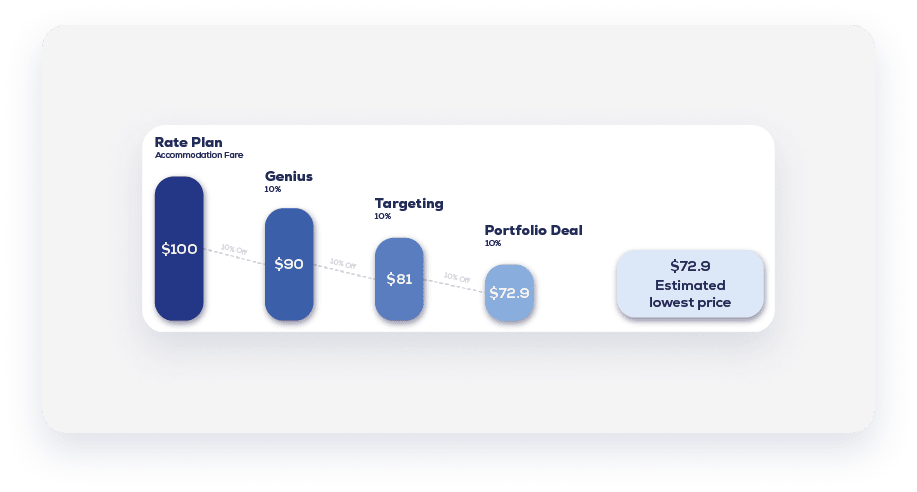
Promotions fall into categories: Genius, Targeting, Portfolio, and Campaigning. Guesty only supports Portfolio promotions (Last Minute, Basic promotion, and Early bird).
- Genius promotions: Can be combined with other promotions.
- Same category: If a reservation is eligible for multiple promotions in the same category (excluding Genius), the promotion offering the greater discount is applied.
- Different categories: First, the rate plan determines the fare. Then, a Genius promotion is applied, followed by a targeted promotion, and finally a portfolio deal.
Expedia
Promotions cannot be combined. If two promotions are set for the same dates, the promotion offering the greater discount is applied.
Manual & direct integration sources
You can apply three types of promotions to manual reservations and reservations from direct integration sources: Early Bird, Length of Stay, and Last Minute.
If a reservation is eligible for multiple promotions, only one is applied, according to the logic described below. However, promotions can be combined with weekly discounts, monthly discounts, and coupons.
Multiple Early Bird promotions
An Early Bird promotion rewards early bookers. If a reservation is eligible for multiple Early Bird promotions, the one offering a discount for earlier bookings is applied.
|
Example: Early Bird #1 gives a 10% discount for reservations made at least 30 days before check-in. Early Bird #2 gives a 20% discount for reservations made at least 60 days before check-in. If a guest books a reservation 70 days before check-in, Early Bird #2 is applied. |
Multiple Last Minute promotions
A Last Minute promotion rewards late bookings. If a reservation is eligible for multiple Last Minute promotions, the one offering a discount for later bookings is applied.
|
Example: Last Minute #1 gives a 15% discount for reservations made two days or less before check-in. Last Minute #2 gives a 20% discount for reservations made seven days or less before check-in. If a guest books their stay two days before check-in, Last Minute #1 is applied. |
Multiple Length of Stay promotions
A Length of Stay promotion motivates longer reservations. If a reservation is eligible for multiple Length of Stay promotions, the promotion rewarding a longer stay is applied.
|
Example: Length of Stay #1 gives a 10% discount for reservations made for 7 days or more. Length of Stay #2 gives a 20% discount for reservations made for 10 days or more. If a reservation is made for 18 days, Length of Stay #2 is applied. |
Promotions of different types
If a reservation is eligible for multiple promotions of different types (for example, an Early Bird of 10% and a Length of Stay of 12%), the one giving the highest discount is applied (Length of Stay). If the discount amount is identical, the last promotion set is applied.
