Welcoming families is a great way to expand your guest base and increase occupancy. Follow the instructions below to set your property as child-friendly and configure specific settings for channels like Booking.com and Vrbo.
Limitations
- Children count toward the property's occupancy limit. The total number of adults and children must not exceed it.
- Children above the age limit set in your child policy are considered adults.
- If a reservation includes more children than your policy allows, the excess guests are considered adults.
How guests are counted for pricing
Guesty uses a guest count to calculate pricing, such as the extra person fee and per-guest taxes. This count depends on where the reservation came from:
- Airbnb, Vrbo, and Expedia: Adults and children.
- Manual and direct reservations: Adults only.
- Booking Engine: Follows the Booking Engine's final price calculation setting. By default, only adults are counted.
Infants and pets are never included in the guest count, unless you include infants in a Booking Engine's price calculation.
Each reservation also stores the full guest breakdown (adults, children, and infants). If an integration needs the total number of guests, such as a CRM, have it use this breakdown instead of the guest count.
Channel-specific settings
See how child policies sync to specific channels below.
From October 1, 2026, Airbnb's non-discrimination policies prohibit hosts from declining guests with children, unless there is a genuine safety hazard or the maximum number of guests is exceeded.
Setting your property as "Not suitable for children" in Guesty doesn't block guests with children from booking. To display safety considerations for guests with children, add them directly in Airbnb as informational warnings.
See how bookings with children sync on different booking settings:
- Instant book: Guests booking through Airbnb make reservations regardless of the child policy settings configured in Guesty. You may receive instant bookings with children or infant guests for listings that don't accept children. Guesty syncs the children policy settings with Airbnb, yet Airbnb no longer applies them in the booking flow or displays them in the "Safety considerations" section.
- Request to book: If it's critical that children or infants don't stay at your property due to strict safety hazards, switch your listing's booking mode to "Request to book". This allows you to manually review each reservation for children, and ensure the booking aligns with your property safety considerations.
- Pre-approvals and special offers: Sending pre-approvals or special offers entirely bypasses the child policy settings. Don't send pre-approvals or special offers to inquiries that include children if your listings are not suitable for children.
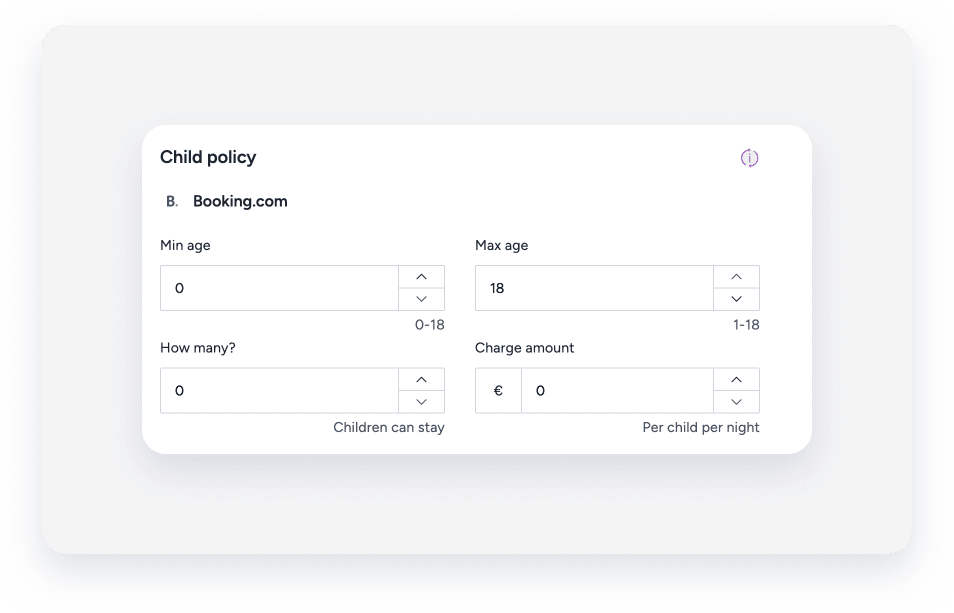
Configure how children are accommodated and charged for on your Booking.com listings.
Define the following details:
- Age range for children
- Maximum number of children
- Child fees
When publishing a property, the "Child policy" field defaults to "Children allowed".
Control whether children and infants are included in the final price calculation for each Booking Engine.
Configure the guest breakdown for children and infants
Manage which occupancy counts are sent to the final price and fees calculation directly in the Booking Engine. This configuration applies per Booking Engine and does not affect existing reservations or quotes.
Follow the steps below to configure price calculation for a Booking Engine.
Step by step:
- Sign in to your Guesty account.
- In the side navigation menu, click
 Marketing and sales to open the dropdown menu.
 - Under Channel management, select Distribution.
- Click the Guesty Booking Engine card.
- Click
 next to the relevant Booking Engine, and select Edit booking engine.
 - In the side navigation menu, click Booking settings.
- Under "Final price calculation", choose which guest types to charge as adults:
- Check the Include children box
- Check the Include infants box
- In the side navigation menu, click Languages to navigate to the last action.
- Click Save Booking Engine to apply your changes.
Once enabled, children (aged 2-12) and infants (under 2) are charged as adults and count toward the listing's maximum guest capacity. Unchecking the boxes next to children or infants excludes them from extra guest fees and maximum capacity limits.
Understanding guest calculations
In the table below, review how the guest count is sent to the price calculation based on your selection.
Include children |
Include infants |
Guests included in price and occupancy calculation |
|---|---|---|
| Off | Off | Adults (default) |
| On | On | Adults, children and infants |
| On | Off | Adults and children |
| Off | On | Adults and infants |
Changes to the child policy sync to Vrbo within 24 hours. Your listing amenities update automatically to include "family/child friendly".
Configure house rules to allow children
Use the instructions below to allow children at a property.
Step by step:
- Sign in to your Guesty account.
- In the side navigation menu, click
 Properties.
 -
Select the relevant property.
For a multi-unit, edit the main settings. The house rules will update in the sub-units automatically.
- In the left-side menu, click Pricing & policies.
- Select Reservation policies.
- Scroll down to the "House rules" section.
- To the right of "House rules", click Edit.
-
Under "Child policy", toggle on Children (2-12) or Infants (0-2).
Airbnb users: If you toggle these off, an "Explain why" field appears. You must provide a reason for the change to sync.
- Click Save.
Set a child fee for Booking.com
For listings with a "Full sync" connection type, you can add a child fee. This fee is added to the reservation price on top of the adult fare.
Step by step:
- Repeat steps 1-3 above.
- In the left-side menu, click Pricing & policies.
- Select Pricing.
- Scroll down to the "Basic Fees" section and click Edit.
-
Under "Child policy", configure the age range, the total number of children allowed per reservation, and the price per child per night.
- Click Save.
