House rules help you set clear expectations with guests before they book. By defining guidelines—such as pet policies, quiet hours, or safety details—you ensure guests know exactly what is permitted at your property.
House rules can also be included in quotes sent to guests and synced differently across booking platforms.
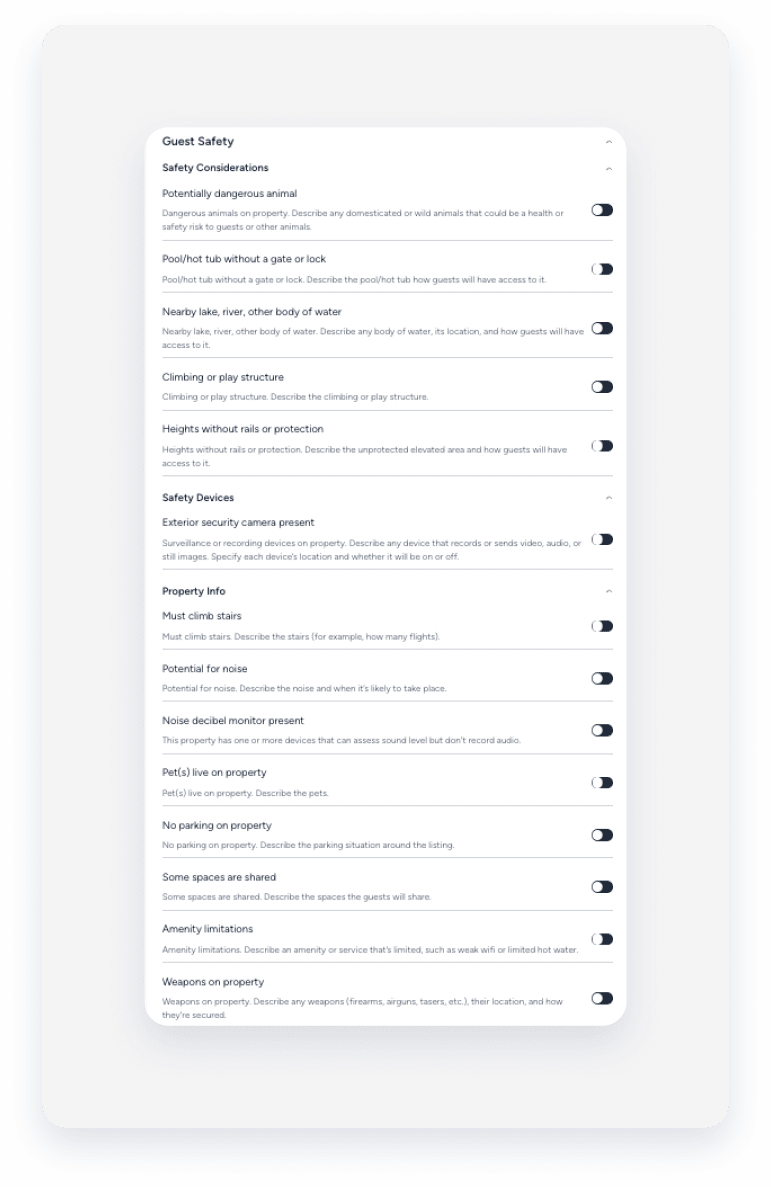
Airbnb: Airbnb provides additional “Guest Safety” house rules to highlight specific safety considerations. For example, you can let guests with children know about a “nearby lake, river, or other body of water,” or advise elderly guests that they “must climb stairs.” These details keep your guests informed and prevent unwanted surprises.
Channel limitations
Manage house rules in Guesty only for listings with full sync. If you use limited sync, manage house rules directly on Airbnb. Change your sync settings to manage all content attributes, including house rules, in Airbnb.
If you change the free text for house rules in Airbnb, you can't update them in Guesty. This applies to all sync types. If disabled, house rules' free text sections are managed in Airbnb and can't be changed from Guesty. The free text won't display in Guesty but will appear on Airbnb.
Content must adhere to Airbnb’s content policy. Adding the following content causes sync failures:
Policy restrictions
Content:
- Advertising or commercial content
- Spam, unwanted content, or repeated content
- Illegal, harmful, sexually explicit, violent, graphic, threatening, or harassing content
- Discriminatory content
- Impersonation of another person, account, or entity
- Violations of personal or intellectual property rights
- Disclosure of private or confidential information, including content that can identify a property's location
Formatting:
- Email addresses.
- Website links.
- Phone numbers.
Emojis and symbols.
- Abbreviations (Mr, Ms).
- Repetitive special characters.
- All-capitalized words (such as "CC").
- Words connected with a dot are interpreted as a website address, causing an error. Resolve this by inserting a space after the dot: [word]. [word].
While Airbnb offers a brief grace window (usually one day) after checkout where contact information is still permitted, any message containing restricted content will be blocked once that window closes.
Verification requirements
Under house rules, you can add guest verification requirements for instant bookings, such as host recommendations and no negative reviews.
Limitations
- The "Quiet time" field doesn't sync from Guesty to Airbnb. To add "Quiet time", change your sync settings to "limited sync".
- If you toggle off "The property is suitable for infants and/or children", an "Explain why" field appears. This field syncs only with Airbnb.
- The "Primary guest minimum age" field doesn't sync from Guesty to Airbnb. Manage the age limit directly on Airbnb.
Only the first 150 characters of the house rules sync to Vrbo.
Set up house rules
Follow the instructions below to configure house rules for a property.
Step by step:
- Sign in to your Guesty account.
- In the side navigation menu, click
 Properties.
 -
Select the relevant property.
For a multi-unit, edit the main unit settings to update the sub-units automatically.
- In the left-side menu, click Pricing & policies.
- Select Reservation policies.
- Scroll down to “House rules” and click Edit.
- Toggle on relevant house rules. When you activate a specific rule, fill in any additional fields that appear.
-
Child policy
Specify if the property is suitable for children (2-12 years) and for infants (under 2). If either is toggled off, an ”Explain why” free-text field appears. (Only syncs with Airbnb).
-
Allow pets
Toggle to allow pets and select whether they stay free or if charges may apply.
-
Allow smoking
Toggle to permit or prohibit smoking on the property.
-
Allow parties or events
Toggle to allow or disallow parties and events.
-
Quite time
If toggled on, a selection of start and end times appears.
-
Vrbo: Primary guest minimum age
Set the minimum age for the primary guest using the arrows. Other channels don't support this field. For Airbnb, the age limit must be managed directly on Airbnb.
-
Guest verification policy
Toggle on to restrict instant booking to guests with positive recommendations from other hosts and no negative reviews.
-
Additional house rules
Enter any additional house rules in the free text field.
-
Airbnb only: Guest safety
Use this section to provide safety alerts and considerations, such as security cameras or stairs. If you toggle an option on, an optional "Add helpful details" field appears. Keep the text under 300 characters to avoid sync failures.
-
- At the top-right, click Save.
