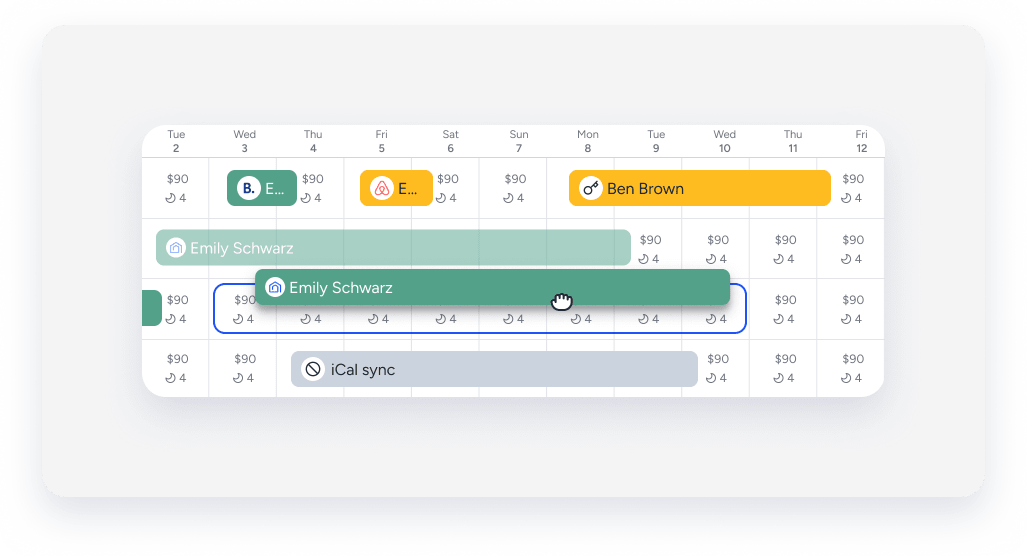
You can drag and drop a reservation between different units in the same multi-unit or to different dates directly from the Multi-Calendar. Move reservations to manage overbooking, upgrade or downgrade a guest, or switch units within a multi-unit.
Changing dates automatically updates the payout summary and fees, and requires approval. Financial updates occur only if the price changes.
Notes and limitations
- Drag-and-drop is supported for reservations from Vrbo, Airbnb, Booking.com, Guesty Booking Engine, and for manual reservations.
- Moving an Airbnb reservation requires guest approval. Learn more in the section below.
- OTA reservations that are "channel-locked" cannot be modified through Guesty. Attempting to move these will fail, and a notification will appear.
- The new property must use the same currency as the original.
- You can drag manual blocks only. Calendar settings, such as advance notice and preparation time blocks, can't be dragged.
- If you drop a reservation on dates that are already occupied, the reservation will snap back to its original position and no changes will be made.
- Reassigning sub-units within the same multi-unit doesn't require channel approval, regardless of the channel.
Move a reservation
Follow the steps below to move a reservation to a new sub-unit or date by dragging and dropping it on the Multi-Calendar. You can move reservations between sub-units in the same multi-unit or to a completely different multi-unit.
Step by step:
- Sign in to your Guesty account.
- In the side navigation menu, click
 Multi-Calendar.
 - Click and hold a reservation.
- Drag and drop the reservation onto the relevant listing or dates. Drag the reservation to the right or left edge of the Multi-Calendar to scroll to dates outside your current view.
- Review the comparison panel that opens on the right side of the page and edit as needed.
- For multi-units: Reassigning sub-units within the same multi-unit doesn't open the side panel and doesn't require approval.
- Under "Property", you can manually select a different property from the property list.
- Under "Dates", you can manually adjust the dates.
- Under "Payout", click
 to view and adjust the guest folio.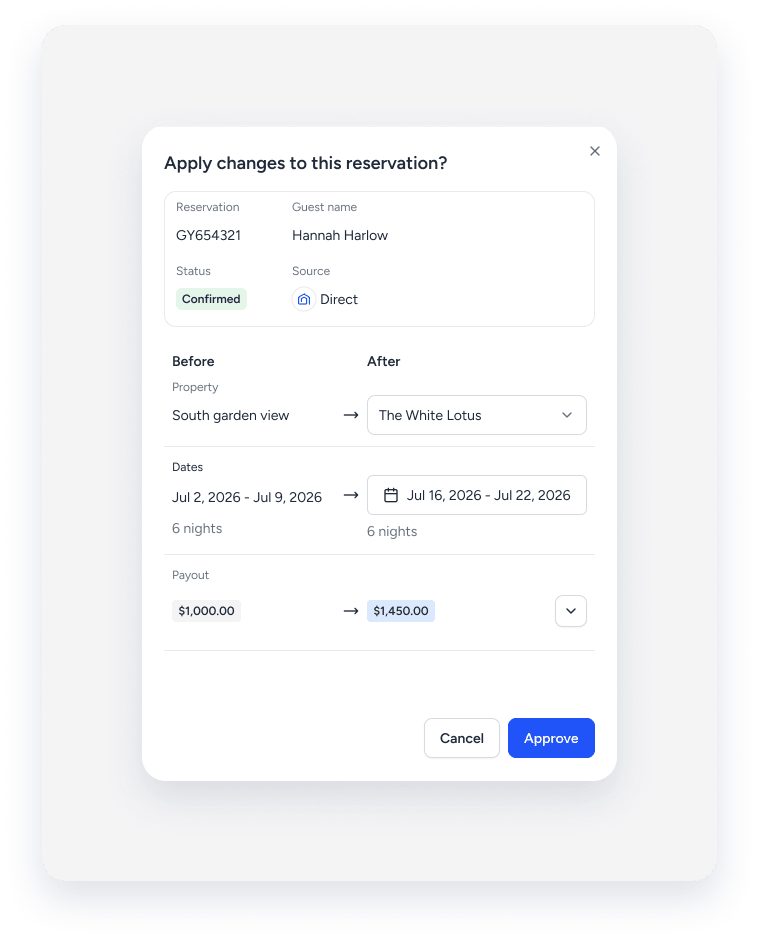
- In the bottom-right corner, click Approve.
Airbnb reservations
Moving an Airbnb reservation requires Airbnb approval. After you move the reservation in Guesty, the Multi-Calendar displays a red dot on the original reservation and a "ghost" reservation on the new dates.
The new dates remain unreserved and available for new bookings until Airbnb approves the change.
Tape behavior
Review the table below to understand how the reservation tape behaves after you drop it.
| User sees | What it means | Outcome |
|---|---|---|
| Tape snaps back | The target dates are occupied, the currency differs, or it's a cross-account Airbnb move. | The move failed. Verify the currency match and Airbnb account. |
| Red dot appears, and tape doesn't move | Airbnb approval is pending. Resolves automatically. | Waiting on guest approval from Airbnb. No action needed. |
| Ghost tape on empty dates | Shows where the Airbnb reservation lands once approved. | Not a confirmed booking yet. Those dates are still available. |
