Guesty Accounting provides a suite of reports to help you track and manage your finances. In addition to the preconfigured and customizable reports available to all Guesty Accounting users, you also access reports specific to Australia and New Zealand. These reports help you comply with Australian trust accounting regulations.
Before you begin
Before running monthly reports, update your company information with the relevant Australian business registration details (ABN, ACN, or license).
Note:
If you are an Australia or New Zealand user and do not see the reports listed below, contact us to enable the "Australian-based account" feature on your account.
Understanding trust accounting requirements
Australian state and territory laws require property managers to use a separate trust account to handle client funds. Guesty’s trust accounting module assists you in:
- Reporting client money accurately and transparently.
- Reconciling trust accounts every month.
- Generating reports that allow external audits.
Important:
You are responsible for ensuring your trust account remains compliant with the rules in your region. Always review your monthly reports for completeness and accuracy.
Access Accounting reports
Follow the steps below to access the preconfigured reports menu.
Step by step:
- Sign in to your Guesty account.
- In the side navigation menu, click
 Accounting to open the dropdown menu.
 - Under General ledger, select Preconfigured reports.
- In the side navigation menu, click the relevant report from the options below.
- Select the relevant date or date range.
- Select additional fields if required per report (e.g. ledger, transaction type).
- Click Export as PDF.

Accounting audit reports
Balances
The balance sheet report provides a snapshot of assets and liabilities. Generate this report to view if your trust account is in balance and to see the asset breakdown by ledger.
Cash account reports
- Three way reconciliation: Compares the cash ledger, bank account, and liability ledgers as of a selected date. Use this report to ensure your trust account balances, as required for compliance. Learn more.
- Unpresented deposits detail: Shows a detailed list of funds received into the trust account but not yet presented or cleared in the bank.
- Unpresented cheques detail: Lists payments issued from the trust account (such as cheques or electronic transfers) that have not cleared or been presented to the bank.
Cash book report
Displays deposits, withdrawals, and transfers in the cash account. This report categorizes transactions, making it easy to track movement in and out of the account.
Cash adjustments
Details transactions agents enter to reconcile trust account discrepancies, such as unknown or unallocated amounts. Tracks adjustments made directly in bank reconciliations.
Monies held in trust
Displays funds held in each trust ledger as of the selected date, including:
- Advanced deposit
-
Accounts payable for ledgers such as:
- Vendor
- PMC
- Taxes and VAT
- Channels
- Owners
Ledger detail
Provides a record of all financial transactions for each account within the trust. Use this report for these ledgers: Advanced deposit, Accounts payable (Vendors, PMC, Taxes and VAT, Channels), and Owners.
- Advanced deposit: Lists all advanced deposit transactions for the selected month by reservation.
-
Accounts payable: Lists accounts payable transactions in the selected month by ledger:
- Vendor
- PMC
- Taxes and VAT
- Channels
- Owners: Lists all owner transactions for the selected month per owner.
PMC income
- PMC income summary report: Summarizes the property management company’s income and expenses by category and month.
- PMC income detail report: Details the property management company’s income and expenses transactions by category and month.
- PMC GST income summary report: Summarizes the property management company’s GST income and expenses by category and month.
- PMC GST income detail report: Details the company’s GST income and expenses transactions by category and month.
- PMC income summary report by month: Summarizes the property management company’s income and expenses by category for a date range.
Journal (Check register)
This report lists all cash ledger transactions for a selected month, grouped by transaction type:
- Deposits
- Disbursements
- Group transactions
- Journal entries
- Reverse disbursements
Exported reports include unique sequential numbering for deposits and disbursements.
Best practices for running and saving reports
- Schedule time at the start of every month to generate and review trust audit reports for the previous month.
- Save PDFs securely for your records and future audits.
- Compare the “three way reconciliation” to your bank statement monthly to verify compliance.
Tip:
Set calendar reminders so you do not miss monthly reconciliation and reporting deadlines.
Additional monthly actions
- Download owner statements.
- Manage bank reconciliations.
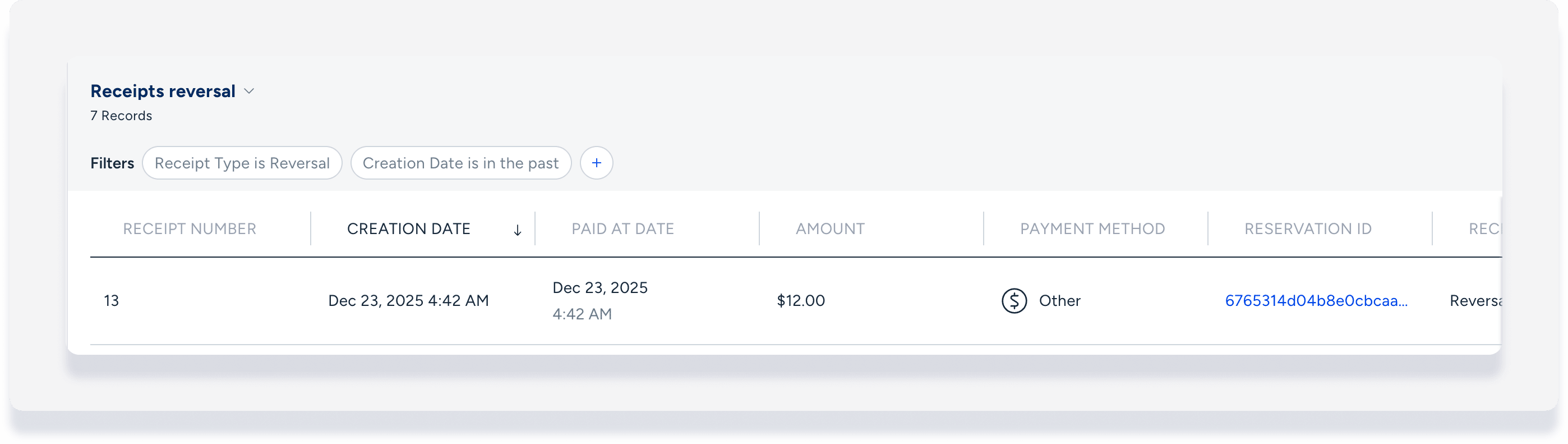
- Audit for reversed payments to the trust account:
- Navigate to Guest Payments > Receipts.
- Filter for date and set "Receipt type" to Reversal.
- Save as a new view for future reference.