Accounting users can use Guesty's own payment processor, GuestyPay. This eliminates the manual work required to track processing fees. For GuestyPay credit card commissions, Guesty records the exact commission expense per transaction. Automate GuestyPay transactions with Accounting in the following ways.
Tip:
Split or charge the GuestyPay processing fee to the owner in your business model expenses.
Activate GuestyPay automations
Follow the steps below to activate GuestyPay automations.
- Sign in to your Guesty account.
- In the side navigation menu, click
 Accounting to open the dropdown menu.
 - Under Accounting setup, select Automations.
- Toggle on the following options:
- Create journal entries for commission fees
- Enable GuestyPay rolling reserve journal entries
- Group transactions
Journal entries for commission fees
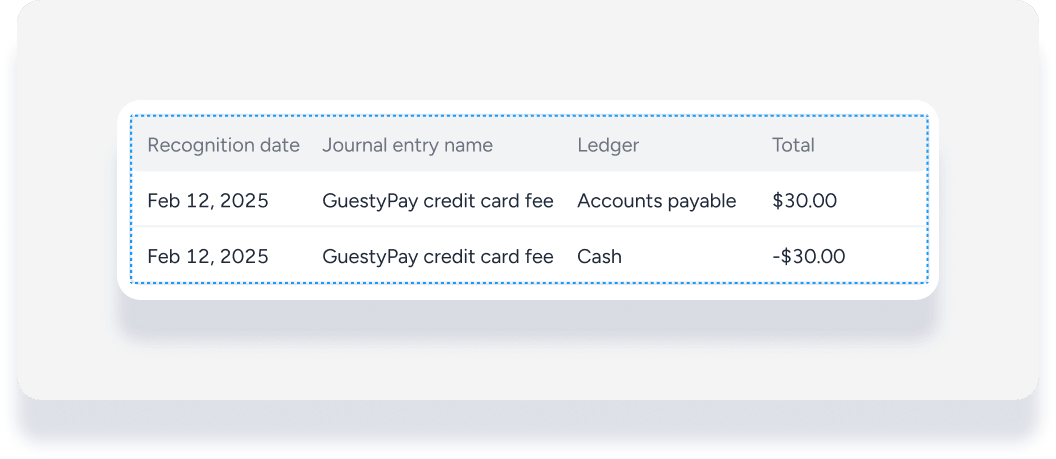
GuestyPay commissions automatically record in your posting journal, creating two journal entries: a debit to the "Accounts Payable PMC" ledger and a credit to the "Cash" ledger.
For example, a guest pays $1000 for their reservation. The GuestyPay commission fee is 3% ($30). Two journal entries automatically create as shown below.
GuestyPay Rolling reserve
The GuestyPay rolling reserve automation enters the payment from the guest based on your agreement with GuestyPay, rather than creating one entry for the total guest payment amount. No additional setup is required.
For example, 90% deposits into the bank on the transaction settlement date, and the remaining 10% deposits 90 days later. Process the guest's credit card for $100 on Jan 1. Two payment journal entries create automatically: a credit to the "Cash" ledger for $90 on Jan 1, and a credit to the "Advanced Deposit" ledger scheduled for Mar 31.
Note:
If you selected cash basis over accrual basis for your accounting, not all transactions flow off the guest account until they fund. This means 10% of the reservation transactions may not flow off the guest account until 90 days after the last payment is received.
Group transactions
Grouping transactions helps your bank reconciliation process and allows auditors to see the relationship between payments received in Guesty and transactions in your bank account.
Automatically group daily GuestyPay transactions into batches for simplified bank reconciliation. Auto-grouping happens three days after payment processing to ensure all transactions post.
Important:
Activate group transactions only with the first two options to ensure accurate reconciliations. Without activating commission fees and rolling reserve, transaction grouping may not match your bank records.
Audit GuestyPay groups
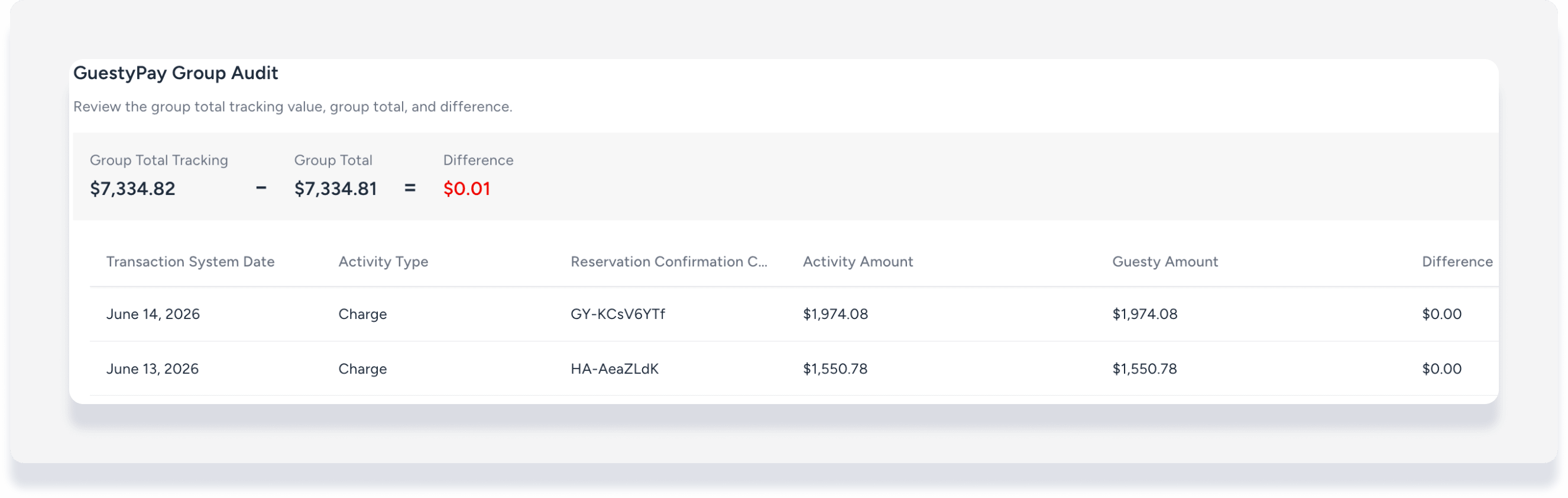
Reconcile discrepancies between GuestyPay automated groups and bank deposits easily with the dedicated GuestyPay group audit page. This detailed audit view pulls transaction system dates, activity types, linked reservation codes, and database deltas directly from Guesty and GuestyPay.
Follow the steps below to audit a GuestyPay group.
Step by step:
- Sign in to your Guesty account.
- In the side navigation menu, click Accounting to open the dropdown menu.
Under Cash management, select Check register.
Next to Filters, click
 . Search for filter "Entry type", and select Group.
Next to Filters, click
. Search for filter "Description", and enter GuestyPay.Add column Group Tracking. This display any discrepancy between the "group goal" amount in your bank and what is recorded in GuestyPay.
To the right of the relevant group transaction, under the "Actions" column, click
 and select Edit.
In the pop-up, click Audit GuestyPay Group.
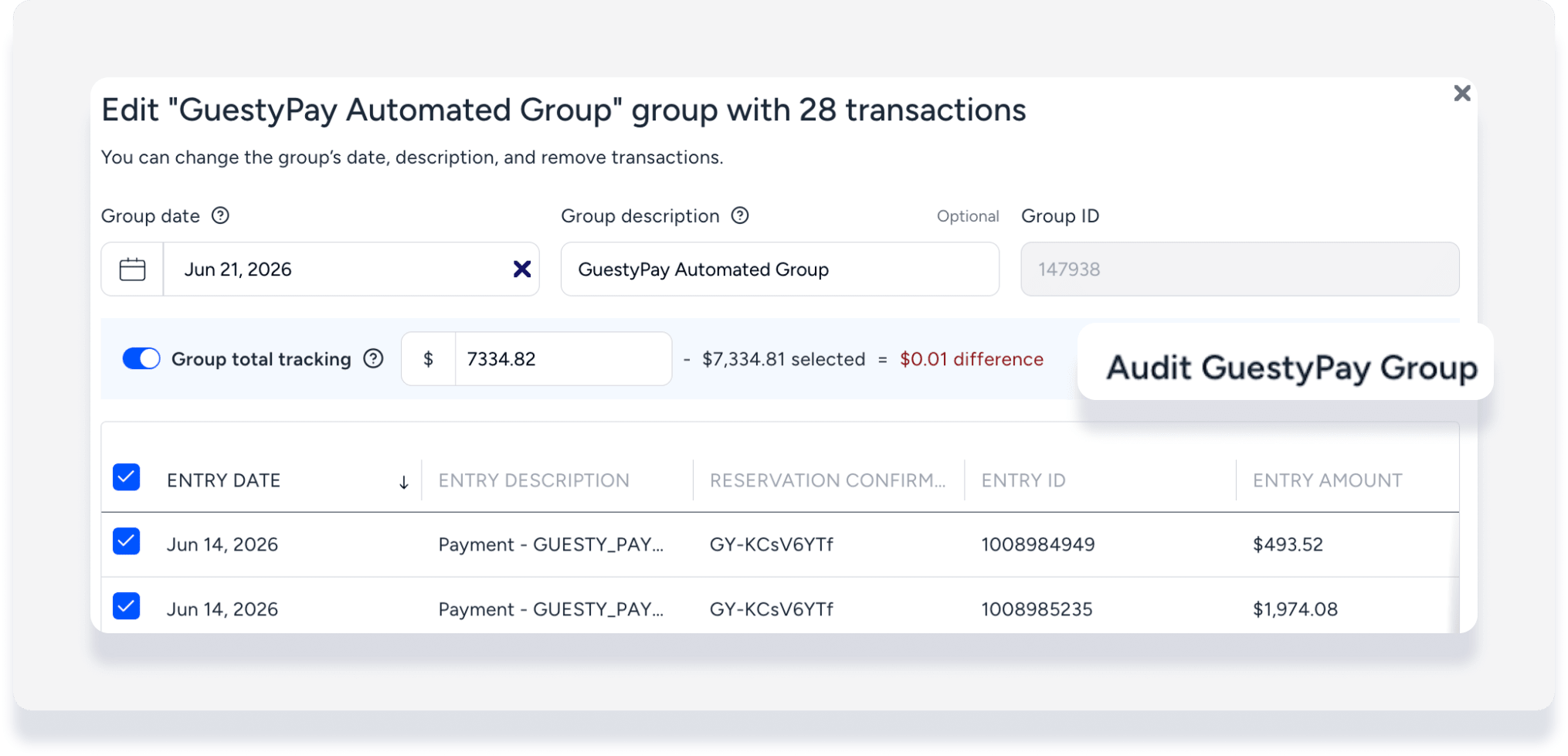
On the next page, the Activity amount column displays the GuestyPay amount, and the Guesty amount column displays what is recorded in Guesty. Any discrepancy displays in the Differences column.
Click on a reservation number to open the details. Add manual transactions in the accounting folio to reconcile discrepancies as needed.