Welcoming families is a great way to expand your guest base and increase occupancy. Follow the instructions below to set your property as child-friendly and configure specific settings for channels like Booking.com and Vrbo.
Limitations
- Children are included in the guest count. This total count must not supersede the property's occupancy limit.
- Children above the age limit set in your child policy are considered adults.
- If a reservation includes more children than your policy allows, the excess guests are considered adults.
Read below how this rule is configured for different channels.
Channel-specific settings
See how child policies sync to specific channels below.
Booking.com
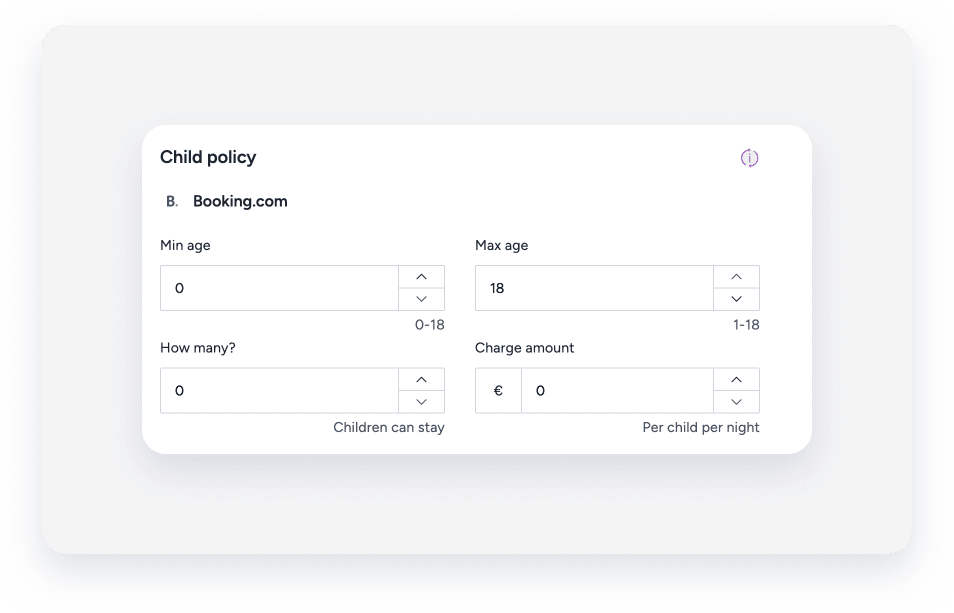
Configure how children are accommodated and charged for on your Booking.com listings.
Define the following details:
- Age range for children
- Maximum number of children
- Child fees
When publishing a property, the "Child policy" field defaults to "Children allowed".
Vrbo
Changes to the child policy sync to Vrbo within 24 hours. Your listing amenities update automatically to include "family/child friendly".
Configure house rules to allow children
Use the instructions below to allow children at a property.
Step by step:
- Sign in to your Guesty account.
- In the side navigation menu, click
 Properties.
 -
Select the relevant property.
For a multi-unit, edit the main settings. The house rules will update in the sub-units automatically.
- In the left-side menu, click Pricing & policies.
- Select Reservation policies.
- Scroll down to the "House rules" section.
- To the right of "House rules", click Edit.
-
Under "Child policy", toggle on Children (2-12) or Infants (0-2).
Airbnb users: If you toggle these off, an "Explain why" field appears. You must provide a reason for the change to sync.
- Click Save.
Set a child fee for Booking.com
For listings with a "Full sync" connection type, you can add a child fee. This fee is added to the reservation price on top of the adult fare.
Step by step:
- Repeat steps 1-3 above.
- In the left-side menu, click Pricing & policies.
- Select Pricing.
- Scroll down to the "Basic Fees" section and click Edit.
-
Under "Child policy", configure the age range, the total number of children allowed per reservation, and the price per child per night.
- Click Save.
