You can replace your email address in Airbnb with a new Guesty integration email address when you connect an Airbnb account to Guesty. The integration email forwards messages from Airbnb to Guesty, allowing you to communicate with Airbnb Support through Guesty, without affecting guest conversations.
The integration email can be utilized as follows:
- Use it as your Airbnb username
- Send and receive messages to Airbnb Support via Guesty
- Receive Airbnb account notifications in your Guesty Inbox
If you do not set up an integration email, manage communication with Airbnb Support and receive account notifications directly in Airbnb. You can also forward Guesty integration email messages to your personal email.
Replace your Airbnb email address
Follow the steps below to use your Guesty integration email as your Airbnb email address.
Step by step:
- Retrieve your Guesty integration email by forwarding guest communication to Guesty using an integration email.
- Sign in to your Airbnb account.
- In the top right corner, click the profile icon.
- From the dropdown, click Account.
- Click Personal info.
- Next to "email address", click Edit.
-
Replace the current email address with your Guesty integration email address.
Note:
- The integration email must end with @user.guesty.com. Other email domains are not supported, and communication with Airbnb Support through Guesty will not work. This is a system requirement, and there is no alternative workaround.
- Emails with diacritics or accents aren't supported in the integration email.
- Click Save.
To update your default Guesty integration email address later, contact us.
Communicate with Airbnb Support via Guesty
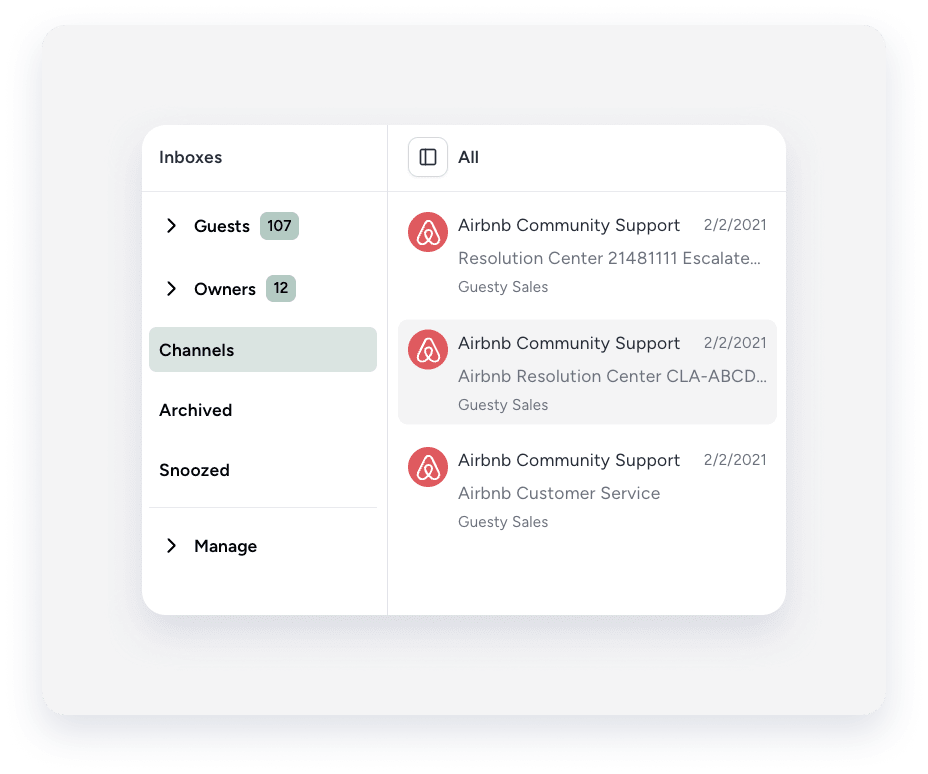
Once you initiate a new conversation with Airbnb Support, responses from response@airbnb.com are sent to the "Channels" inbox in the Guesty Inbox.
Follow the instructions below to communicate with response@airbnb.com from the Inbox.
Step by step:
-
Sign in to your Guesty account.
Check that you use the account associated with the Guesty integration email you set up.
- In the side navigation menu, click
 Inbox.
 - In the Inbox submenu, select Channels.
- Click the relevant message thread with an Airbnb icon.
Reply to Airbnb Support: via Guesty vs. in Airbnb
You can usually reply to Airbnb Support messages directly from the Guesty Inbox. However, some messages require you to reply on Airbnb for trust and safety reasons. In this case, click Reply to view the full message and respond in Airbnb.
Unsupported features
The following features and messages aren't supported by the Airbnb integration email feature:
- Airbnb Support conversations appear in the "Channels" inbox, not in the main guest conversations list.
- Certain Airbnb Support messages must be answered directly on Airbnb for trust and safety reasons.
- Airbnb Resolution Center claims and verification conversations aren't visible in Guesty. Only a closed resolution appears as a line item in the reservation's guest folio.
