Guesty allows you to set up various tax types, such as VAT and local tax, to ensure your revenue and reporting are accurate. However, tax support and synchronization vary across different booking channels.
This article explains how taxes sync between Guesty and major channels like Airbnb, Booking.com, and Vrbo, and provides details on channel-specific limitations.
Tax sync summary
The table below summarizes how each tax type in Guesty syncs with Airbnb, Booking.com, and Vrbo. If a tax type doesn't sync, it's marked with an ✗. When a tax does sync, you can see the label the guest sees on the channel.
For other channels, see this overview and click on the relevant channel article for details.
| Tax type | Airbnb | Booking.com | Vrbo |
|---|---|---|---|
| City tax | ✗ | City tax | Tax |
| Goods and services tax | VAT/GST | Goods and services tax | Tax |
| Local tax | Lodging tax | Tax | Tax |
| Tourism tax | Tourist tax | Tourism fee | Tax |
| VAT | Sales tax | VAT | Tax |
| Other tax | ✗ | ✗ | Tax |
| State tax | Tourism assessment fee | ✗ | Tax |
| County tax | ✗ | ✗ | Tax |
| Occupancy tax | Hotel tax | ✗ | Tax |
| Transient occupancy tax | Transient occupancy tax | ✗ | Tax |
| Home sharing tax | Room tax | ✗ | Tax |
| Harmonized sales tax | ✗ | ✗ | ✗ |
| Minimum alternate tax | ✗ | ✗ | ✗ |
Channel limitations
Important:
You are responsible for collecting and remitting:
- Taxes set up in Guesty and synced with channels
- Any additional tax that doesn't sync Guesty but that you must collect based on your local tax authorities
Airbnb
Airbnb only syncs with taxes created on the listing level. Some listings may not be eligible for tax sync at Airbnb's discretion. Learn more from Airbnb about how taxes work.
When you sync taxes from Guesty, the outcome depends on how taxes are already configured in Airbnb:
- Taxes collected by Airbnb: Guesty does not override these. Any tax you sync from Guesty is added on top of what Airbnb already collects.
- Taxes manually set by the host in Airbnb: These may be replaced when you sync from Guesty. The tax configuration in Guesty will become the new source of truth for your host-collected taxes.
Important:
When you sync taxes with Airbnb, Guesty becomes the source of truth for your host-collected taxes. Any taxes you previously set up manually in Airbnb may be removed. However, taxes that Airbnb collects directly from guests will remain and are not affected by the sync.
You can set up taxes in Guesty or directly in Airbnb. Airbnb supports only the following tax configurations:
- Percentage per stay
- Fixed amount per guest
- Fixed amount per guest per night
- Fixed amount per night
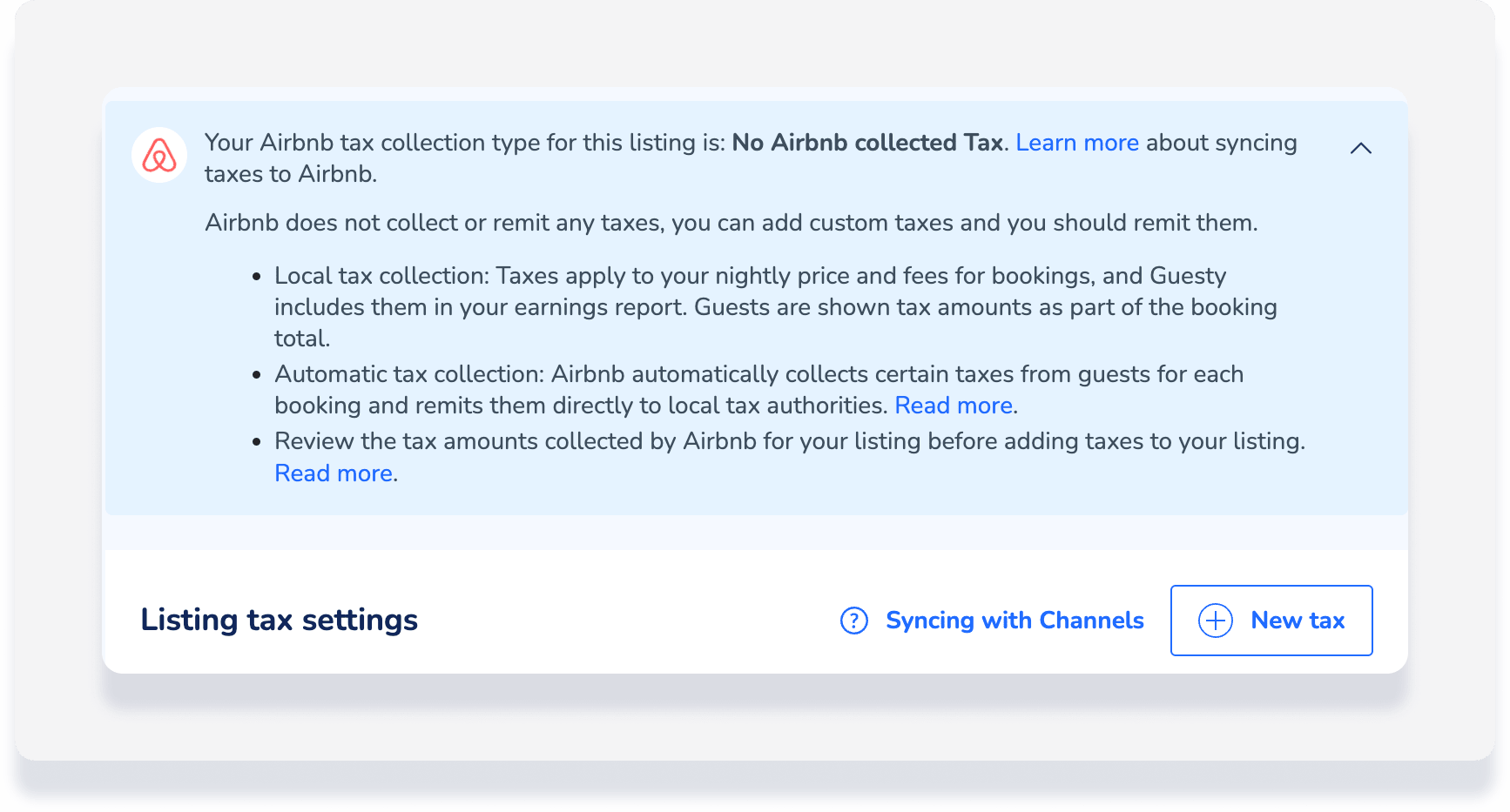
When you create a tax at the listing level in Guesty, we show you how Airbnb collects taxes for that specific listing. Use this information to decide whether to sync the tax. For example:
Note:
Tax support depends on the listing location. If a status appears incorrect, contact Airbnb directly.
Airbnb tax sync statuses
- Ineligible: You can't sync taxes from Guesty to Airbnb on this listing.
- No Airbnb collected tax: Airbnb doesn't collect taxes for this listing. You can sync your Guesty taxes to Airbnb. You are responsible for collecting and remitting these.
- Stacked: Airbnb collects some taxes. If you sync a Guesty tax, it is added to the taxes Airbnb collects. You are responsible for the additional tax.
Choose not to sync with Airbnb
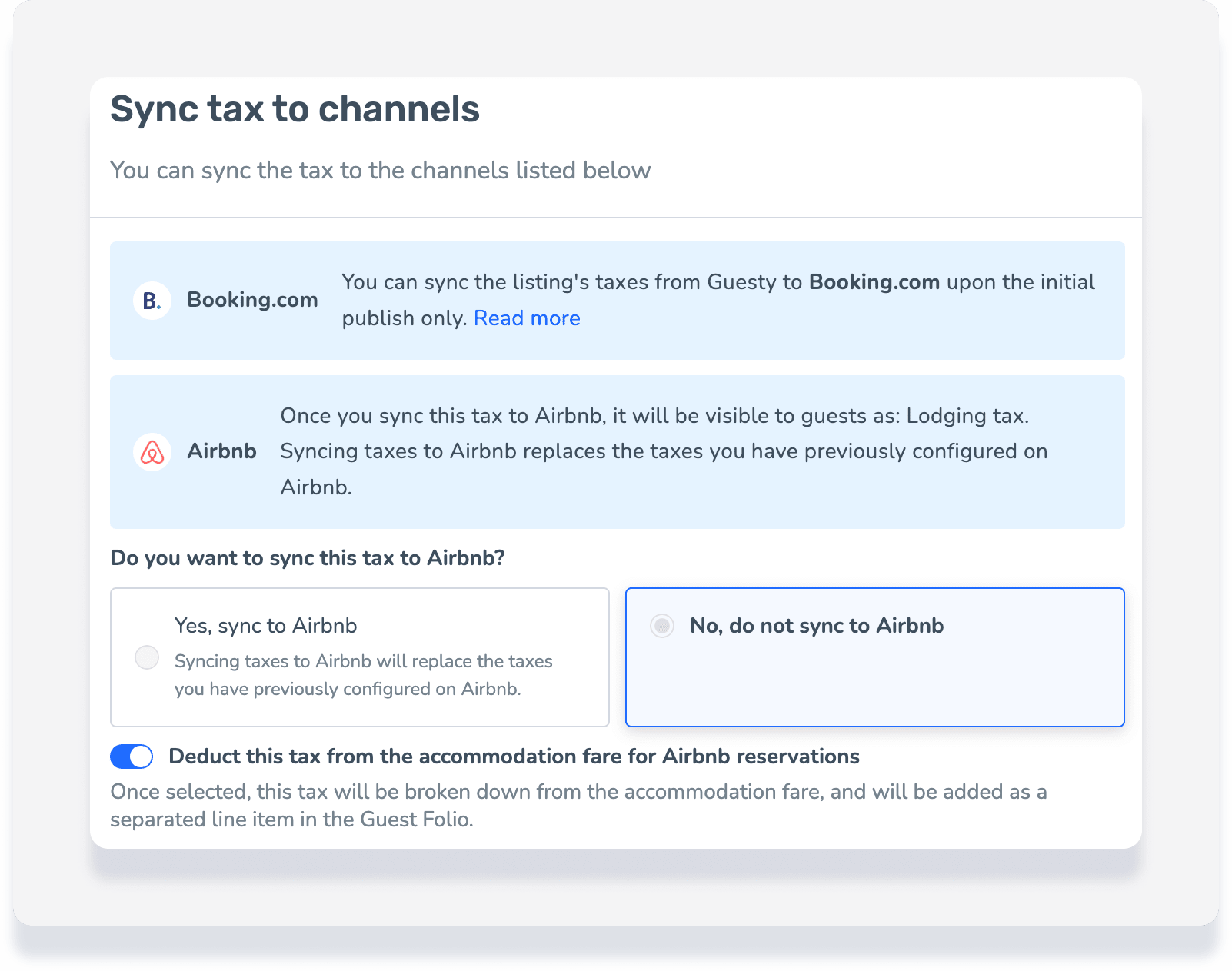
If you don't sync a listing tax but still collect taxes via Airbnb, you can view the tax breakdown in Guesty. Toggle on Deduct tax from the accommodation fare for Airbnb reservations.
Important:
If selected, the tax is calculated from the accommodation fare only.
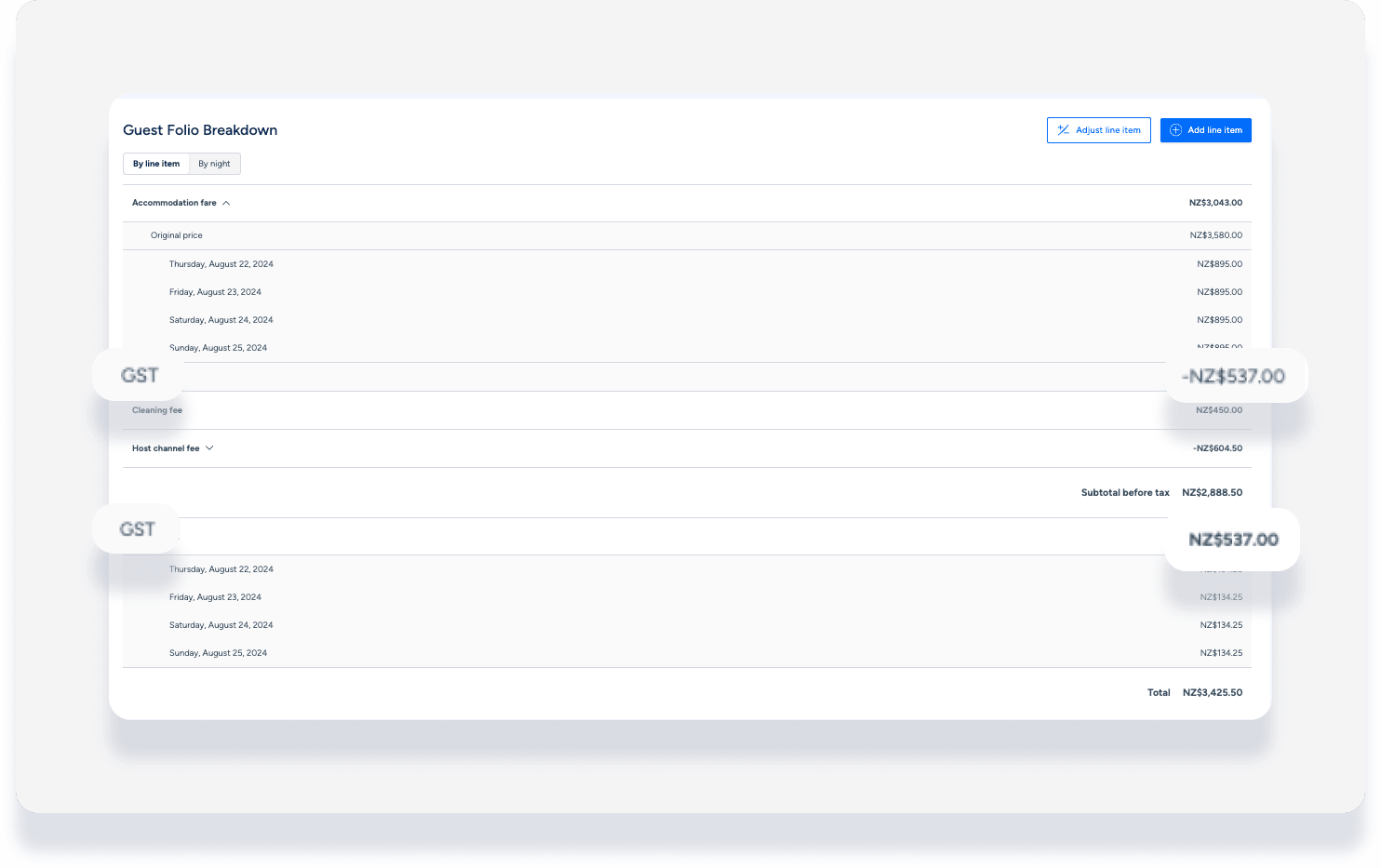
The tax appears in the guest folio as two separate line items: a negative amount deducted from the fare and a positive amount added as a tax. Example:
Booking.com
Tax synchronization for Booking.com depends on your sync type:
Rates & availability: Taxes don't sync. Set them up directly in the Booking.com Extranet.
Full sync: Taxes only sync during the initial publish. If you change tax values in Guesty later, they only sync if the listing status in the Booking.com Extranet is "XML: Being Built". This status isn't visible in Guesty.
If you change tax values after the initial publish, update them manually in Booking.com or contact Booking.com support for assistance.
Booking.com limitations
Tax type: Booking.com only allows either "local tax" or "VAT". If both are set up in Guesty, an error occurs during publishing. You must remove one to comply with Booking.com requirements. Additionally, VAT must be a percentage, not a fixed amount.
Taxable fees: Booking.com doesn't support taxes on fees. Any fees included in the tax calculation are disregarded by Booking.com. While the total booking amount remains the same, this creates a discrepancy between the accommodation fare in Guesty and the "room total" displayed in the Booking.com Extranet. Refer to the guest folio in Guesty for an accurate breakdown of taxes per fee.
Note:
For properties in Brazil, in line with local regulations, two new taxes will be applied to property invoices starting February 2026:
CBS (Contribution on Goods and Services): 0.9% federal tax.
IBS (Goods and Services Tax): 0.1% states and municipality tax.
For properties in Mexico, Booking.com is required to withhold VAT and income tax for reservations paid via Payments by Booking.com with a check-out date on or after 1 February 2026. The withholding amounts depend on your Registro Federal de Contribuyentes (RFC) status:
- Business RFC: 8% VAT and 2.5% income tax.
- Individual RFC: 8% VAT and 4% income tax.
- No RFC provided: 16% VAT and 20% income tax.
These withholdings are in addition to commission fees. Booking.com pays these to the Tax Administration Service (SAT) and sends a monthly withholding tax certificate (CFDI) to connected properties.
Vrbo
Vrbo collects and remits taxes in the United States. However, because Guesty users are the merchant of record and collect payments directly, Vrbo only collects the service fee.
Once taxes are set up in Guesty, they sync to Vrbo as follows:
- All fixed amount tax configurations sync.
- Only "Per night" and "Per stay" configurations sync for percentage taxes.
While you see a specific breakdown in the Guesty guest folio, Vrbo guests only see a single "taxes" line item.
Tax conditions
Vrbo supports the following conditions:
Fixed amount per guest (between dates or LOS).
Fixed amount per stay (between dates or LOS).
Percentage per stay (LOS)
A maximum of 15 tax rules is allowed. Each tax counts as one rule, and each condition counts as three rules. For example, a city tax of $5 per stay for a length of stay (LOS) less than 30 days equals four rules total.
Other channels
Taxes don't sync for the following channels. Set up taxes directly on each channel platform:
- Agoda
- Expedia
- Feratel
- Misterb&b
- Reconline CIH
- Reserva.is
- Roibos
- SiteMinder
- Szallas
- Travia
- Trip.com
Note:
If a tax is missing from a reservation because it didn't sync, add the tax manually as a line item in the guest folio.
Tip:
To master tax settings, visit Guesty Academy for interactive courses and step-by-step video tutorials.
