Connect your Guesty account to HubSpot using Guesty Connect. This integration syncs data between both platforms, saving you from manual data entry and complex setups. You can use your Guesty data for guest communication, owner acquisition, and powerful reporting—all within HubSpot. The integration allows you to:
- Manage owner and listing acquisition: Track your entire sales funnel in HubSpot, from a new lead to a signed contract. Once signed, sync the owner and listing data straight into Guesty for easy onboarding.
- Send personalized guest campaigns: Use Guesty data (like reservation details, guest preferences, and reviews) in HubSpot. This lets you trigger automated campaigns to drive repeat bookings and build guest loyalty.
- Get actionable insights: Combine Guesty's reservation data with HubSpot's analytics. You can track listing performance, optimize your revenue strategy, and share financial insights with owners.
Before you begin
Step by step
You must complete two steps before you can connect the integration:
- Subscribe to the Guesty Connect add-on.
- Sign in to your Guesty account.
- In the side navigation menu, click
 Integrations to open the dropdown menu.
 - Select Guesty add-ons.
- Click "Guesty Connect"
- Click subscribe.
- Set up your HubSpot account to receive Guesty data.
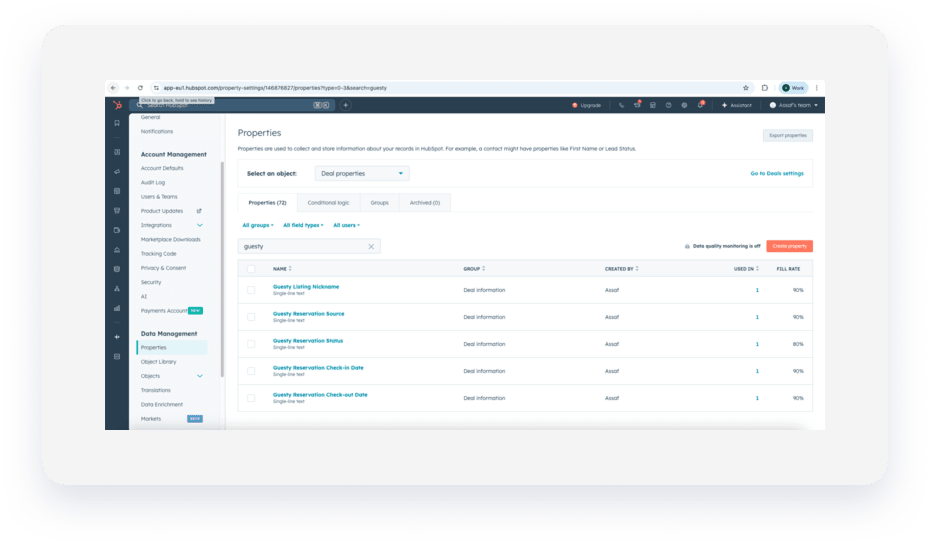
To get your HubSpot account ready, you must customize a few objects to hold your Guesty data.- Add a custom object for Guesty listings. Create a "custom" object in HubSpot to connect to Guesty listings. This allows you to sync Guesty listings with HubSpot's custom objects.
-
Add new custom properties in HubSpot for data you would like to sync with Guesty. These identifiers update Guesty objects from HubSpot.
Important:
Always use "single line text" field type for properties in HubSpot unless advised otherwise in a field's tooltip.
Connect Guesty to HubSpot
Step by step
- Sign in to your Guesty account.
- In the side navigation menu, click Integrations to open the dropdown menu.
- Select Marketplace.
- In the search bar on the left, enter "HubSpot", then click the HubSpot thumbnail.
- In the top-right corner, click Connect.
- Toggle on the flows you would like to activate
Supported flows
The Guesty and HubSpot integration currently supports the Syncing confirmed reservations to HubSpot contacts flow.
How Guesty data syncs to HubSpot
Hubspot uses several main objects to organize your data:
- "Custom objects": Manage properties or units for buying, selling, or renting.
- "Contacts": Store all people in your business—buyers, tenants, owners, and other stakeholders.
- "Deals": Track reservations.
The integration syncs your Guesty data to the following objects in HubSpot:
- Guesty Guest syncs to a HubSpot "Contact"
- Guesty Owner syncs to a HubSpot "Contact"
- Guesty Listings syncs to the HubSpot "Custom" object
- Guesty Reservation syncs to a HubSpot "Deal" (using a renting pipeline)
