Expenses in Guesty originate from multiple flows, including recurring rules, manual entries, and OCR invoice uploads. To reduce manual work and improve accounting accuracy, Guesty uses an automatic retry process for expenses pending due to insufficient funds.
First, enable pending transactions in your accounting setup, then follow the steps below to manage expenses with insufficient funds.
Note:
For regions where commingling funds is prohibited, learn more about Creating pending expenses for owners.
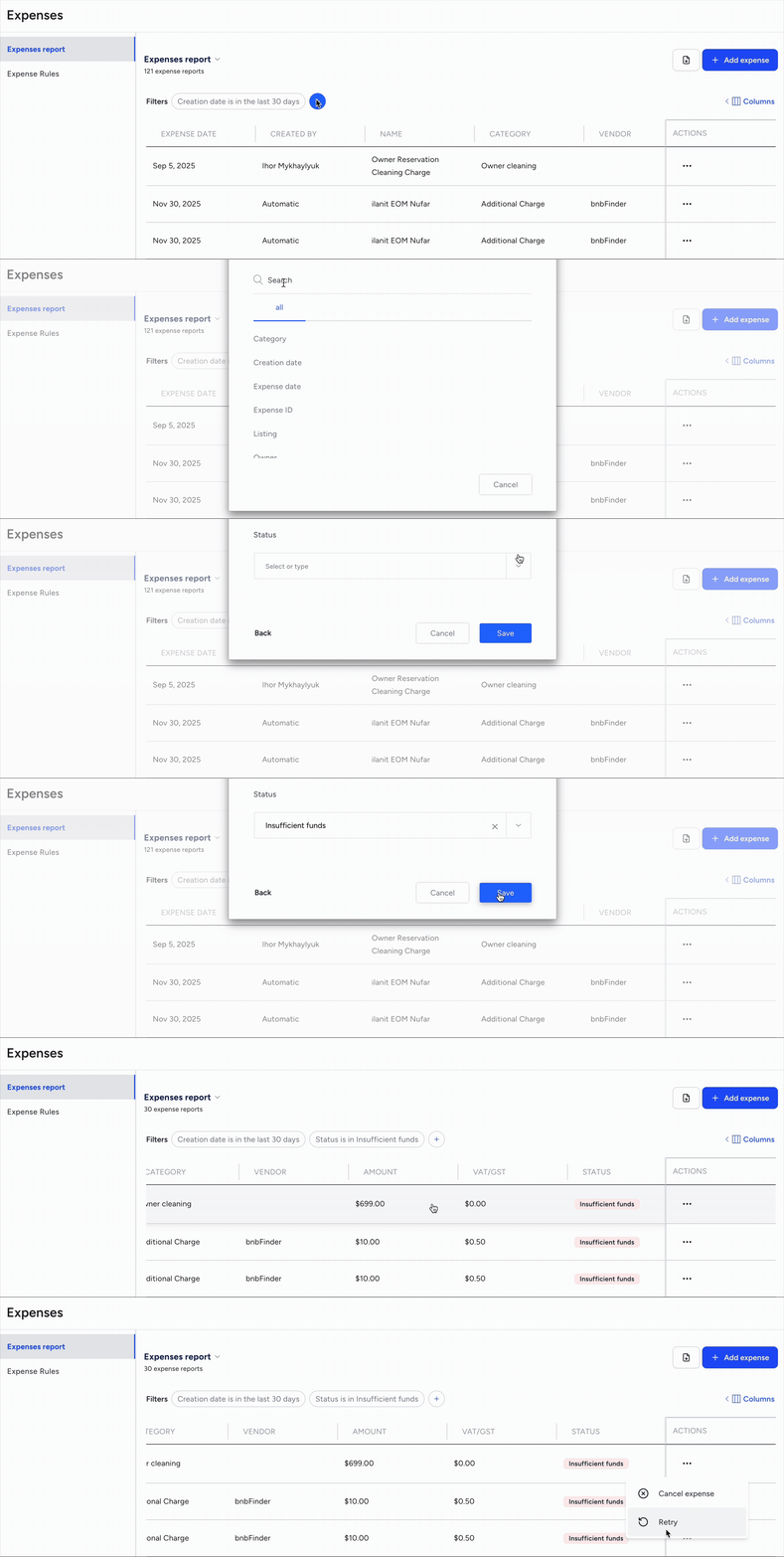
Find expenses with insufficient funds
Step by step:
- Sign in to your Guesty account.
- In the side navigation menu, click
 Financials to open the dropdown menu.
 - Under Expenses, select Expenses report.
- To the right of "Filters" click
 and select Status.
 - From the dropdown menu, select insufficient funds.
- Click Save.
How automatic retry works
When an expense has the "Insufficient funds" status, it is automatically added to a retry queue. The system prioritizes this queue by the oldest expense date and the expense amount.
During scheduled hourly runs, the system re-checks the owner balance in the trust account and responds as follows:
If funds are available: The expense status updates to "Submitted" and the system creates journal entries in Financials.
If funds are still insufficient: The expense remains in "Insufficient funds" status and the system retries it in the next scheduled run.
Automatic retries occur for up to 45 days from the date the status first changed to "Insufficient funds". After 45 days, you must handle the expense manually.
Manually retry an expense
Trigger a manual retry at any time from the Expenses report page. This immediately re-checks the owner balance and updates the expense status.
Step by step:
To the right of an expense with the "Insufficient funds" status, click
 and select Retry.
In the pop-up, click Retry.
If the retry is successful:
The status updates to "Submitted" or "Paid" (if already disbursed).
A journal entry is recognized in Financials with the current date.
The expense appears on the owner statement.
You can pay the vendor via the regular disbursement flow.
If the retry fails:
The expense remains in "Insufficient funds" status.
A message appears indicating the failure.