The guest folio with tax breakdown per line item is reflected in Accounting in the following ways.
Accounting folio
The accounting folio creates a separate journal entry for each percentage tax applied per line item in the "Accounts payable" and "Advanced deposit" ledgers. For example, instead of one "GST" entry, the breakdown displays entries like "Net rental income GST" and "Cleaning fee GST".
A journal entry is also created for any line item tax adjustments made.

Revenue recognition
Important:
Because each new tax journal entry is linked to a specific line item, the tax recognition date depends on the business model setup for that related line item.
If a tax is a standalone fixed fee, its recognition is based on the "Guest taxes" setting in your business model. If a tax is a percentage applied to a specific item, it follows the recognition rule of that parent line item.
For example, if your business model is set as follows:
Net rental income: Recognized on check-in
Cleaning fee: Recognized on check-out
Guest taxes: Recognized on check-in
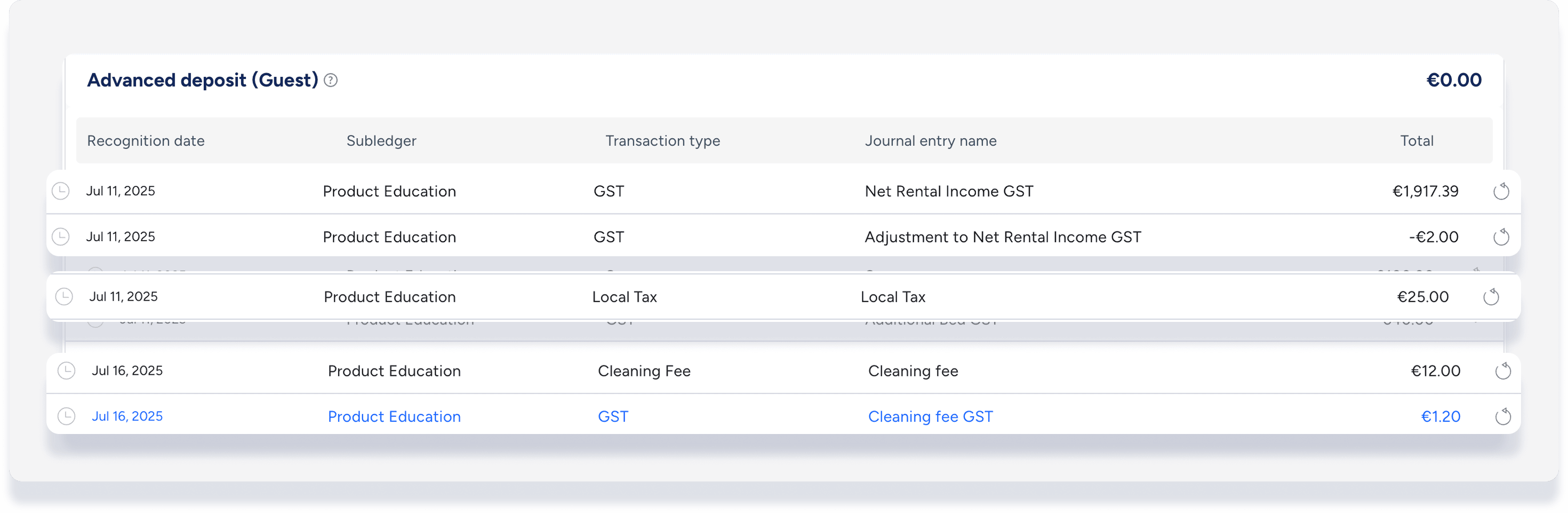
The revenue for each tax is recognized based on those rules:
Net rental income GST: Recognized on check-in (follows the parent item).
Cleaning fee GST: Recognized on check-out (follows the parent item).
Local tax: Recognized on check-in (follows the "Guest taxes" setting).
You can see these specific dates in the accounting folio as the recognition date for each journal entry:
Note:
Reversing a transaction with a linked tax line item automatically reverses the tax. For example, reversing a cleaning fee journal entry also reverses the "cleaning fee GST". However, reversing "cleaning fee GST" alone does not reverse the "cleaning fee".
