Use commission calculations to determine how revenue is shared between you and your property owners. You can set these calculations at the account level to apply them to all listings automatically, or customize them for specific listings and individual reservations.
Important:
If you use Accounting by Guesty, don't set up these commission calculations. Your revenue share is managed through your business model. Assign your listings to a Business Model to follow the revenue share agreement between you and the owner.
Set the calculation level
Set calculations at the account level to apply the formula to all listings in your Guesty account, or customize calculations for individual listings. If you're managing a multi-unit, you must set the fee on both the parent and sub-unit levels.
You have the option to customize further by changing the formula per reservation.
- Sign in to your Guesty account.
- In the side navigation menu, click
 Financials to open the dropdown menu.
 - Select Commission calculations.
- To the right, click Edit.
- Complete the settings, then click Save in the top-right corner.
- Sign in to your Guesty account.
- In the side navigation menu, click
 Properties.
 - Click the relevant listing. If the listing is a multi-unit, the fee must be set up on the parent and the sub-unit level.
- In the left-side menu, click Pricing & policies and select Commissions.
- To the right of "Commission calculation", click Edit.
- If activated, toggle off Use your account's default settings.
- Complete the settings, then click Save in the top-right corner.
Configure the calculation formula
Follow the instructions below to define how Guesty calculates your commission and owner revenue.
-
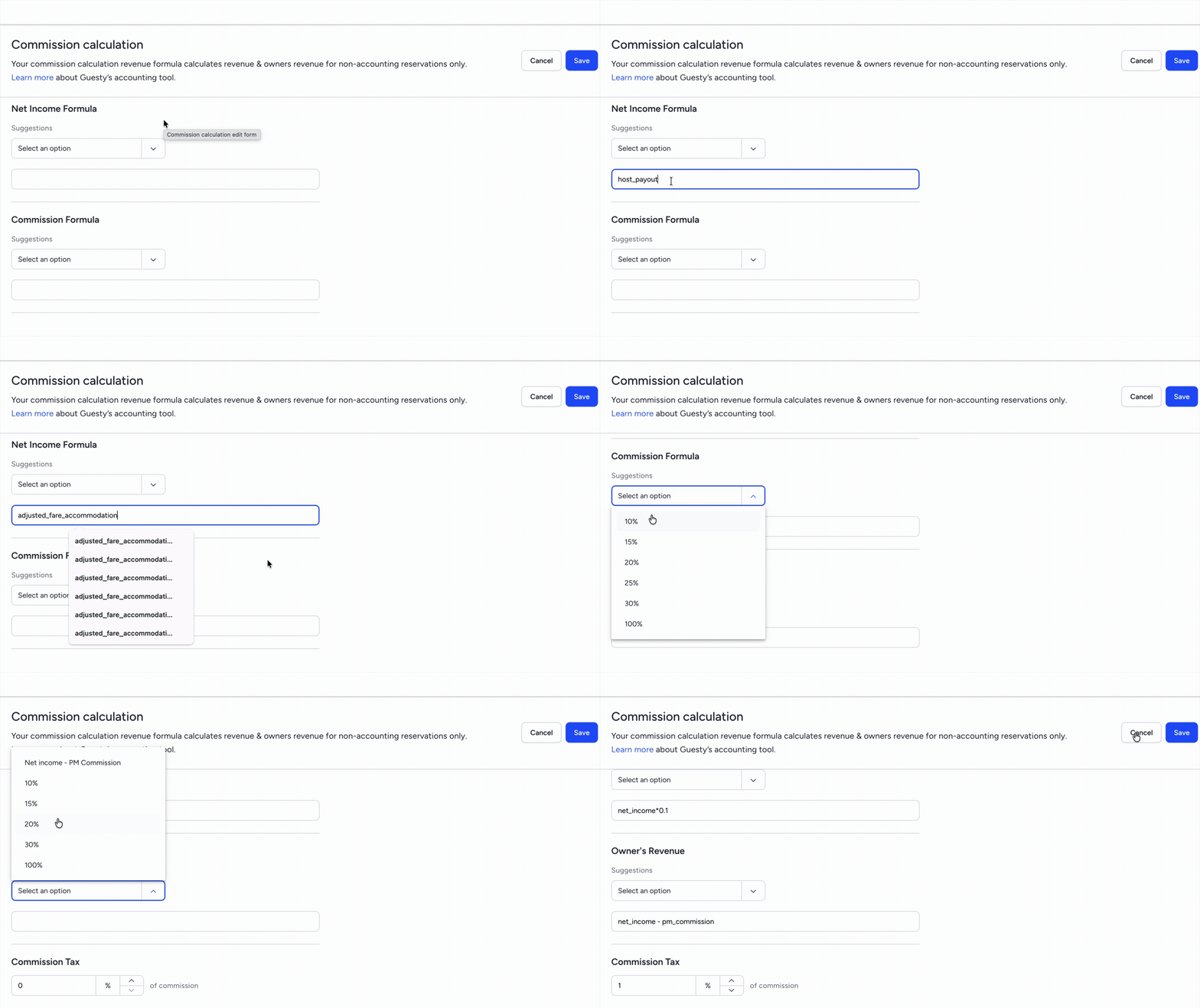
Net income formula: Define the base amount used to calculate your commission. Click Suggestions to select a pre-set option, or paste placeholders into the text box to create a custom calculation.
- When using a pre-set option we recommend changing "fare_accommodation" to "adjusted_fare_accommodation".
- Commission formula: Select a percentage from the dropdown menu. This is the commission amount you take from the net income.
-
Owner's revenue: Select a percentage for the owner's share, or enter a calculation using placeholders. For example:
net_income - pm_commission. -
Commission tax: Enter a percentage. This tax is calculated from the commission amount per reservation rather than the total formula.
- Click Save.
- In the pop-up, choose whether to apply the changes retroactively to past reservations.
- Click Confirm.
Commission calculation placeholders
View the full list of placeholders that can be used in your commission calculation formula.
Tip:
We recommend using adjusted_fare_accommodation instead of fare_accommodation to ensure the most recent data is used in cases where the accommodation fare has been changed in a reservation.
Placeholder |
What is calculated?
|
|---|---|
adjusted_fare_accommodation |
The net accommodation fare amount. This includes adjustments, markups, discounts, and coupons. *RECOMMENDED*
|
channel_commission |
Value of "Channel commission" from each reservation (including Airbnb). |
channel_commission_tax |
The taxes that are paid on the channel commission. |
discount |
The discount is calculated for each reservation based on a listing's pricing settings. Currently relevant for Vrbo reservations. |
extra_person_fee |
A listing's extra person fee. |
fare_accommodation |
The total accommodation fare as it appears in the booking channel. |
fare_cleaning |
The cleaning fee, if it exists for the specific reservation. |
guests_count |
Total number of adults for the reservation. |
guests_included_in_base_price |
Number of guests who are included in the base price. This is used to determine the number of added guests, minus the guest count). |
host_channel_fee |
Relevant for Airbnb and pre-deducted manual reservations. This is Airbnb's Service Fee. |
host_payout |
Total payout received from the booking channel including taxes plus additional fees. For Airbnb reservations, the host_channel_fee is removed from the host_payout. For all other channels, the channel_commission is not deducted from the host_payout. |
host_subtotal |
Total payout received from the booking channel, plus additional fees, and does not include taxes. For Airbnb reservations, the host_channel_fee is removed from the host_subtotal. For all other channels, the channel_commission is not deducted from the host_subtotal. |
net_income |
The result of the "Net income formula" field. This can only be used inside the second or third fields of "Commission formula". |
nights_count |
Total number of nights for the reservation. |
pm_commission |
The value (calculation result) of the Property Manager’s (PM) Commission Formula field. This value includes both the PM commission and PM commission tax. |
round |
If you want to round up/down the results, you can insert the formula into the "round" brackets. For example: round(fare_accommodation*0.2). |
taxes |
The total amount of taxes for the reservation. |
Commission calculation example
The property manager's commission is 15% of the accommodation fare, plus the cleaning fee, and the owner's payout is 85% of the accommodation fare. Set up the formulas as follows:
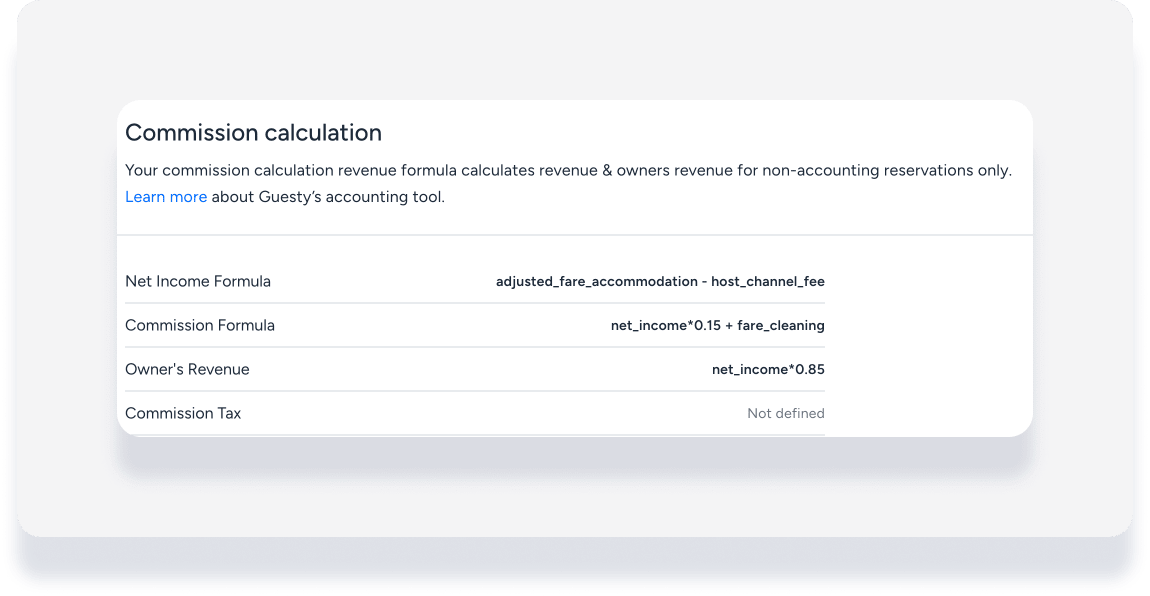
If the accommodation fare for a reservation was $400 with a cleaning fee of $80 and a channel fee of 5%:
The PMC’s revenue would be (400 x 0.95) x 0.15 + 80 = $137.
The owner’s revenue would be (400 x 0.95) x 0.85 = $323.
