3D Secure (3DS) technology adds an extra layer of security to online credit and debit card transactions. Learn how Guesty supports 3DS to help you manage secure payments and reduce chargebacks.
Understand 3DS support in Guesty
Guesty supports 3DS for all reservation sources when you process payments through GuestyPay, if both the property and the guest’s credit card are located in the EU or UK.
If you use Stripe to handle payments, 3DS triggers based on Stripe’s requirements.
Card validation and tokenization
The system may require guests to manually validate some transactions when processing a card with 3DS verification. Guesty runs card validation and tokenization by attempting a $0.00 charge.
When Stripe triggers 3DS authentication, the system sends an authentication message to the guest automatically. The amount shown is 0.00 and not the total reservation amount.
Note:
The system sends these authentication messages automatically. They are separate from Guesty's automated messages, and you can't change or disable them.
Review 3DS outcomes on the charge row
The Reservation Payment overview displays clear 3DS outcomes directly on the charge row. When reviewing a charge in the Payments tab, check the indicators for successful, failed, and not performed 3DS attempts. Hover over the indicator to view a helpful tooltip explaining the outcome of the background checks and customer prompts.
The status of the payment method in the payment section indicates whether it was validated during tokenization, while the 3DS report shows the status for each specific payment.
Verified: frictionless (3DS successful): "Verified in the background by the bank."
Verified: challenge (3DS successful): "Customer was prompted by their bank to perform extra action to verify the payment."
Failed: frictionless (3DS failed): "Bank couldn't verify the transaction in the background."
Failed: challenge (3DS failed): "Customer didn't complete the bank's verification step."
Review Forter fraud screening for US users
For US users reviewing a Forter-processed payment, fraud-screening statuses appear directly on the payment method.
Approved
Not reviewed
Declined
3DS indicator in payment details
When viewing a reservation’s payment details, you may see a shield icon that indicates a 3D Secure (3DS) status. It is important to understand the difference between the status of the payment method setup and the status of an individual transaction. Successful 3DS challenges on payments don't update the payment method verification status.
The shield icon tracks the validation status of the payment method during the initial setup (tokenization)—not the outcome of a specific transaction.
🟦 Blue (Validated Method): This means the payment method has been successfully tokenized and validated for 3DS. The system is ready to handle 3DS challenges for this guest’s card. Note: The indicator stays blue even after successful 3DS-payments. This shows the method is still valid for future use.
🟩 Green (Verified Method): This signals a fully verified payment method tokenization and 3DS (outside the 3DS report for GuestyPay Protect).
To check the status of a specific payment transaction—whether authenticated or not—see: Protecting your business from payment fraud with GuestyPay Protect.
Handle declined authentications
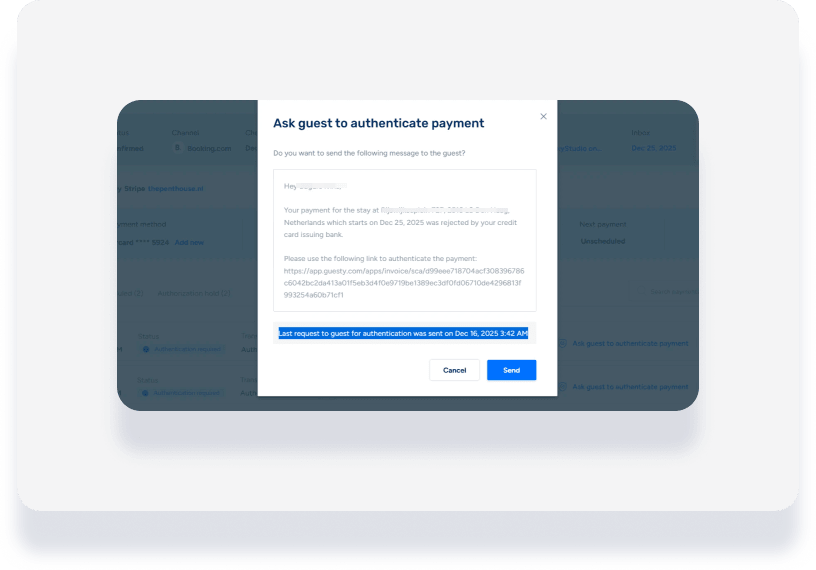
If a guest’s 3DS authentication is declined or not completed, you can manually intervene to secure the payment.
Resend authentication requests
Check the reservation or payment details to monitor the status of the authentication. If the initial attempt fails, you can prompt the guest to try again.
Follow the steps below to resend an authentication request.
Step by step:
Sign in to your Guesty account.
Navigate to the relevant reservation.
- In the left submenu, click Payments.
Click Ask guest to authenticate payment to resend the request or follow up with the guest.