Keep your HubSpot contact records up-to-date whenever a guest's profile is modified in Guesty. This tool monitors for changes in Guesty and pushes the latest information directly to HubSpot, eliminating the need for manual data entry.
Sync to HubSpot.
Step by step
- Connect Guesty to HubSpot
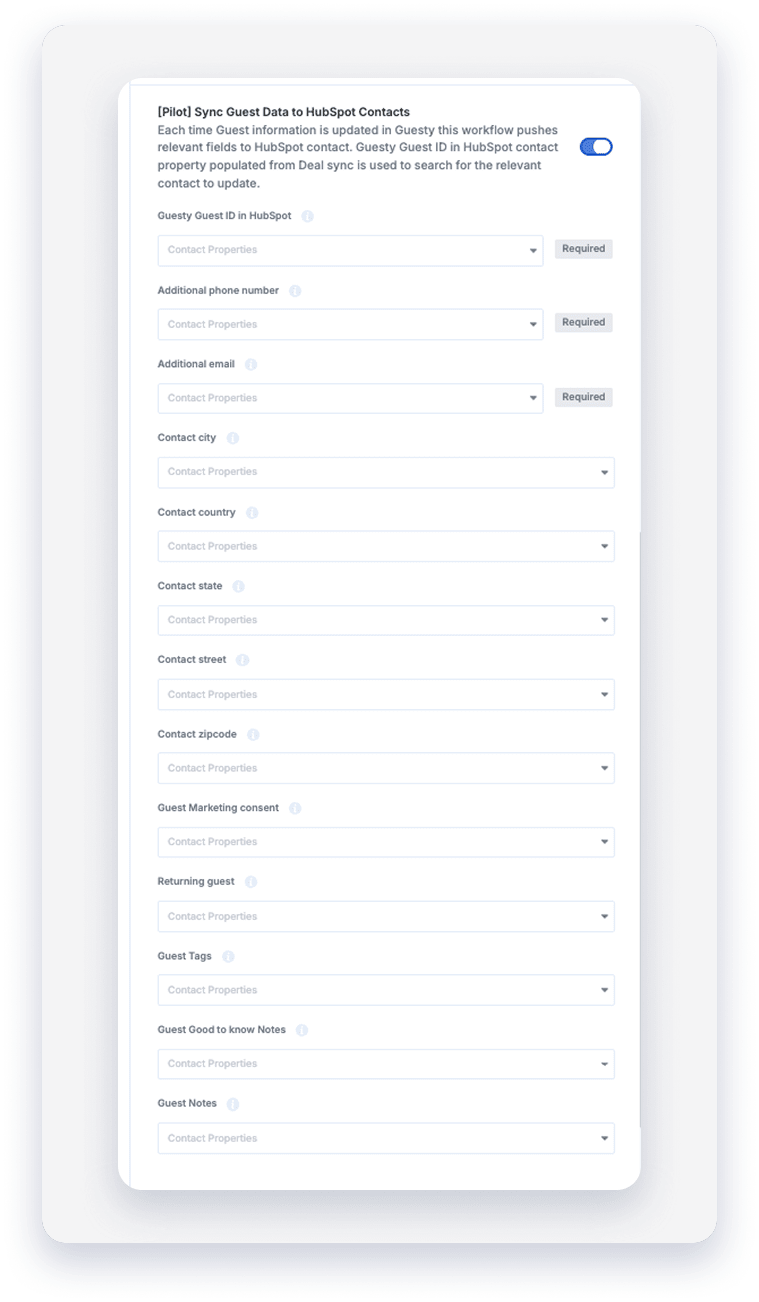
- In the configuration tab, toggle on "[Pilot] Sync guest data to HubSpot contacts"
- From the dropdown, select the HubSpot field that will contain the "Guesty guest ID".
- Connect additional HubSpot fields to Guesty fields
How the sync works
The workflow is triggered automatically every time a guest profile is updated in Guesty. To ensure the data reaches the correct contact in HubSpot, the system uses a unique identifier.
- The anchor (Guest ID): The sync relies on the Guesty Guest ID stored in HubSpot. This ID is pushed to HubSpot when a reservation is first created through your "Reserved", "Inquiry", or "Confirmed" workflows.
- The search: When a guest's profile is updated in Guesty, the integration searches your HubSpot database for a contact with a matching Guesty Guest ID.
- The update: Once the matching contact is found, the system updates the fields you have mapped, such as address, tags, and custom notes.
Important:
In your integration settings, you must select which HubSpot contact property stores the Guesty Guest ID. If this is not mapped, the workflow will not know which contact to update.
Email and phone update logic
The integration uses Smart Logic to decide where to place new email and phone information, preventing primary contact details from being overwritten.
- If the HubSpot Email / Phone field is empty: The system populates it with the guest’s email or phone number from Guesty.
- If the HubSpot Email / Phone is different from Guesty: The system does not overwrite the primary email or phone number. Instead, it pushes the Guesty email to your designated "Additional Email" field in HubSpot.
- If they match: No action is taken.
Syncable fields
You can map the following data points to sync from Guesty to HubSpot:
- Address Details: Street, City, State, Country, and Zip Code.
- Guest Insights: Marketing consent status, "Returning Guest" flags, and Guest Tags.
- Notes: Both general "Guest Notes" and "Good to Know" notes are pushed to HubSpot.
Troubleshooting the sync
If you find that guest data is not updating in HubSpot, check your ID mapping.