Guesty uses reverse mapping to ensure that financial data remains accurate, even when booking channels don’t support specific fee types. This article explains how reverse mapping impacts your accounting reports, business models, and owner statements.
For a detailed look at how fees are displayed and synced, see our article on How channel additional fees appear in Guesty (Reverse mapping).
How reverse mapping impacts Accounting
The primary benefit of reverse mapping in Accounting is ensuring that funds are allocated to the correct stakeholder based on your Business Model, regardless of how the channel labels the fee.
Without reverse mapping, a fee might be misidentified by the channel and processed incorrectly in your Guesty Accounting reports. Reverse mapping acts as a bridge, translating the channel's label back into your specific Guesty fee type to maintain financial integrity.
Example: Maintaining fee allocation
Consider a scenario where you have a specific payout structure for different fees:
Linen fee: Paid to the Property Management Company (PMC)
Management fee: Paid to the owner
If a channel doesn't support the "Linen fee" type, it may categorize that amount as a "Management fee" on the guest's receipt.
Before reverse mapping: Guesty Accounting would recognize the amount as a "Management fee" and allocate the payout to the owner, resulting in a loss for the PMC.
With reverse mapping: When the reservation enters Guesty, the system identifies that the channel's "Management fee" is actually your "Linen fee." Accounting reports and business models then process the funds correctly, ensuring the PMC receives the payment as originally intended.
Reporting and owner statements
The Guesty fee type is the primary label used for all internal financial documentation. While a guest might see a generic name on their channel invoice, your Guesty account remains consistent with your internal settings.
The following tools use the Guesty fee type for calculations and display:
Accounting reports: Fees are grouped by their mapped Guesty type, ensuring your ledger reflects the correct revenue categories.
Owner statements: Owners see the fees as defined in your Guesty settings, preventing confusion regarding payout splits.
Reservation reports: Breakdown columns reflect the Guesty fee type for easy reconciliation.
Verify fee mapping in the folio
To confirm that Accounting is receiving the correct data, you can check the guest folio breakdown. Each additional fee displays three names to provide a clear audit trail:
Guesty fee type * Fee type on channel * Guesty fee name
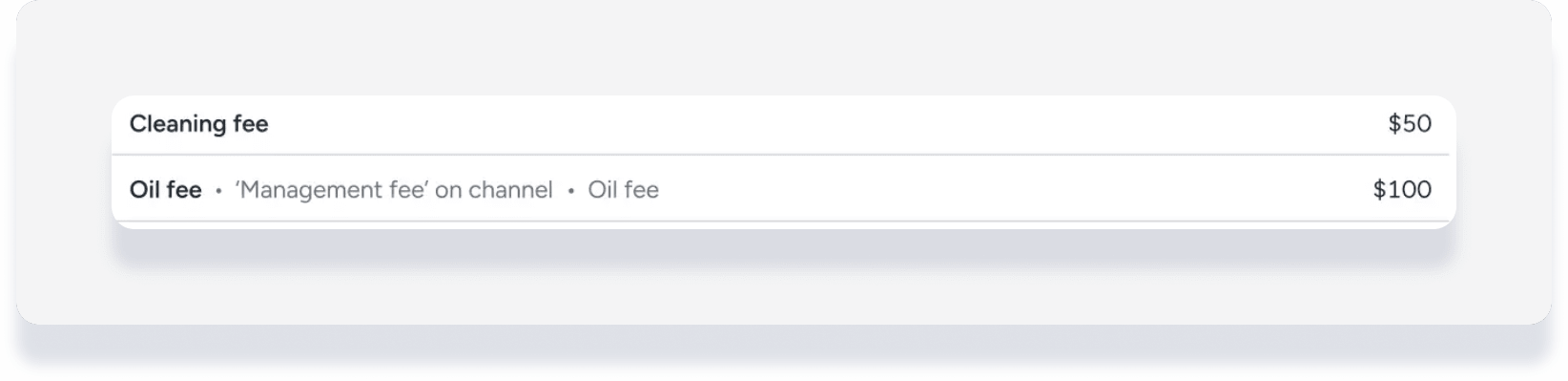
Follow the steps below to verify a fee.
Step by step:
Sign in to your Guesty account.
In the left-side menu, click Reservations.
Select the relevant reservation.
Check the "Guest folio" section to see how the fee is mapped and split.
Note:
If multiple Guesty fees are mapped to a single channel fee, Guesty splits the total amount proportionally. This split is automatically reflected in your Accounting reports to ensure each fee category is credited correctly.