Accounting by Guesty is a premium feature. Contact us to discuss activating it.
Working capital is the money you use to fund operations and meet short-term obligations. Set up working capital in your agreement with the owner to protect your business from liquidity or cash flow problems, for example, if you need to pay for a property repair.
The working capital in contract shows the amount of funds you agree to withhold for an owner. Enter this static amount in the owner’s profile.
The working capital on hand is the current balance in the working capital sub-ledger. This amount updates automatically when you move funds between working capital and the owner balance sub-ledgers.
When you make an owner disbursement, Guesty automatically withholds or refunds funds until the working capital on hand equals the working capital in contract.
How it works
- You enter the agreed upon working capital in contract amount in the owner's profile.
- The working capital on hand is funded in one of the following ways:
- The amount is automatically withheld from the next payout to owner. If the payout is less than the working capital in contract amount, withholdings occur in consecutive payouts until the working capital on hand balance equals the working capital in contract amount.
-
You create a transaction to manually move the amount from the owner balance to working capital.
Important:
This manual transaction only works if the working capital on hand is less than the working capital in contract amount. You cannot exceed the contract amount. If the working capital on hand already matches the contract, update the contract field before adding more funds.
- When you need to use working capital funds, create a transaction to manually transfer funds to the owner. For example: The working capital in contract and working capital on hand are both $1,000. The owner needs to replace an appliance, costing $500.
- Create a transaction to transfer $500 from working capital to the owner balance to cover the expense.
- The working capital on hand reduces to $500.
- In the next disbursement to the owner, $500 is automatically withheld to bring the working capital on hand back to the contract amount of $1,000.
- Any time you move funds between working capital and the owner balance, Guesty creates a journal entry and updates the owner statement automatically.
Set the working capital in contract amount
Step by step:
- Sign in to your Guesty account.
- In the side navigation menu, click
 Operations to open the dropdown menu.
 - Under Portfolio, select Owners.
- Click the relevant owner.
- Scroll down to the "Business information" section. To the right, click Edit.
- In the "Working capital" field, enter the working capital amount in contract.
- At the top right, click Save.
Note:
You can update the working capital in contract amount any time. When you change the amount, Guesty will automatically withhold or refund funds in the next disbursement to the owner, based on the current working capital on hand.
If you no longer have a working capital agreement with the owner, follow the steps below.
Remove working capital in contract amount
Step by step:
- Repeat steps 1-3 above.
- Click the relevant owner.
- Scroll down to the "Business information" section. To the right, click Edit.
- In the "Working capital" field, change the amount to "0".
- At the top right, click Save.
- The withheld amount returns to the owner in one of the following ways:
- You create a transaction to manually move funds from working capital to the owner balance.
- In the next disbursement to the owner, Guesty automatically refunds the working capital on hand balance.
- Regenerate the owner statement to apply the change.
Manually transfer working capital
Move funds manually between the owner and working capital outside of a disbursement in the following scenarios:
- An owner needs to use working capital funds for an expense or repair
- You want to fund working capital on hand on a certain date
- You end a working capital agreement with the owner and want to refund the working capital on hand balance on a specific date
Tip:
You can only transfer funds into working capital up to the contract limit for that owner. If you need to add more funds but have reached the limit, update the contract amount first, then transfer funds manually.
Step by step:
- Sign in to your Guesty account.
- In the side navigation menu, click
 Accounting to open the dropdown menu.
 - Under General ledger, select Posting journal.
- In the top-right corner, click
 .
. - Select Working capital as the transaction type.
- Under "From" and To", select from the dropdown menu. You can transfer funds from working capital to an owner, or vice versa.
- Under "Owner", select the specific owner for this transaction from the dropdown menu.
- Fill in the amount to transfer and the recognition date.
- Click Add.
View working capital balances
Step by step:
- Repeat steps 1-3 above.
- Select Owners balance as of today.
- To the right, click Columns. In the dropdown menu, toggle on Outstanding balance, Working capital in contract and Working capital on hand.
- At the top right, click Save or Save as and name the filtered view for future access.
If the working capital on hand balance is less than the working capital in contract, it's reflected in the owner ledger balances as follows.
- Balance owed from PMC to owner

When this payout is made, Guesty automatically transfers the $500 difference from the owner balance to working capital.
- Balance owed from owner to PMC
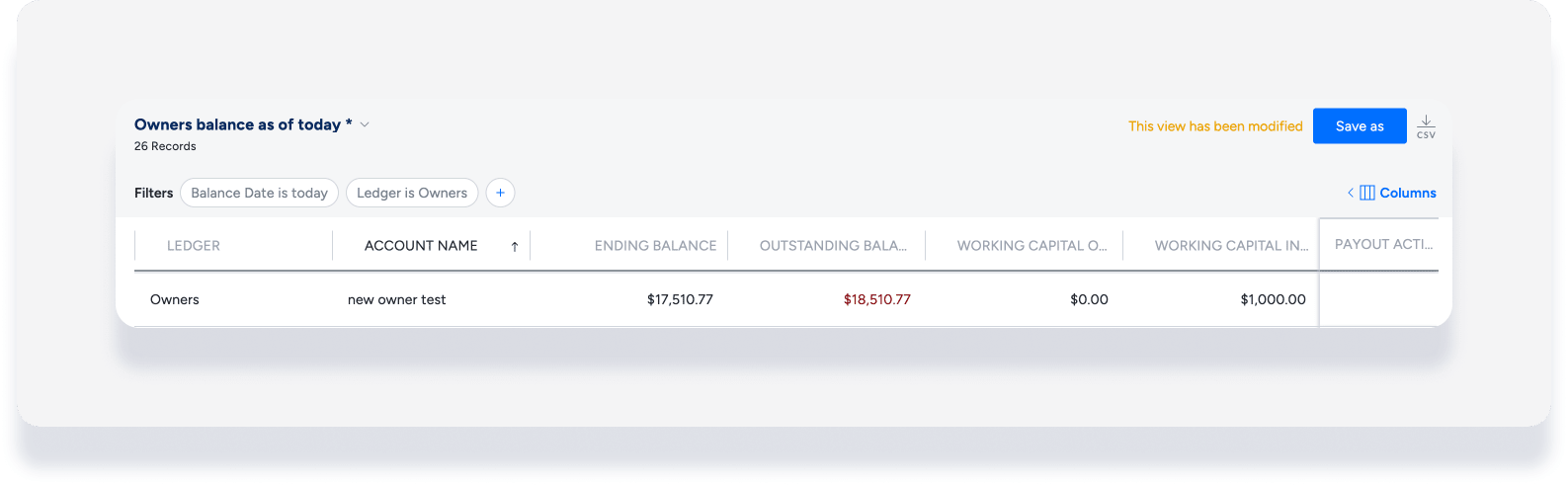
In the above example, the working capital on hand is $0, and the contract amount is $1,000. The ending balance of $17,510.77 is owed from the owner to the PMC. Guesty automatically adds $1,000 to make the outstanding balance $18,510.77. Once the owner pays, $1,000 is moved from the owner balance to working capital.
