Send ACH bank transfers to owners and vendors directly from Guesty with just a few clicks—no NACHA files or bank portals required. Learn how to set up and make payments in this article.
If a transfer is in "failed" or "on hold", it only affects the specific transaction, it doesn't stop the entire batch. View the error reason in the tooltip or the email notification, then follow the steps below to resolve.
Resolve a failed transaction
When a payout fails, the bank eventually returns these funds. Common "failed" errors include:
- Beneficiary name mismatch
- Insufficient balance
- Invalid recipient account details
- Recipient bank blocks the transaction (often due to ACH Originator ID not being whitelisted)
Follow these steps to reconcile your records.
Step by step:
- Record the failed transaction: Because you can't cancel the original payout in Guesty, you must create a journal entry. This moves the money back into your cash account and the respective owner account so your records match your bank statement.
- Attempt the payout again: After recording the journal entry to reset the balance, repeat the steps to make a direct ACH transfer.
Resolve a transaction on hold
An "on hold" error occurs when there is missing information about your business.
Follow these steps to provide the missing information and re-submit the transaction.
Step by step:
- Sign in to your Guesty account.
- In the side navigation menu, click
 Accounting to open the dropdown menu.
 - Under Accounting setup, select Direct ACH transfers.
- In the banner under "Transfer on hold", click Provide information.
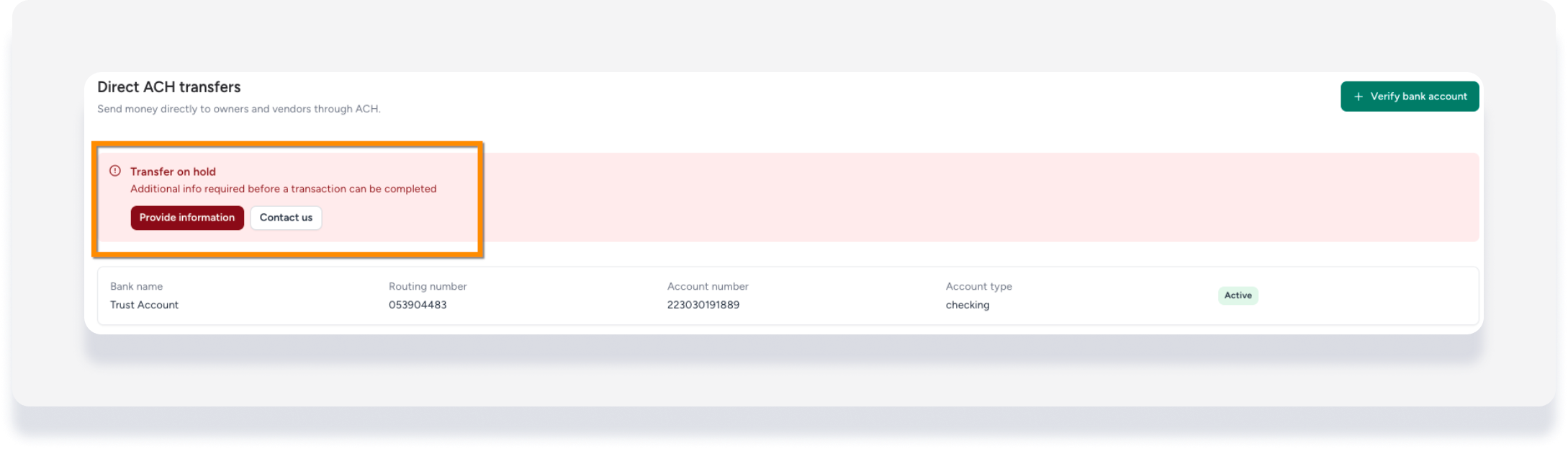
- Under "Transaction RFI list", click Response required on the relevant transaction line.
- In the side panel, under "Customer support", see details for what information is missing.
- At the bottom-right corner, click Provide information.
- Enter the requested information, then click Submit.
Once you provide the information and it's verified, the transaction will be processed again automatically.
