Missing or outdated owner banking details can delay monthly payouts. The Owner payment details collector agent keeps this information current by scanning owner profiles, preparing reminder emails for those with missing details, and sending the reminders after you approve them.
Note:
Enable the Owners Portal module in your account to use this agent.
Understand Owner payment details collector agent
The agent runs automatically on the 20th of each month, or you can trigger it manually at any time. On each run, the agent performs the following actions:
- Scans all active owner profiles.
- Checks if the owners' payout banking details are provided, including address fields for ACH transfers.
- Drafts a reminder email for your approval if payout details are missing and an inbox conversation with a given owner exists. If no conversation exists, the agent lists the owner's name so you can reach out directly.
- Sends the approved reminder email with information what's missing.
- Adds a note to the owner's profile after sending a reminder.
Limitations
- Email reminders: Only owners with an existing inbox conversation receive reminder emails. Reach out to other owners manually.
Email sender: The agent uses the default account email as the sender.
Reminder note: The agent adds a "Reminder sent" note to the owner's profile only after sending the approved reminder.
Run the Owner payment details collector manually
Trigger the agent manually at any time from the Agents hub, in addition to its scheduled monthly run.
- Sign in to your Guesty account.
- In the side navigation menu, select
 Agents hub.
 - At the top, select the Owner relations tab.
- Click the Owner payment details collector tile.
- Click Run now.
Any required approvals appear as cards at the top of the Agents hub.
Review the agent's activity feed
You can review the results and status of every run in the agent's activity feed.
- Sign in to your Guesty account.
- In the side navigation menu, select Agents hub.
- In the left submenu, click Agent activity.
- Click the relevant row with the agent's name to review the report details in the side panel.
When the agent identifies an owner with incomplete payment details and existing inbox conversation, it creates a draft reminder and displays an info card in the report details.
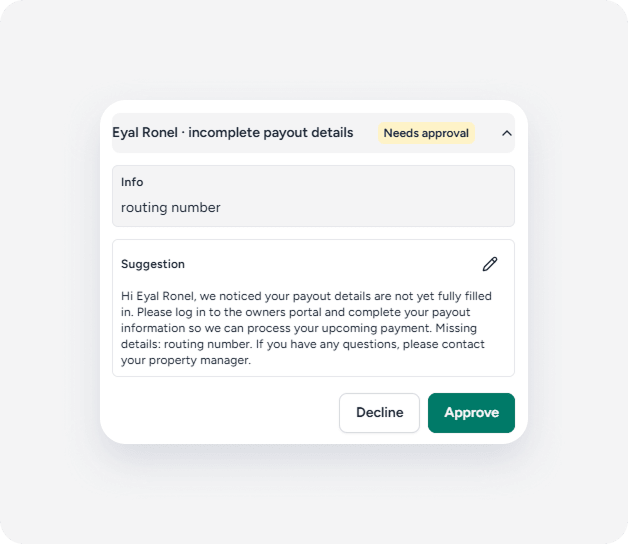
From the info card, you can take one of the following actions:
- Approve: Sends the email to the owner as drafted.
- Edit: Allows you to modify the message before approving and sending it.
- Decline: Prevents the reminder email from being sent.
If you don't respond within two days, the suggestion expires, and no reminder is sent.
Important:
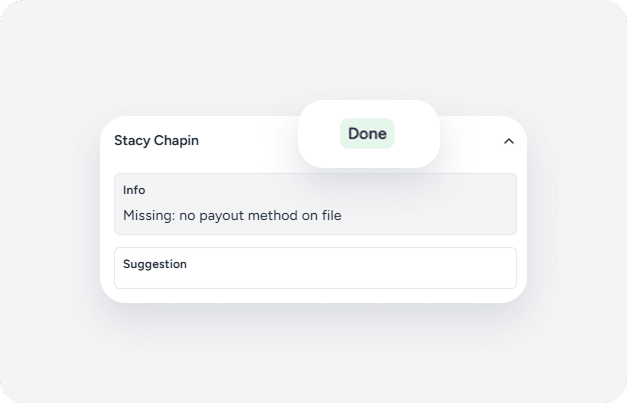
A "Done" status in the activity feed doesn't always mean a reminder email was sent. If an owner doesn't have existing inbox conversation, the agent marks the task as "Done" for you to follow up directly.
How owners submit payment details
Owners provide their payment details in one of the following ways:
- Owners who use the Owners Portal regularly can update the payment details themselves within the portal.
- Owners who don't log in to the Owners Portal receive a direct, secure link to submit the information. Guesty never stores or transmits payment details in plain-text messages.