The default currency determines how prices display to guests visiting your Guesty Booking Engine. Configure this setting to match your preferred currency or target market.
Set your default currency
Follow the instructions below to set your default currency for your Guesty Booking Engine.
Step by step:
- Sign in to your Guesty account.
- In the side navigation menu, click
 Marketing and sales to open the dropdown menu.
 - Under Channel management, select Distribution.
- Click the Guesty Booking Engine thumbnail.
- Click
 next to the relevant Booking Engine, and select Edit booking engine.
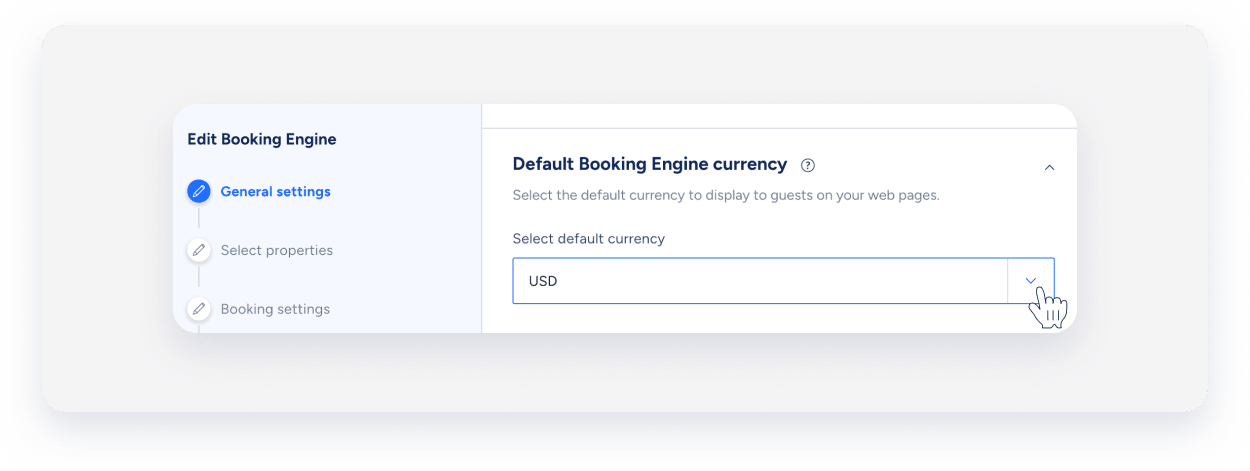
 - In the side navigation menu, click General settings and scroll down to "Default Booking Engine currency".
-
Click the dropdown arrow and select your preferred currency from the list.
- In the side navigation menu, click Languages to navigate to the last action.
- Click Save Booking Engine to apply your changes.
Guests will see prices in this currency throughout their booking journey, as the default currency affects pricing displayed across your Booking Engine, such as room rates, fees, and taxes.
Currency formatting
Currency displays match regional conventions, ensuring prices look familiar to your international guests, for example:
Language/Region |
USD Format |
EUR Format |
Local Currency |
|---|---|---|---|
| English (US) | $123,456.79 | €123,456.79 | $123,456.79 (USD) |
| Spanish (Spain) | 123.456,79 US$ | 123.456,79 € | 123.456,79 € (EUR) |
| Polish | 123 456,79 USD | 123 456,79 € | 123 456,79 zł (PLN) |
The system also handles currencies without decimal places (like the Japanese Yen) by applying appropriate rounding rules.
