Use Guesty’s hyperlink variable system to create dynamic, personalized links within your Guesty Booking Engine.
- Hyperlink: Clickable pieces of text that direct guests to a specific web address.
- Variable: Placeholders that automatically populate with relevant information when guests interact with your Guesty Booking Engine.
By including a variable within a hyperlink, you create a dynamic link that adapts based on the property, booking dates, or other contextual information.
Use this feature to:
- Create personalized booking confirmation messages with property-specific information
- Direct guests to relevant policies or amenities for a specific property
- Build dynamic contact links with pre-populated booking details
Limitations
You can currently use dynamic hyperlinks only in the "Booking confirmation page" section under "Booking settings". Guests see the booking confirmation page after booking.
Supported variables
Include any of these variables within your URL:
Variable |
Description |
|---|---|
{reservationId} |
Unique reservation identifier |
{amount} |
Reservation total price |
{guestName} |
Guest name (as entered on the checkout form) |
{listingName} |
Listing title |
{listingId} |
Unique listing identifier |
{checkIn} |
Selected check-in date |
{checkOut} |
Selected check-out date |
Create and add dynamic hyperlinks
Follow the instructions below to create a hyperlink with variables for dynamic content in your Guesty Booking Engine settings.
Step by step:
- Sign in to your Guesty account.
- In the side navigation menu, click
 Marketing and sales to open the dropdown menu.
 - Under Channel management, select Distribution.
- Click the Guesty Booking Engine thumbnail.
- Click
 next the relevant Booking Engine, and select Edit Booking Engine.
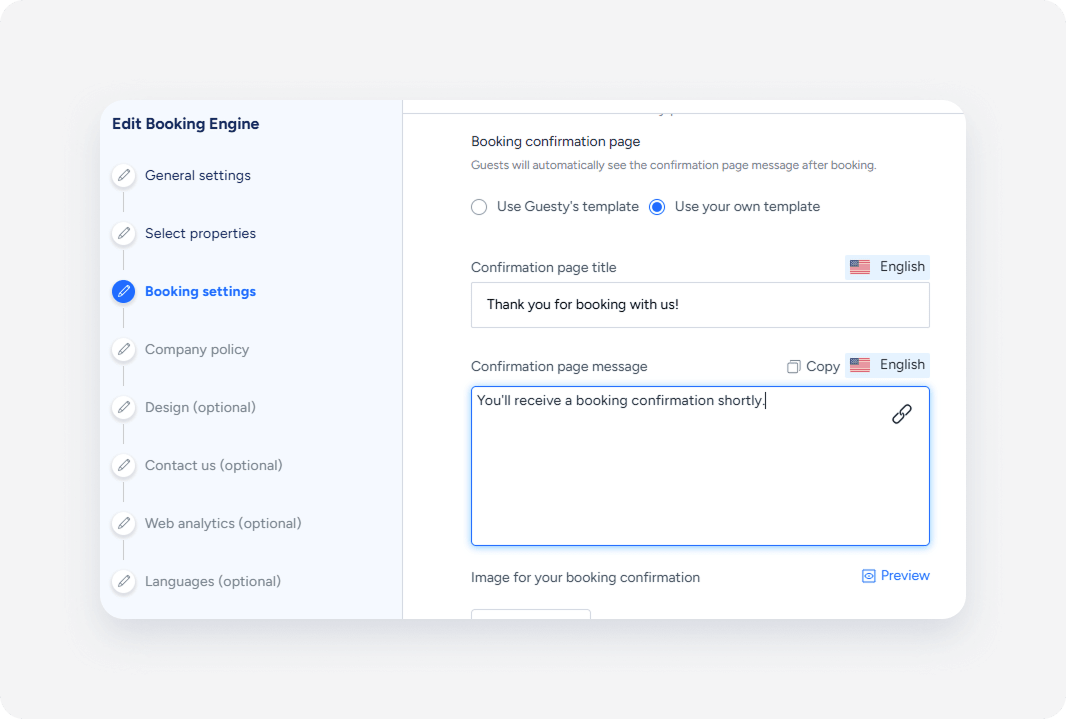
 - Click on text box where you want to add a hyperlink, and click
 .
.
- In the pop-up, enter the fields accordingly:
-
URL: Enter the web address where you want to direct guests. Include hyperlink variables using curly brackets to create dynamic, personalized links as follows:
https://yoursite.com/welcome?property={listingName}&date={checkIn} -
Text to display: Write the clickable text that guests will see in your confirmation message.
Use clear, descriptive language that tells guests exactly where the link will take them (for example, "View your welcome guide" or "Download property information").
-
Target: Choose how the link opens:
- Select New window to open the link in a separate tab
- Select Same window to replace the current page
-
- Click Save.
Examples of hyperlink variables in action
Property-specific amenity link
Component |
Value |
|---|---|
| Link text | Check available amenities [for your stay] |
| URL | https://yourwebsite.com/amenities?property={listingId} |
| Result | Check available amenities for your stay |
Listing policy link
| Component | Value |
|---|---|
| Link text | Read our [policies] |
| URL | https://yourwebsite.com/policies?property={listingId} |
| Result | Read our policies |
Best practices for hyperlink variables
Keep links relevant and helpful
Only use variables that add value to the guest experience. Avoid overwhelming links with unnecessary parameters that don't enhance functionality.
Consider what happens if a variable doesn't have data. Design your links to remain functional even with missing information.
Write descriptive link text that clearly indicates where the link will take guests, even without seeing the final URL.
Test across different scenarios
Preview your Guesty Booking Engine with different property types, languages, and booking configurations to ensure variables populate correctly.
