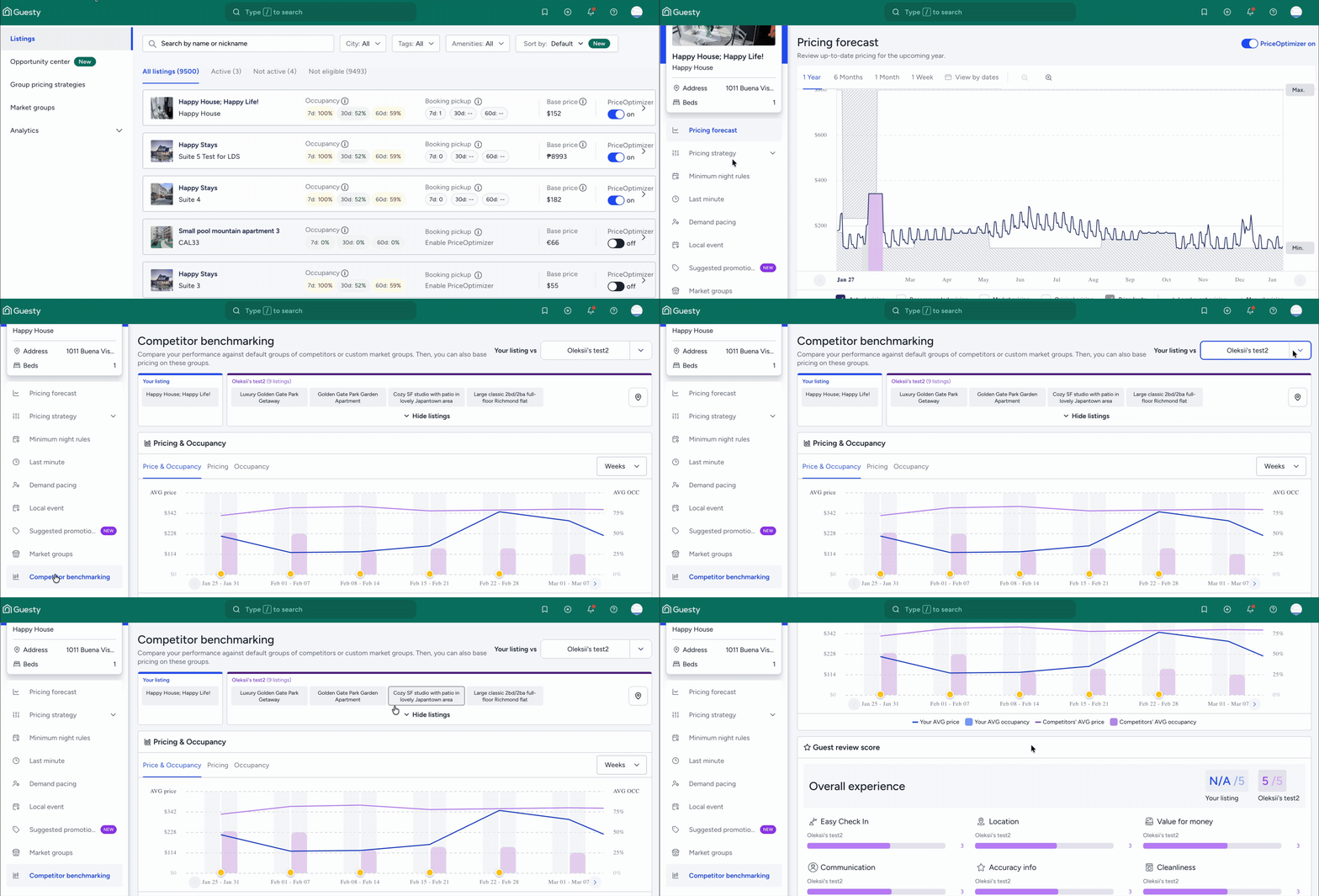
Gain a better understanding of your listings' performance in comparison to direct competition with Guesty PriceOptimizer's competitive benchmarking.
Effectively evaluate your performance and make data-driven decisions using:
- Average pricing and occupancy on a weekly and monthly basis
- Review scores, including subcategories
To view this data, you must select a market group. Market groups are collections of competitor listings created at the account level that can be reused across multiple listings. Learn how to create and manage market groups.
Note:
Competitor benchmarking is only applicable for active PriceOptimizer listings.
View market data for a listing
The system no longer displays a default competitor group. You must select a previously created market group to see the competitor benchmarking data. Follow the steps below to view market data for a specific listing.
Step by step:
- Sign in to your Guesty account.
- In the side navigation menu, click
 Marketing and sales to open the dropdown menu.
 - Under Revenue management, select PriceOptimizer.
- Find and select the relevant listing.
- In the side navigation menu, click Competitor benchmarking.
- At the top right, open the dropdown menu next to Your listings vs.
- Select the relevant market group from the list.
- The charts and data will update to show your listing's performance compared to the selected group.